

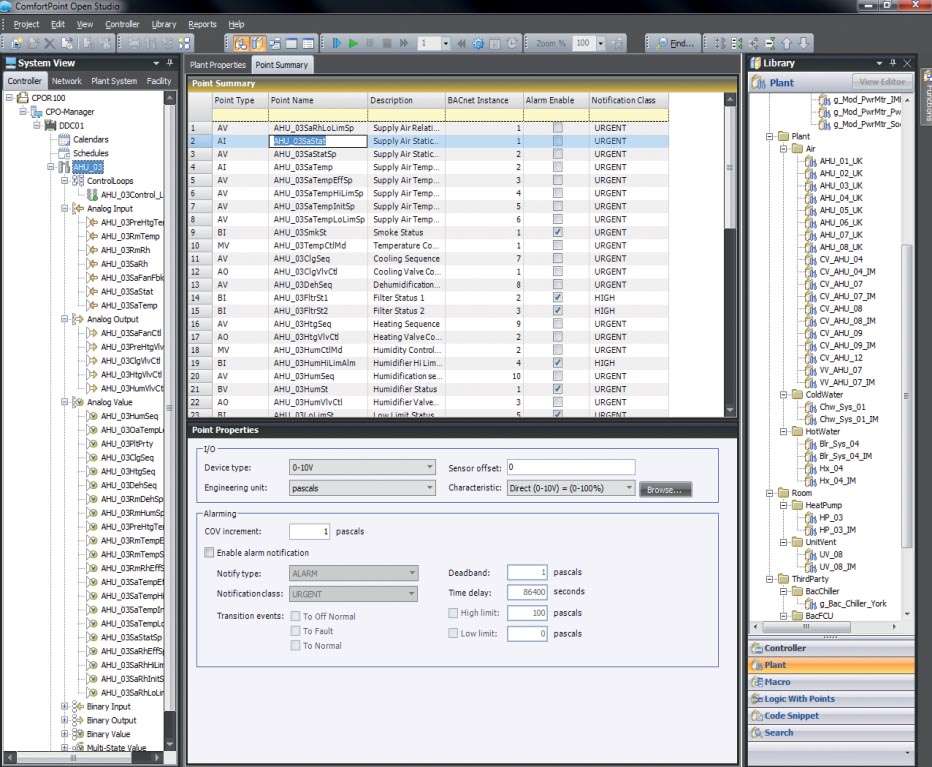
Download Honeywell CPO Studio Tool – Building Automation Configuration Software
The Honeywell CPO Studio Tool is a specialized application developed by Honeywell International Inc. for configuring and programming the company’s ComfortPoint Open controllers. This building automation software is crucial for system engineers and integrators managing HVAC, lighting, energy, and security systems in commercial, industrial, and institutional facilities. It serves as a primary interface for designing custom control logic and managing the operational parameters of Honeywell’s building automation infrastructure.
Overview of Honeywell ComfortPoint Open Studio Tool
Honeywell ComfortPoint Open Studio Tool is designed as a comprehensive environment for system engineers and facility managers to configure and program Honeywell’s ComfortPoint Open controllers. It plays a pivotal role in the deployment and maintenance of building automation systems (BMS), enabling precise control over critical building functions such as heating, ventilation, air conditioning (HVAC), lighting, and security. The software facilitates the creation of sophisticated control strategies tailored to the specific needs of diverse facility types, ensuring optimal building performance and operational efficiency.
Programming Environment and Control Logic Design
The software provides a robust programming environment that supports industry-standard languages, allowing engineers to develop custom control logic with flexibility and precision.
- Function Block Diagram (FBD): Engineers can utilize a graphical FBD interface to create complex control sequences by interconnecting pre-defined function blocks, visually representing system logic.
- Ladder Logic: For those familiar with traditional control systems, the tool offers Ladder Logic programming, enabling the design of control functions through relay-like diagrams that are intuitive for many automation professionals.
- Custom Control Functions: These environments allow for the development of bespoke control algorithms, offering granular management of HVAC operations, lighting schedules, and energy consumption based on real-time environmental data and operational requirements.
Hardware and Protocol Connectivity
Honeywell CPO Studio Tool is essential for establishing communication pathways between controllers, I/O modules, and overarching building management systems.
- Controller and I/O Module Configuration: The software allows for the detailed configuration and parameter setting of Honeywell ComfortPoint Open controllers and their associated input/output modules, ensuring correct physical interaction with building systems.
- Protocol Support: Native support for key industrial communication protocols, including BACnet, Modbus, and LONWorks, ensures interoperability with a wide range of building devices and third-party systems.
- System Integration Platforms: The tool facilitates seamless integration with higher-level platforms, such as Honeywell Enterprise Buildings Integrator (EBI) and the Niagara Framework, enabling centralized monitoring and management of diverse building systems.
Real-Time Diagnostics and Monitoring Capabilities
Effective building management relies on continuous monitoring and rapid troubleshooting, capabilities central to the CPO Studio Tool.
The software provides live data visualization, allowing operators to monitor the real-time status of HVAC equipment, lighting systems, and energy consumption. Integrated error detection tools and diagnostic features aid in quickly identifying system faults or performance anomalies. System troubleshooting is streamlined through data trending and logging capabilities, offering historical performance insights to guide corrective actions and optimize system operation.
User Access and Security Management
Security and access control are paramount in building automation to prevent unauthorized changes and ensure operational integrity.
Honeywell CPO Studio Tool implements role-based access control, allowing administrators to assign specific permissions to different users based on their responsibilities. This feature ensures that only authorized personnel can access or modify critical system configurations, enhancing the overall security posture of the building automation system. User management capabilities further allow for the creation and administration of user accounts, maintaining a controlled and secure operational environment.
Updates and Enhancements in Recent Versions
Continuous development of the Honeywell CPO Studio Tool introduces advanced features and improved functionality for modern building automation challenges.
- Enhanced Protocol Support: Recent versions often include expanded support for newer versions of communication protocols or additional specialized protocols.
- Cloud and Remote Management: Initial support for cloud connectivity and remote access enables system management and diagnostics from off-site locations, increasing flexibility and response times.
- Improved Debugging Tools: Advanced debugging capabilities and an enhanced programming environment streamline the process of developing and testing control logic, reducing commissioning time.
- Expanded Device Libraries: Updated software typically features augmented device libraries, simplifying the integration of new Honeywell controllers and a wider array of compatible building automation hardware.
Practical Applications and Industry Use Cases
The Honeywell CPO Studio Tool is instrumental in various real-world scenarios within the building automation sector.
- BMS Configuration: System engineers and integrators use the tool to set up and configure Honeywell ComfortPoint Open controllers for new installations or system upgrades.
- Programming HVAC Control Logic: The software is employed to develop and fine-tune custom control sequences for HVAC systems, optimizing thermal comfort and energy efficiency.
- System Integration: Engineers leverage the tool’s protocol support to integrate Honeywell controllers with existing or third-party building management systems for unified oversight.
- Facility Management: Facility managers utilize the diagnostic and monitoring features to oversee building operations, identify potential issues, and ensure systems run according to design specifications.
Frequently Asked Questions
What programming languages does Honeywell CPO Studio Tool support for building automation?
Honeywell CPO Studio Tool supports standard industrial programming languages including Function Block Diagram (FBD) and Ladder Logic. These languages enable system engineers to design custom control logic for HVAC and building automation systems, offering flexibility in how control strategies are implemented.
Which communication protocols are compatible with Honeywell CPO Studio Tool?
The software natively supports widely used building automation protocols such as BACnet, Modbus, and LONWorks, allowing seamless integration with different building management systems and devices. This broad compatibility ensures that Honeywell controllers can communicate effectively within diverse networked facility environments.
Can Honeywell CPO Studio Tool be used for remote monitoring and cloud management?
The latest versions of Honeywell CPO Studio Tool include initial support for cloud connectivity and remote system access, enhancing the ability to manage building automation systems from remote locations. This capability allows for more efficient diagnostics, monitoring, and adjustments without requiring on-site presence.




Reviews
There are no reviews yet.