

Download Exposure X7 v7.2 – Professional Photography Editing and Analog Film Emulation Software
Exposure X7 is a versatile photography editing and cataloging solution developed by Alien Skin Software, tailored for creative photographers seeking an authentic analog aesthetic and advanced editing capabilities. It excels with its innovative “no-import” live cataloging system, non-destructive editing, and a comprehensive engine for analog film emulation. This software is ideal for hybrid shooters, portrait and wedding photographers, and digital artists looking for flexible tools that go beyond subscription-based models.
Innovative Cataloging with Live Folder Browsing and Metadata Management
Exposure X7 streamlines the digital photography workflow by eliminating the need for traditional import processes. Its live folder browsing system provides instant indexing of images directly from your hard drive or connected storage. Enjoy zero catalog synchronization delays and the ability to edit metadata and keywords directly on RAW files, maintaining data integrity. The software organizes images using albums and smart albums, effectively combining the simplicity of folder management with the powerful search capabilities of database-driven systems.
Authentic Analog Film Emulation and Creative Presets
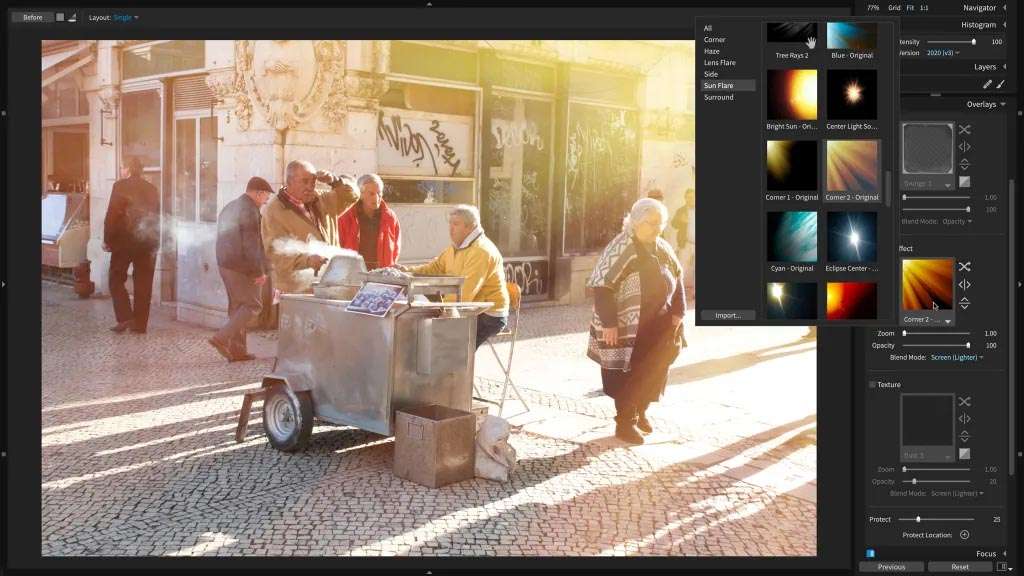
A core strength of Exposure X7 lies in its meticulously crafted analog film emulations that represent a wide spectrum of classic films, including popular choices like Kodak Portra, Fuji Provia, and Ilford HP5. These presets go beyond simple color adjustments, accurately simulating photochemical reproduction aspects such as nuanced grain structure, detailed color response, and characteristic contrast curves. Additionally, it offers authentic analog overlays, including halation, light leaks, dust, and scratches, to enhance the vintage aesthetic. The Audition Mode allows for side-by-side comparisons of presets, facilitating informed creative decisions.
Advanced Non-Destructive Editing Engine and Masking Tools
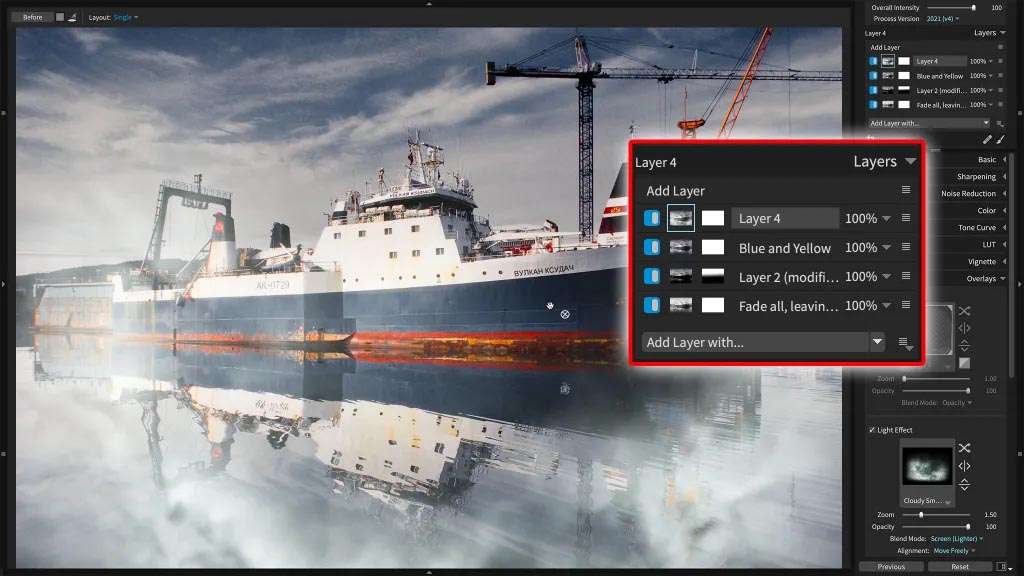
Exposure X7 features a robust non-destructive editing engine that ensures your original image files remain unaltered. The editing history is fully reversible, and the software supports unlimited virtual copies, enabling extensive experimentation without risk. Its capabilities include a comprehensive set of adjustment layers and sophisticated masking tools, notably the advanced polygon selection tool introduced in version 7.2 for precise control. The RAW development suite includes essential tools for lens correction, white balance adjustment, noise reduction, and sharpening, alongside support for third-party LUTs within its non-destructive workflow.
Customizable Workspace for Optimized Photography Workflows
Tailor the Exposure X7 interface to your specific needs with its highly customizable workspace. Users can rearrange panels, collapse categories, and save multiple workspace layouts optimized for different tasks, such as culling, detailed editing, or preparing images for export. UI refinements, including high-DPI display support and a clean, intuitive design, prioritize speed and efficiency, particularly when working with high-resolution files and complex edits.
Flexible Integration as Standalone Software and Photoshop/Lightroom Plugin
Exposure X7 offers remarkable flexibility by functioning as both a comprehensive standalone application and a powerful plugin for industry-standard software. It integrates seamlessly with Adobe Photoshop (CS6/CC 2015+) and Lightroom (6/CC 2015+). This plugin compatibility enables smooth round-trip editing, ensuring that your edit history is preserved whether you are working within Exposure X7 or switching between it and its Adobe hosts. Version 7.2 specifically enhances compatibility and performance with the latest Adobe releases, including Photoshop CC 2024 and Lightroom Classic 13+.
Technical Considerations and Limitations Users Should Know
While Exposure X7 offers powerful editing capabilities, some technical considerations are important for users. Its RAW rendering quality is generally strong, though it may differ from native Adobe rendering. Perspective correction is handled manually, and the software does not support multi-image compositing through image layers, positioning it differently from applications focused entirely on compositing. Performance can be nuanced with extremely high-resolution files, and while lens profile corrections are included, occasional imperfections may occur. Some advanced features might be restricted when using the software exclusively as a plugin compared to its standalone mode.
Frequently Asked Questions
How does Exposure X7’s film emulation differ from other photo editing software?
Exposure X7 offers meticulously crafted analog film emulations that replicate the grain structure, color response, contrast curves, and vintage optical effects like halation and light leaks with remarkable authenticity. Its presets are designed to reproduce photochemical features rather than simple color filters, setting it apart from many competitors by focusing on the nuances of physical film. This detailed approach allows for a more genuine analog aesthetic in digital photography.
Can Exposure X7 work as a plugin for Lightroom and Photoshop?
Yes, Exposure X7 functions both as a standalone application and as a plugin fully compatible with Adobe Photoshop CS6/CC 2015+ and Lightroom 6/CC 2015+. When used as a plugin, it supports seamless round-trip workflows, allowing edit history to be preserved across applications. This integration ensures that photographers can leverage Exposure X7’s unique tools within their existing Adobe-centric workflows without losing editability.
What new features were introduced in Exposure X7 version 7.2?
Version 7.2 introduces an intelligent polygon selection tool for precise masking, customizable workspaces enabling tailored interface layouts, an improved combined crop and transform tool, faster preset browsing, enhanced audition mode for preset comparison, and new film presets. The update also includes crucial compatibility enhancements for Photoshop CC 2024 and Lightroom Classic 13+, improving overall user experience and workflow efficiency.






Reviews
There are no reviews yet.