

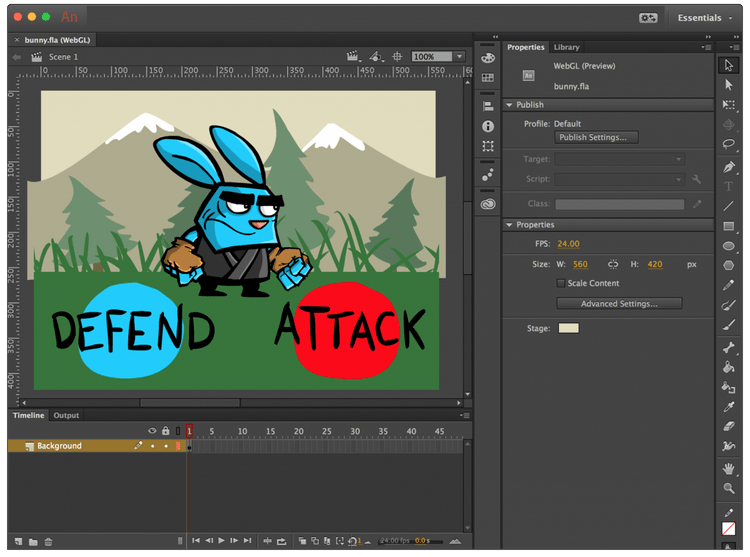
Download Adobe Animate 2024 – Comprehensive Multimedia Authoring Tool
Adobe Animate 2024 is a professional animation and multimedia authoring software developed by Adobe Inc. It serves as a robust platform for creating animated content, interactive applications, and rich media experiences for digital platforms. Designed for animators, game developers, and web designers, Adobe Animate facilitates the creation of vector graphics and animations that conform to modern web standards, marking a significant evolution from its predecessor, Flash Professional.
Overview of Adobe Animate 2024
Adobe Animate 2024 represents the latest iteration in a long lineage of multimedia creation tools, originally established as FutureSplash Animator in 1996. The software underwent a significant rebranding and functional shift in 2016, transitioning from Flash Professional to Adobe Animate. This evolution emphasized a modernization of its capabilities, moving towards web standards like HTML5 and away from the deprecated Flash Player. Its primary purpose now is to enable the creation of dynamic, interactive content suitable for a wide range of digital applications, including web platforms, mobile applications, and interactive installations.
Core Features and Capabilities
Vector Graphics and Animation Tools
Adobe Animate provides a comprehensive suite of tools for creating and manipulating vector graphics, allowing for scalable and high-resolution designs. The software excels in its animation capabilities, offering versatile tools for frame-by-frame animation, motion tweens, and inverse kinematics. This flexibility empowers designers to craft fluid character animations, intricate motion graphics, and engaging visual sequences with ease and precision.
HTML5 and Web Standards Support
A cornerstone of Adobe Animate 2024 is its robust support for modern web standards, with a primary focus on HTML5. The software enables users to export their creations as HTML5, WebGL, and SVG content. This capability is crucial for developing animations and interactive elements that render seamlessly across contemporary web browsers and devices without requiring plugins. By leveraging these standards, users can ensure broad accessibility and compatibility for their digital content.
Audio and Video Integration
Adobe Animate offers powerful features for integrating audio and video elements into multimedia projects. Users can import various audio formats and synchronize sound effects, voiceovers, and music directly within the animation timeline. The software also supports embedding video content, allowing for the creation of cohesive and immersive multimedia experiences that combine visual animation with auditory and video components.
Applications in Various Industries
Adobe Animate 2024 finds extensive application across multiple industries due to its versatile animation and interactive design capabilities. In the gaming industry, it is utilized for creating 2D game assets, animations, and interactive gameplay elements. For online advertising, animators leverage Animate to produce engaging banner ads and promotional videos that meet web performance standards. Furthermore, educational content creators utilize the software to develop interactive learning modules and animated tutorials, enhancing user engagement and comprehension.
Comparative Insights with Other Animation Software
Compared to traditional animation software that may focus solely on frame-by-frame techniques, Adobe Animate distinguishes itself through its deep integration with web technologies and robust interactive design tools. While some competitors might offer specialized features for 3D animation or film production, Adobe Animate excels in creating 2D vector animations optimized for digital platforms like web and mobile. Its ability to export to HTML5, WebGL, and SVG provides a distinct advantage for developers targeting modern web applications and interactive web content, setting it apart from tools that primarily support proprietary formats or older web technologies.
User Community and Resources
Adobe Animate 2024 is supported by a large and active user community, providing a wealth of resources for learning and development. Official tutorials, extensive documentation, and user forums hosted by Adobe offer valuable insights and solutions for a wide range of creative challenges. Additionally, the availability of third-party plugins and extensions allows users to further expand the software’s functionality, tailoring it to specific project needs and workflows.
Frequently Asked Questions
What is Adobe Animate used for?
Adobe Animate is primarily used for creating interactive animations and multimedia content for platforms such as websites, mobile apps, and games. It enables designers to create vector graphics and animations that conform to modern web standards.
How does Adobe Animate support HTML5?
Adobe Animate offers robust support for HTML5, allowing users to export animations in HTML5 format, which is essential for developing content that runs smoothly on modern web browsers without Flash. This transition is part of Adobe’s shift towards web standards.
Can I integrate audio into animations using Adobe Animate?
Yes, Adobe Animate allows users to seamlessly integrate audio into their animations, enabling synchronization of sound effects and voiceovers directly within the animation timeline, enhancing the multimedia experience.





Reviews
There are no reviews yet.