

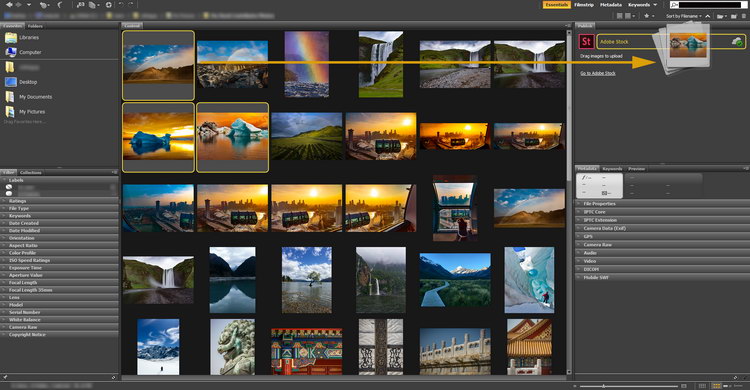
Download Adobe Bridge 2026 – Your Essential Asset Management Tool
Adobe Bridge 2026, developed by Adobe Inc., is a specialized digital asset management application designed for photographers and graphic designers. It serves as a central hub for organizing and accessing file assets, facilitating efficient workflows within the broader Adobe ecosystem. This tool enhances productivity by providing robust capabilities for managing various multimedia formats and their associated metadata.
Introduction to Adobe Bridge 2026
Adobe Bridge 2026 functions as a crucial component of Adobe’s Creative Cloud, offering a unified platform for photographers and designers to manage their digital assets. Unlike editing software, Bridge focuses on organization and metadata handling, providing a seamless experience when working with files across different Adobe applications. Its primary role is to streamline the initial stages of creative projects by ensuring assets are easily locatable and manageable.
Harnessing Digital Asset Management
The core strength of Adobe Bridge 2026 lies in its comprehensive digital asset management (DAM) functionalities. It allows creative professionals to efficiently locate, sort, and preview a wide range of file types without needing to open each application individually. This centralized approach to asset management is fundamental for maintaining organized project libraries and accelerating the creative process.
Key functionalities contributing to its effectiveness include:
- Centralized file browsing and previewing capabilities.
- Tools for applying keywords, labels, and ratings to assets.
- Efficient searching and filtering based on metadata.
- Integration with Adobe’s cloud storage solutions for accessibility.
Key Features and Capabilities
Adobe Bridge 2026 offers a suite of specialized features to support robust multimedia asset organization and manipulation within the Adobe Creative Cloud environment.
- File Organization and Management: Users can navigate through folders, view thumbnails and previews of various file types, and apply organizational structures like collections and keywords to group related assets efficiently.
- Metadata Editing and Management: The application allows for detailed editing and viewing of file metadata, including IPTC, EXIF, and custom metadata. This is critical for photographers to manage copyright information, location data, and other descriptive details.
- Batch Processing and Automation: Bridge includes powerful batch processing capabilities, such as batch renaming files with custom naming conventions, applying Photoshop actions, and converting file formats, significantly saving time on repetitive tasks.
- Integration with Adobe Creative Cloud Applications: It offers deep integration with other Adobe software like Photoshop, Illustrator, and Premiere Pro, allowing users to open files directly in their respective applications, transfer settings, and maintain a consistent workflow across the suite.
Working with Multimedia Formats
Adobe Bridge 2026 supports a vast array of multimedia file formats, extending beyond common image types to include video and audio files. This broad compatibility ensures that creative professionals can manage diverse project assets from a single interface.
Supported formats typically include:
- Raster image files (JPEG, PNG, TIFF)
- Vector image files (AI, EPS)
- Raw camera files from various manufacturers
- Common video codecs (QUICKTIME, MPEG)
- Adobe document formats (PSD, INDD, PDF)
Users can preview many of these formats directly within Bridge, aided by Camera Raw support for processing raw image files before they are sent to Photoshop.
Use Cases in Photography and Design
In professional workflows, Adobe Bridge 2026 serves as an indispensable tool for both photographers and graphic designers, optimizing project management and asset retrieval.
- Photography Workflow: Photographers utilize Bridge to ingest images from cameras, apply initial culling, organize shoots using keywords and color labels, and prepare files for editing in Adobe Lightroom or Photoshop. Batch renaming and metadata application are particularly valuable for handling large volumes of wedding, event, or commercial photography.
- Graphic Design Projects: For graphic designers, Bridge facilitates the organization of project assets such as logos, illustrations, fonts, and layout files. It allows for easy previewing and selection of elements needed for marketing materials, web design, or print publications, ensuring all necessary components are readily accessible.
- Cross-Application Collaboration: Teams can use Bridge to share collections of assets or project elements, improving collaboration and ensuring consistency across design and photography tasks within the Adobe Creative Cloud ecosystem.
Conclusion: Streamlining Your Workflow
Adobe Bridge 2026 solidifies its position as a vital utility for creative professionals seeking to enhance their digital asset management capabilities. By centralizing file organization, metadata control, and providing seamless integration with other Adobe applications, it significantly streamlines workflows. For photographers and graphic designers, leveraging Bridge is key to maintaining efficiency and focus on the creative process rather than administrative file handling.
Frequently Asked Questions
What is Adobe Bridge used for?
Adobe Bridge is used primarily for organizing and managing multimedia assets, allowing users to edit metadata, sort files, and streamline workflows across Adobe applications. It acts as a central hub for accessing and managing all your creative project files, ensuring everything is easily locatable and controllable.
How does Adobe Bridge integrate with other Adobe software?
Adobe Bridge integrates seamlessly with applications like Photoshop and Camera Raw, enabling users to easily access, edit, and manage their creative assets across different platforms within the Adobe ecosystem. This direct integration allows for quick launching of files into their native applications and batch processing across multiple Adobe programs.
Can I use Adobe Bridge for batch processing images?
Yes, Adobe Bridge supports batch processing, allowing users to rename multiple files, apply color labels, and edit metadata en masse, which is especially useful for photographers handling large volumes of images. Features like batch renaming, resizing, and applying Photoshop actions can be automated to process entire sets of files efficiently.






Reviews
There are no reviews yet.