

CADMATIC 2024T3: Complete Industrial & Marine Digital Twin Software Suite
CADMATIC 2024T3 is the latest release of the comprehensive digital twin software platform for industrial plant, marine, electrical, and HVAC design. This version introduces a customizable ribbon interface, enhanced IFC4 interoperability, AI-driven point cloud label detection, new LED strip and EDZ import tools for Electrical, and advanced hull plate marking features .
The software suite comprises multiple integrated modules:
| Module | Primary Function | Key Industries |
|---|---|---|
| Plant & Outfitting | 3D plant design, piping, cable routing, ducting | Oil & Gas, Power Generation, Process |
| Hull | Ship structure design, plate cutting, jumbo panels | Shipbuilding, Offshore |
| Electrical | Single-line, multi-line, layout, schematics, EDZ import | Power Distribution, Manufacturing |
| HVAC | Heating, ventilation, air conditioning design | Building Services, Industrial |
| Draw | 2D drafting, IFC import/export, customizable ribbon | All sectors |
| eShare / eBrowser | Cloud collaboration, collision detection, AI point cloud analysis | All sectors |
With starting from 2025, CADMATIC software will have two main releases annually (H1/H2) instead of three, making 2024T3 a significant milestone release.
???? Primary Users
This professional digital twin software suite is designed for:
-
Plant & Outfitting Engineers designing complex industrial plants, offshore platforms, and ship outfitting systems
-
Marine & Hull Engineers modeling ship structures, plate cutting data, and jumbo panel assemblies
-
Electrical Engineers & Designers creating schematics, single-line diagrams, and 3D electrical layouts with EPLAN integration
-
HVAC & Building System Designers modeling heating, ventilation, and air conditioning systems with IFC4 export
-
BIM Coordinators & Project Managers using eShare for cloud-based collision detection, AI label detection, and multi-discipline collaboration
⚡ Key Features & Capabilities by Module
???? Plant & Outfitting / 3D Plant Design
Ducting & Piping Enhancements:
-
Circular ducts can now be routed with on-the-fly size definition, similar to rectangular ducts
-
Gaskets can be defined for circular or rectangular duct parts with flanges
-
“Change size” command can now adjust the size of an entire duct run at once
-
External valve data support via enhanced Web API and XML import capabilities
Cable Routing & Management:
-
Cable stacking heights can now exceed the width of the stack – ideal for multiple interference classes in a single tray
-
Enhanced cable router with improved management of previous routes:
-
Original cable length remains accessible even after status changes
-
Changed routes display percentage of change for easy evaluation
-
Fill rates are maintained even if some routed cables get broken
-
Broken cables automatically repaired when routes become available
-
-
Manual routing speed improved by enabling selection of a sequence of routing points
Pipe & Support Alignment:
-
“Follow pipe” command now considers Primary Supports, aligning supports of the new pipe regardless of nominal size or support type
Isometric & Spool Drawings:
-
Drawings can automatically adjust to display short branches otherwise obscured by main pipe
-
Improved dimensioning for piping parts with triangles
-
Automatic annotation can insert nominal size labels at pipe run ends
-
Configurable color, lineweight, and layer for weld symbols, field welds, and extra lengths
-
Plant Modeller can generate spools from multiple isometric groups at once
P&ID Integration:
-
3D designers can use the P&ID view to link diagram objects to 3D objects or remove links
-
Candybar line shows route to correct equipment even when pipelines include branches
Hull Markings for Outfitting (NEW):
-
Outfitting parts welded to hull plates can now be marked on coded plate cutting data (DXF files)
-
Overlapping plating (e.g., doubler plates) can be marked in the DXF file of the plate below
???? Hull Design
View Cube (NEW):
-
Modern navigation tool replacing the sidebar, offering both planar and non-planar viewing options
-
Users can easily switch between viewpoints even when objects are obstructing the view
Jumbo Panels (BETA):
-
Split large plates into sub-plates with varied thicknesses and materials using seams
-
Parts connected to jumbo panels automatically adjust when sub-plate thickness changes or seams are moved
-
Note: This Beta version is not meant for production use
Reports & Data:
-
New logistical field types for minimum and maximum extent of parts in vertical, longitudinal, and transverse directions
⚡ Electrical Design
LED Strip Tool (NEW):
-
Available in layout symbol functions for 2D and 3D drawing
-
Define width, height, and other properties; draw with different elevations
-
Creates a device with a device ID, enabling LED strips to function like any other light fixture
EDZ Import for EPLAN (NEW):
-
Import EDZ files directly to create product models with all specifications:
-
Product information, symbols, product images, and manuals
-
Specify what to include if all information is not needed
-
-
EDZ files are available from manufacturers’ websites
DIALux evo Integration:
-
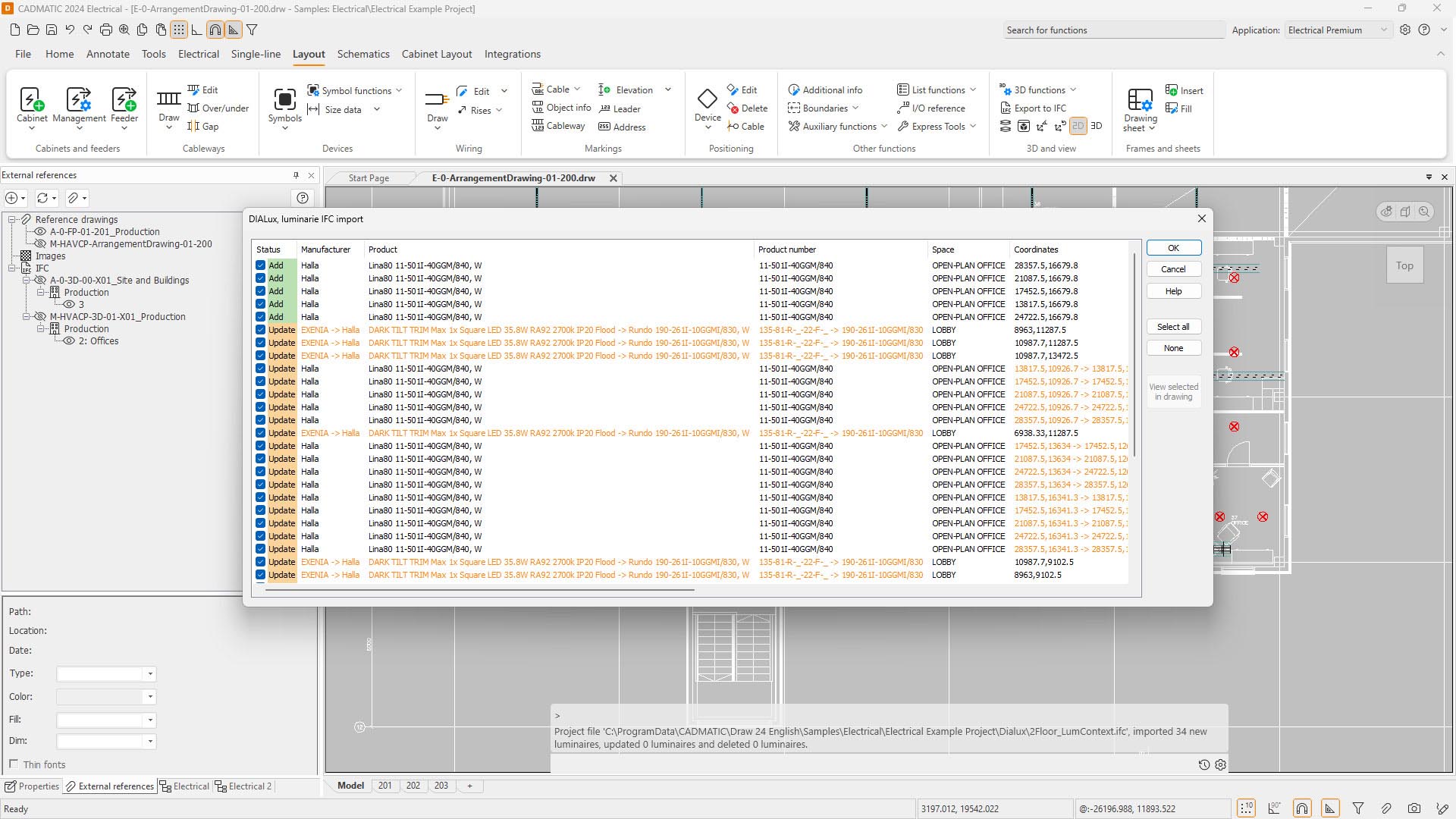
Export spaces (STF export) to DIALux evo for lighting calculations – drastically reduces time spent creating spaces
-
Import back IFC files with product information to insert light fixtures at correct coordinates
Distribution Board & Feeder Tools:
-
Create distribution boards, busbars, and feeders with symbols or copy existing ones
-
Automated drawing function for inserting busbars and feeders reduces time
-
For busbars, new validation checks that they have at least one incoming feeder
User Wire Markings:
-
Define user-specific wire markings (lines, boxes, or hatches) and make them default
-
Wire markings saved to user wire markings table
Single-line & Schematics Enhancements:
-
Load diagrams now have group handles (GROUPGRIP=2, GROUPSEL=1) for easier moving of object groups
-
Busbars now have connection points that follow module spacing defined in project settings
-
Terminal blocks can be pasted as new occurrences (Ctrl+Shift+V) instead of new devices
???? HVAC & Building Systems
Performance & IFC Enhancements:
-
Focus on improving existing functionalities, including IFC export and LVK dimensioning
-
National standardized product part and system information automatically assigned to each HVAC component
-
Standardized property sets (RAVA IFC) for IFC4 export with one-click
Truss Enhancements:
-
Round hole penetrations added for trusses based on user requests
???? System Requirements
Minimum Requirements
-
OS: Windows 10 (64-bit) Professional
-
Processor: Intel Core i5 or equivalent
-
RAM: 8 GB (16 GB recommended for complex models)





Reviews
There are no reviews yet.