

CADMATIC Electrical 2024: Professional Electrical Design Software
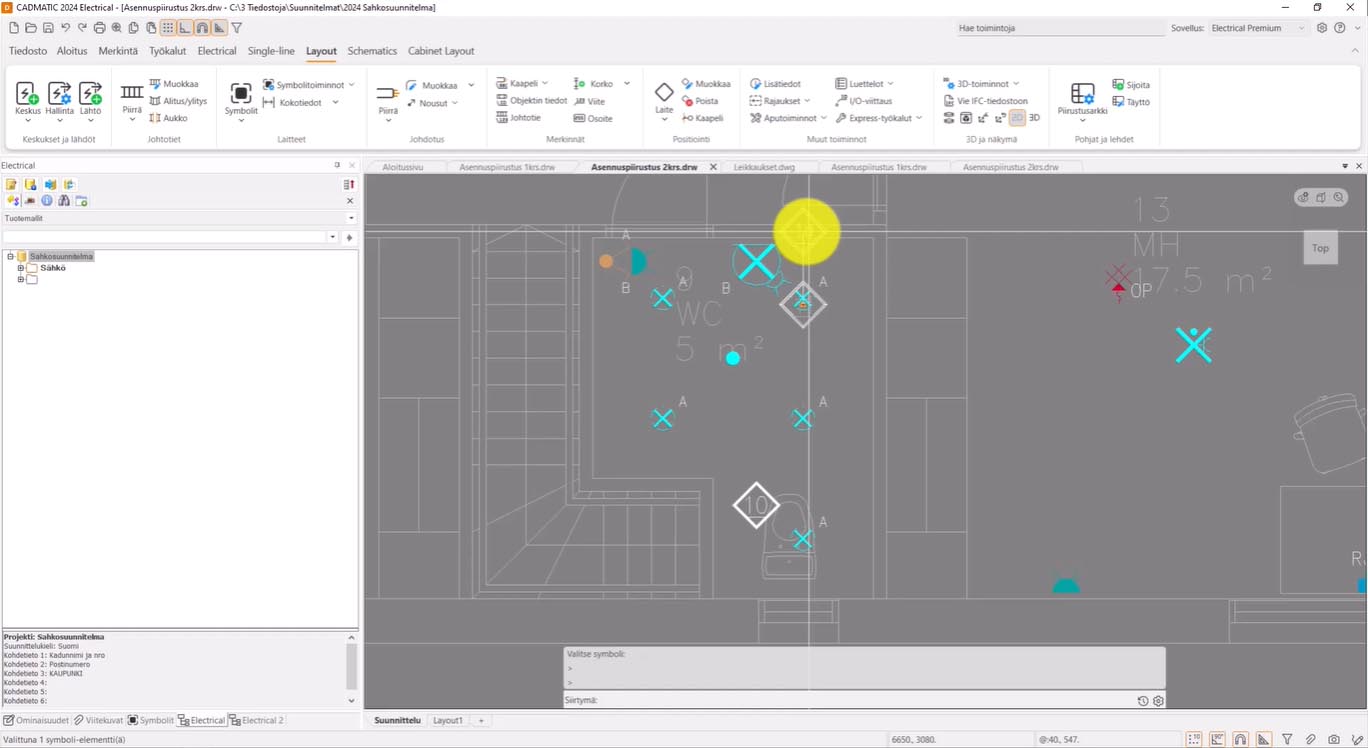
CADMATIC Electrical 2024 is a comprehensive electrical computer-aided design software that covers the entire electrical engineering workflow—from single-line diagrams to fully detailed 3D installations. As part of CADMATIC’s integrated digital twin solutions, the 2024 release represents a major evolution, introducing a completely new ribbon-based user interface—the most extensive UI enhancement in the software’s history,
The 2024 version consists of three main releases (T1, T2, and T3) that progressively introduced significant new capabilities. The software merges previously separate applications (Schematics, Layout, Distribution Board, and Cabinet Layout) into a single unified Electrical application, with functions organized into logical toolsets based on document types . It supports the full range of electrical design tasks, from conceptual single-line diagrams to detailed 3D layouts, with seamless integration across drawing types and powerful database management for components and cables
⚡ Primary Users
This professional electrical CAD software is designed for:
-
Electrical Engineers & Designers creating single-line diagrams, multi-line schematics, and wiring layouts for industrial and marine projects
-
Panel Builders & Switchgear Manufacturers designing distribution boards, control panels, and cabinet layouts
-
Plant & Facility Engineers managing electrical infrastructure and cable routing for industrial facilities
-
Marine Electrical Designers working on ship electrical systems within integrated 3D environments
-
MEP Consultants designing building electrical systems including lighting, power distribution, and cableways
⚡ Key Features & Capabilities
???? Completely Renewed Ribbon Interface (2024T1)
The most significant change in version 2024 is the transition from traditional toolbars to a modern ribbon-based interface . Key improvements include:
-
Functions organized into logical tabs and groups for faster access
-
Clearly named buttons with tooltips linking to instructions
-
Streamlined command line taking less space
-
Unified Electrical application merging all previous sub-applications
The new interface is further enhanced in 2024T3 with personalized ribbon tabs that can be customized to suit individual workflows .
???? Single-Line, Multi-Line & Distribution Design
New Single-line Toolset (2024T1):
-
Dedicated toolset for creating single-line documents, load diagrams, and distribution diagrams
-
Integrates former Distribution Board application functions
-
New symbol library added for single-line diagrams
Multi-line Documents:
-
Create connection diagrams, termination diagrams, and schematic-style diagrams
-
Enhanced cable termination management with improved pair shield settings
-
New functions for hiding/showing attributes across all symbol occurrences
????️ Layout & Arrangement Drawings
-
Terminology updates: “Raceway” renamed to “Cableway,” “Fluorescent light” to “Linear light”
-
New sector creation options: Traditional sectors (1-359°), full circle, full circle with polygon, and free-form sectors
-
Quantity lists: Add quantity lists directly from the Symbols window
-
Location boundaries: Draw location boundaries to arrangement drawings
-
3D visualization window renewed: Round tool menu replaced with new toolbar; viewcube for changing view direction
???? Lighting Design Integration (2024T3)
-
Import luminaires from DIALux evo – Directly import lighting fixture data from DIALux evo for accurate lighting calculations
-
New LED strip creation – Draw LED strips in 2D and edit them in 3D
???? Product Data & Macro Import (2024T3)
-
Import product macros from EDZ file – Directly import EDZ files from manufacturers to create product models with all specifications
-
Improved load diagram functionalities – Enhanced load diagram capabilities
???? Database & Management Enhancements
Electrical DB improvements include :
-
Type definitions: Add custom device types to the database
-
Case-insensitive filtering: Improved drop-down menus with case-insensitive search
-
Grouped data rows: Collapse and expand all grouped rows
-
Enhanced terminal blocks display: Format:
[cable ID or wire type] : [wire number] [wire color] ([from/to device full ID:pin]) -
Multi-feeder protective device selection: Select several feeders and create the same protective device for all
???? Symbol Management
The 2024 release significantly enhances symbol handling with :
-
Symbol editing functions directly in the Symbols window: Delete, Move, Copy, Edit, and Change symbol
-
Symbol filtering to show only search results
-
Temporary symbol source selection – view symbols from another drawing type
-
Favorite symbol list for quick access (2024T2)
-
Protective device symbol selection directly in feeder dialog (2024T2)
???? Integrated 3D Design
-
3D part generation for cables, tubes, and cableways
-
IFC export for interoperability with other BIM software
-
Space information reading from reference drawings
-
Improved cableway editing with unified Edit function
-
3D visualization window with modern toolbar and viewcube
???? Workflow & Integration
-
P&ID to Electrical integration – Seamlessly integrate instrument data from P&ID to Electrical (2024T2)
-
Deleted cable information export – Export only updated cables to Plant Modeller instead of full synchronization
-
Drawing list creation improvements – Better handling of multi-sheet lists with automatic new sheet creation
-
Revision cloud function – Draw revision clouds on Electrical tab
???? Reporting & Documentation
-
Terminology standardization: “Report” consistently replaces “list” in DB Tool
-
Improved drawing list creation with better multi-sheet handling
-
Drawing list creation with improved multi-sheet handling
-
Quantity lists from Symbols window
-
Revision clouds for document versioning






Reviews
There are no reviews yet.