

Download 3Data Expert 15.0 – Advanced Software for 3D Printing Model Preparation
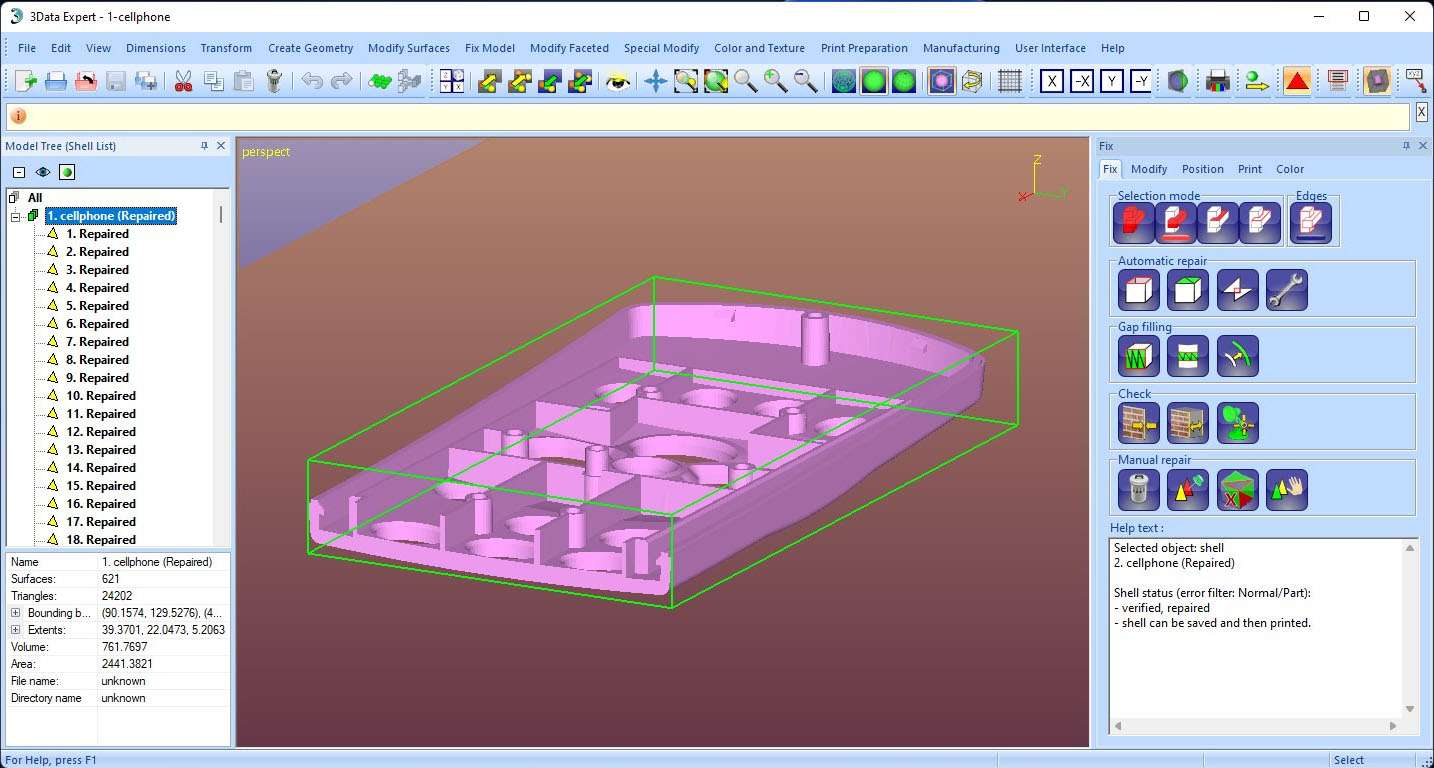
3Data Expert 15.0, developed by DeskArtes, is a specialized software solution designed for the preparation and optimization of 3D models for additive manufacturing. It caters to professionals in industrial design, manufacturing, and prototyping who require robust tools for preparing complex models for various 3D printing technologies, including stereolithography, DLP, metal, and sand printing. This software plays a crucial role in ensuring the printability and quality of parts by addressing common issues found in triangulated models.
Overview of 3Data Expert and Its Role in Additive Manufacturing
Developed by DeskArtes, a company focused on 3D printing and additive manufacturing software, 3Data Expert functions as a vital intermediary between 3D design and production. It specializes in repairing and preparing facet and surface models, making it indispensable for users working with various 3D printing processes. The software supports industries that rely on precise 3D printing for prototyping, tooling, and end-part production, ensuring that digital models translate accurately into physical objects.
Comprehensive Tools for Repairing and Optimizing 3D Models
3Data Expert offers a suite of tools designed to ensure that 3D models are free from errors and optimized for successful printing. These capabilities are essential for minimizing print failures and achieving high-quality results across different additive manufacturing technologies.
Automatic and Manual Model Repair
The software provides advanced functionalities for detecting and automatically repairing common issues found in triangulated models. This includes addressing holes, non-manifold edges, and intersecting surfaces, which are frequent obstacles in preparing models for printing. For more intricate adjustments, 3Data Expert also offers manual editing tools, allowing users to directly manipulate facets, delete unwanted surfaces, and refine the geometry with precision.
Model Optimization for Various 3D Printing Processes
Beyond basic repairs, 3Data Expert enables users to optimize models for specific additive manufacturing requirements. Capabilities include adjusting wall thicknesses to meet minimum print requirements or material properties, and generating crucial support structures for processes like stereolithography that rely on them to build complex geometries. The software also supports specialized features such as shrink coating, which can be applied to models to compensate for material shrinkage during printing, particularly useful for colored models.
Multi-format File Support and Model Manipulation Features
Ensuring broad compatibility, 3Data Expert supports a wide array of 3D file formats commonly used in design and manufacturing workflows. This flexibility allows users to import models from various CAD and modeling software without extensive conversion issues.
Supported input formats include widely adopted standards such as STL, 3MF, VRML, OBJ, and ZPR, alongside others like DXF, PLY, 3DS, Collada, and FBX. The software also supports its proprietary 3DE format for enhanced data integrity. In addition to import capabilities, 3Data Expert allows for model manipulation, such as splitting exceptionally large models that might exceed printer build volumes or manufacturing process limitations. It also facilitates joining separate parts with connection points, enabling multi-component assemblies to be printed as individual pieces and then securely connected post-print.
Production Documentation and Quality Control Reporting
A key differentiator for 3Data Expert is its robust reporting functionality, which extends beyond simple model preparation to support the entire production workflow. The software can generate detailed documentation critical for manufacturing oversight and quality assurance.
Users can create comprehensive reports that include visualizations of the build platform with the part positioned, alongside precise measurements of the model’s volume, surface area, and bounding box. The software can export these quality control data outputs in various formats, such as DOC and XML, facilitating integration with Production Data Management (PDM) systems. This feature helps professionals monitor print jobs, track material usage, and maintain rigorous quality standards in production environments.
Real-world Use Cases and Industry Applications
3Data Expert finds application across a spectrum of industries where accurate 3D printing is paramount. It is utilized in industrial prototyping to rapidly test designs and in manufacturing settings for producing functional parts, jigs, and fixtures. The software’s capacity for detailed model repair and optimization makes it ideal for high-specification applications in aerospace and automotive industries.
Furthermore, its advanced surfacing capabilities and STL repair features can be of interest in fields that utilize 3D printing for custom object creation, potentially including specialized applications within geological sciences for creating physical models derived from geological data, provided the data can be converted into compatible 3D formats.
Frequently Asked Questions
How does 3Data Expert help fix errors in 3D models before printing?
3Data Expert provides both automatic and manual tools to repair common 3D model errors such as holes, open edges, and intersecting surfaces. It can automatically detect and correct errors or allow users to manually edit and refine the model for optimal printability, ensuring a higher success rate for 3D prints.
What types of 3D file formats does 3Data Expert support?
The software supports a wide range of 3D facet formats including STL, 3MF, VRML, OBJ, ZPR, DXF, PLY, 3DS, Collada, FBX, and proprietary 3DE files for input, and can export to STL, 3MF, VRML, ZPR, DXF, PLY, and 3DE formats, ensuring broad compatibility with various design and printing ecosystems.
Can 3Data Expert generate documentation for manufacturing and quality control?
Yes, it can generate comprehensive production reports including images of the build platform, detailed part data like volume and surface area, and export documentation in formats such as DOC and XML for quality control and production monitoring, thereby supporting traceability and process transparency.


Reviews
There are no reviews yet.