

Download 3DQuickForm 3.4.1 for SolidWorks – Advanced Mold Simulation and Design Integration
3DQuickForm 3.4.1 for SolidWorks is a specialized manufacturing software developed by 3DQuickTool, designed to enhance mold design and simulation processes. This plugin seamlessly integrates with SolidWorks, targeting professionals in product and mold manufacturing. It focuses on improving productivity and reducing design errors by combining CAD data input with simulation capabilities for shaping processes.
Introduction to 3DQuickForm
Overview and Applications
3DQuickForm is a powerful add-in for SolidWorks that streamlines the design and simulation of molds and forming processes. It caters primarily to industries involved in product manufacturing, mold manufacturing, and various shaping processes. By leveraging CAD data, the software provides robust tools for template design and reverse engineering, enabling engineers to predict and optimize manufacturing outcomes more accurately.
Key Features of 3DQuickForm
Integration with SolidWorks
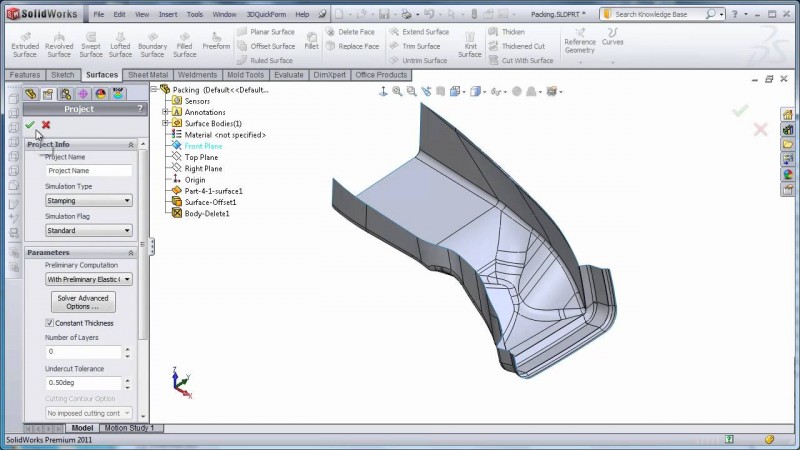
As a SolidWorks plugin, 3DQuickForm offers an integrated experience, allowing users to import existing CAD data directly into the simulation environment. This tight integration ensures that design modifications made within SolidWorks are immediately reflected, facilitating a dynamic workflow for optimizing mold designs and performing simulations without leaving the familiar SolidWorks interface.
Template Design and Reverse Engineering Capabilities
The software excels in template design, a critical aspect of efficient mold creation. It also provides advanced reverse engineering functionalities, enabling users to work with existing designs or scan data to develop new molds. This capability is particularly useful for creating tools for complex shaping processes, ensuring precision and adaptability in design.
Project Management and Simulation Tasks
3DQuickForm supports the management of multiple projects concurrently, allowing engineers to switch between different designs and studies effortlessly. This feature is crucial for managing comprehensive manufacturing workflows. The software facilitates various simulation tasks, from initial stress analysis to detailed load distribution predictions, helping to identify potential design flaws early in the development cycle.
Technical Specifications and Benefits
Automatic Mesh Creation
A key technical capability of 3DQuickForm is its automatic mesh generation functionality. This process discretizes the CAD model into smaller elements, which is essential for performing accurate finite element analysis (FEA) during simulations. Efficient and automated meshing reduces manual effort and ensures that the simulation models are prepared correctly for analysis, contributing to reliable results.
Material Testing and Data Utilization
The software includes a library of materials with predefined properties, enabling designers to test how different materials will behave under specific molding and forming conditions. This feature allows for informed material selection, helping to predict the performance and durability of the final product. By utilizing material data within the simulation, users can refine designs to meet specific performance requirements.
Real-World Applications in Manufacturing
Case Studies and Examples
Product manufacturers utilize 3DQuickForm to accelerate design iterations for complex parts. For instance, a company designing automotive components might use the software to simulate the stamping process, identifying optimal die designs to prevent material defects and reduce tooling costs. Similarly, in consumer electronics manufacturing, it aids in simulating injection molding for plastic casings, ensuring aesthetic quality and structural integrity.
End-User Testimonials
Users frequently cite the software’s ability to provide accurate predictions for molding processes as a significant benefit. Feedback often highlights how 3DQuickForm helps reduce the number of physical prototypes required, leading to substantial time and cost savings in product development cycles for demanding manufacturing applications.
Comparison with Other Simulation Tools
While many CAD platforms offer simulation capabilities, 3DQuickForm distinguishes itself through its specialized focus on molding and forming processes. Its advantage lies in the depth of its simulation tools tailored for these specific manufacturing techniques, coupled with an extensive material library. This specialized approach allows for more precise analysis compared to general-purpose simulation tools, offering unique benefits for mold design and optimization.
Getting Started with 3DQuickForm
Key Considerations Before Use
Before implementing 3DQuickForm, it is essential to ensure compatibility with your existing SolidWorks version and hardware. Familiarity with SolidWorks and basic principles of mold design and simulation will greatly aid in leveraging the software’s full potential. Understanding the specific shaping processes targeted by your projects will help in configuring the simulations effectively.
Frequently Asked Questions
What types of simulations can I perform with 3DQuickForm?
3DQuickForm allows users to simulate molding and forming processes, including load distribution and stress testing of designs. This is crucial for accurately predicting how products will perform under specific conditions, optimizing material usage and ensuring structural integrity.
How does 3DQuickForm integrate with SolidWorks?
3DQuickForm is designed as a plugin for SolidWorks, enabling seamless import of CAD data and allowing users to optimize template designs directly within the SolidWorks environment. This integration streamlines workflows and ensures design data consistency.
Can I use 3DQuickForm for projects involving multiple designs?
Yes, 3DQuickForm supports simultaneous project management, allowing users to test and simulate multiple designs at once without losing data integrity or functionality. This capability is vital for efficient management of diverse manufacturing projects.






Reviews
There are no reviews yet.