

Download Acme CAD Converter 2023 v8.10.6 – A Comprehensive CAD Conversion Tool
Acme CAD Converter 2023 v8.10.6 is a specialized utility designed for efficient CAD file conversion, catering to professionals in engineering, architecture, and manufacturing. This software addresses the critical need for seamless data exchange and format compatibility within complex design and production workflows. It provides extensive format compatibility, including batch file conversion and high-quality output, factors which are critical for engineers and designers within diverse industries.
Overview and Applications in Engineering
Software Overview
Acme CAD Converter facilitates the transformation of various CAD file formats into widely usable outputs. Its core function is to simplify the process of sharing and archiving design data, ensuring that technical drawings and models can be accessed across different platforms and by various stakeholders. The software is built to handle the complexities inherent in CAD data, providing a reliable solution for managing diverse file types.
Key Features and Capabilities
Multi-format Support
The software offers robust support for a broad spectrum of CAD file formats, enabling users to import common drawing files and export them into formats suitable for different applications. This extensive compatibility is crucial in environments where multiple CAD software packages are in use or when interfacing with external partners.
- Supports popular input formats crucial for CAD professionals.
- Exports to various output formats including PDF, WMF, JPEG, TIFF, EPS, SVG, and CGM.
- Ensures that design integrity is maintained during the conversion process.
Batch Conversion Functionality
Acme CAD Converter is equipped with advanced batch processing capabilities, allowing users to convert numerous files simultaneously. This feature significantly enhances productivity by automating repetitive conversion tasks, saving valuable time for engineers and designers who often work with large project datasets.
- Process multiple CAD files in a single operation.
- Streamline workflows by applying consistent conversion settings to entire sets of drawings.
- Ideal for large-scale project archiving and distribution.
Advanced Output Options
Beyond basic file transformation, the software provides several advanced options to customize the output. These controls allow users to fine-tune the appearance and properties of the converted files, ensuring they meet specific project requirements or brand standards.
- Apply personalized watermarks to outputs for branding or protection.
- Configure page settings, including margins and orientation, for precise document preparation.
- Adjust output size and resolution to optimize file quality and compatibility.
- Automate the creation of bookmarks within PDF outputs for enhanced navigation.
Integration with Design Workflows
Interoperability with CAD Formats
Acme CAD Converter acts as a vital bridge between different CAD systems and external applications. By supporting a wide array of formats, it ensures that designs created in specific software environments can be readily integrated into broader project workflows or shared with teams using different tools. This includes handling formats like DWG and DXF, which are foundational in many mechanical and manufacturing design processes.
Usage in Professional Environments
In professional settings, Acme CAD Converter is instrumental for tasks such as preparing engineering drawings for manufacturing, converting architectural plans into shareable PDF documents for client review, or archiving project data in a standardized format. Its utility extends to scenarios where legacy CAD files need to be converted for use with newer systems, preventing data obsolescence.
- Preparing accurate documentation for CNC machining or 3D printing.
- Converting complex assembly drawings into easily viewable formats for non-CAD users.
- Ensuring consistent output quality for reports and presentations.
User Interface and Experience
Interface Design Features
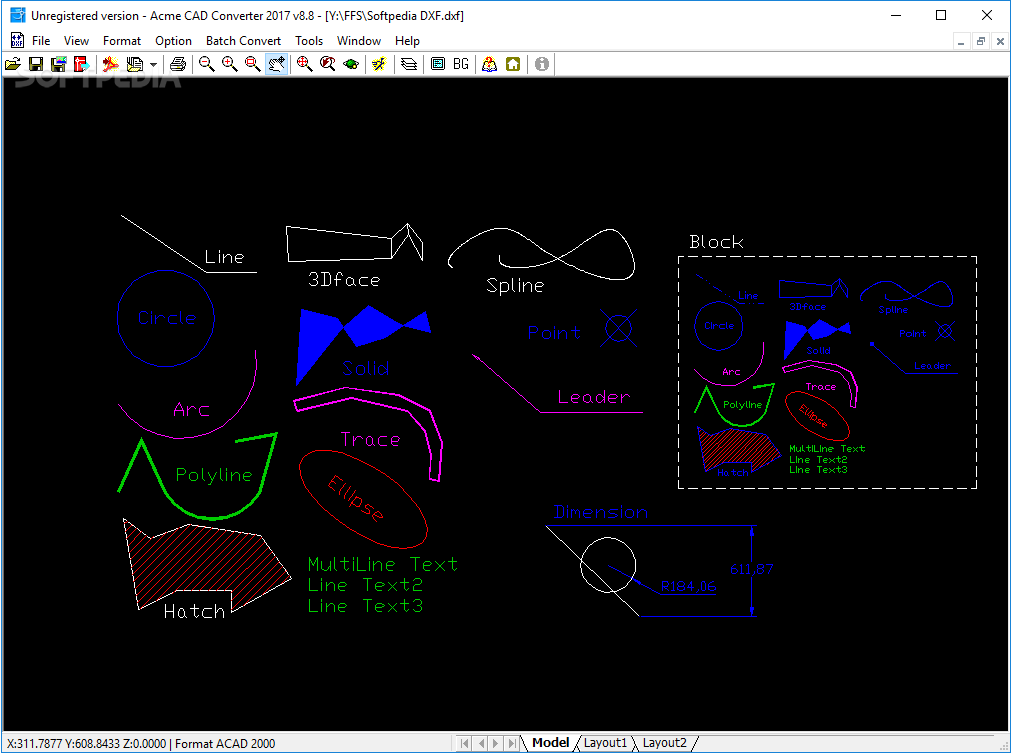
The software features a user-friendly interface designed for operational efficiency. Its layout is intuitive, allowing both novice and experienced users to quickly navigate its functionalities. Professionals can rely on its straightforward design to perform CAD file conversions without a steep learning curve.
- Clear layout for easy file selection and option configuration.
- Progress indicators for batch conversion processes.
- Accessible controls for managing advanced output settings.
Conclusion: Why Choose Acme CAD Converter?
Acme CAD Converter 2023 v8.10.6 stands out due to its comprehensive format support, efficient batch processing capabilities, and advanced output customization options. For engineers, architects, and manufacturers, it offers a reliable method for managing CAD data exchange, ensuring that projects move forward smoothly. Its focus on quality output and user efficiency makes it a valuable tool for any professional dealing with CAD file conversion requirements.
Frequently Asked Questions
What formats can Acme CAD Converter convert to?
Acme CAD Converter supports conversions to a variety of formats including PDF, WMF, JPEG, TIFF, EPS, SVG, and CGM, making it versatile for various design needs. This broad support ensures compatibility across a wide range of applications and project requirements.
Can I perform batch conversions with Acme CAD Converter?
Yes, Acme CAD Converter allows users to batch convert multiple CAD files simultaneously, increasing efficiency and saving time. This capability is particularly beneficial for managing large volumes of drawings or when standardizing project documentation.
Is Acme CAD Converter compatible with recent Windows versions?
Acme CAD Converter is compatible with many versions of Windows, including Windows 7, 8, and 10, ensuring broad accessibility for users. This ensures that most professional workstations can effectively utilize the software for their CAD conversion tasks.






Reviews
There are no reviews yet.