

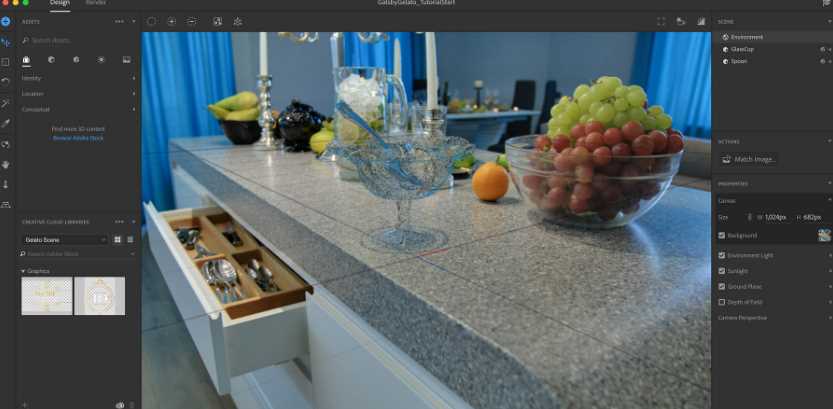
Download Adobe Dimension 3.4.11 – A Powerful 3D Design Tool
Adobe Dimension 3.4.11 is a specialized 3D rendering and design application developed by Adobe Inc. It is engineered to empower graphic designers and digital media professionals to create photorealistic 3D compositions and mockups. Unlike traditional 3D modeling software, Adobe Dimension focuses on the integration and rendering of external 3D models, facilitating a seamless workflow for showcasing designs in digital formats.
Introduction to Adobe Dimension
Adobe Dimension provides a user-friendly environment for creating 3D scenes and visualizations, particularly for graphic designers and advertisers. Its core function revolves around compositing 3D models and custom graphics into realistic scenes, enabling users to produce high-quality mockups for marketing materials, product presentations, and digital art. The software allows for precise placement, lighting, and texturing to achieve photorealistic results.
Core Features and Capabilities
Adobe Dimension offers a suite of features designed for efficient 3D composition and rendering:
- Photo-Based Mockup Editor: Integrates 3D models into real-world product shots and scene backgrounds to create realistic mockups.
- Adobe Rendering Engine (ARE): Utilizes Adobe’s proprietary rendering engine for high-quality, consistent output, as implemented from version CC2.2 onwards.
- Model Integration: Seamlessly imports 3D models created in other software applications for placement and rendering within Dimension scenes.
- Material and Texture Application: Provides tools to apply and edit materials and textures to 3D models, enhancing realism.
- Lighting and Shadow Control: Offers intuitive controls for setting up lighting environments, including image-based lighting, to achieve desired atmospheric effects and realistic shadows.
Comparison with Other 3D Software
Adobe Dimension distinguishes itself from more complex 3D modeling software like SketchUp or Blender by focusing on its role as a rendering and compositing tool. While other applications are built for comprehensive 3D model creation from scratch, Dimension excels at taking pre-existing models and placing them into designed scenes with advanced lighting and realistic rendering. This approach simplifies the 3D design process for users who may not require extensive modeling capabilities but need professional-quality 3D visualizations.
Applications in Professional Settings
Professionals across various creative industries utilize Adobe Dimension for specific project needs:
- Advertising and Marketing: Creating compelling visual mockups for ad campaigns, social media content, and promotional materials.
- Product Visualization: Showcasing product designs, packaging, and branding in realistic 3D environments before physical production.
- Graphic Design: Enhancing graphic design layouts with 3D elements and text for unique visual compositions.
- Digital Media: Developing assets for websites, presentations, and digital art projects that require a professional 3D aesthetic.
User Experience and Workflow Enhancements
Adobe Dimension is designed to integrate smoothly into existing Adobe workflows, enhancing productivity for users of Creative Cloud applications.
- Photoshop Integration: Seamlessly export scenes to Photoshop for further image manipulation, texture editing, or compositing with 2D elements.
- Illustrator Integration: Import vector assets from Adobe Illustrator to use as 3D graphics within Dimension scenes.
- Intuitive Interface: Offers a streamlined user interface that simplifies the process of scene setup, material application, and rendering.
- Asset Library: Access to a library of 3D models, materials, and lighting environments to speed up the design process.
Exporting and Format Compatibility
Adobe Dimension supports a range of export options to facilitate collaboration and further editing of projects:
- Image Formats: Export rendered scenes as high-resolution images in common formats such as JPG, PNG, and TIFF.
- Layered Compositions: Output renders with transparency, allowing for easy compositing into other designs in applications like Photoshop.
- 3D Model Import: Compatible with standard 3D file formats like OBJ, FBX, and SKP, enabling the import of models created in other 3D software.
Conclusion
Adobe Dimension 3.4.11 offers a powerful yet accessible approach to 3D rendering and mockup creation for graphic designers. By focusing on composition and photorealistic rendering rather than complex model building, it streamlines the workflow for creating professional visual content. For designers looking to enhance their portfolios and presentations with impressive 3D visualizations, downloading Adobe Dimension provides a valuable toolset that complements other Adobe Creative Cloud applications.
Frequently Asked Questions
What is Adobe Dimension used for?
Adobe Dimension is primarily used for creating photorealistic 3D designs and mockups, especially useful for graphic designers who want to showcase products or art in digital formats. It allows users to composite external 3D models into realistic scenes for marketing, advertising, and product visualization purposes.
How does Adobe Dimension differ from other 3D modeling software?
Unlike traditional 3D modeling applications, Adobe Dimension does not create 3D models within its interface. Instead, it integrates models created in external sources and focuses on rendering them with realistic lighting, materials, and environments to produce high-quality mockups and visualizations.
Can Adobe Dimension be used with Photoshop?
Yes, Adobe Dimension seamlessly integrates with Photoshop, allowing users to edit and enhance their designs using familiar tools and workflows. Designs can be rendered and then further refined in Photoshop, leveraging the strengths of both applications for a comprehensive creative process.







Reviews
There are no reviews yet.