

Download Adobe Substance 3D Designer 14.1.1 – Professional Texture Creation Software
Adobe Substance 3D Designer is a professional-grade application developed by Adobe Inc., renowned for its advanced capabilities in procedural texture creation and material authoring. It serves as an indispensable tool for artists and designers across industries such as video game development, film production, animation, and architectural visualization, enabling the creation of highly realistic and complex surface materials.
Introduction to Adobe Substance 3D Designer
Adobe Substance 3D Designer is a pivotal software in the digital content creation pipeline, offering a comprehensive environment for designing and developing sophisticated surface materials. Its importance lies in its ability to generate textures procedurally, allowing for unparalleled flexibility and control. This powerful tool empowers artists to craft intricate details and adaptable materials that enhance the visual fidelity of 3D assets, making it a staple in modern game development, visual effects, and design workflows.
Core Capabilities and Features
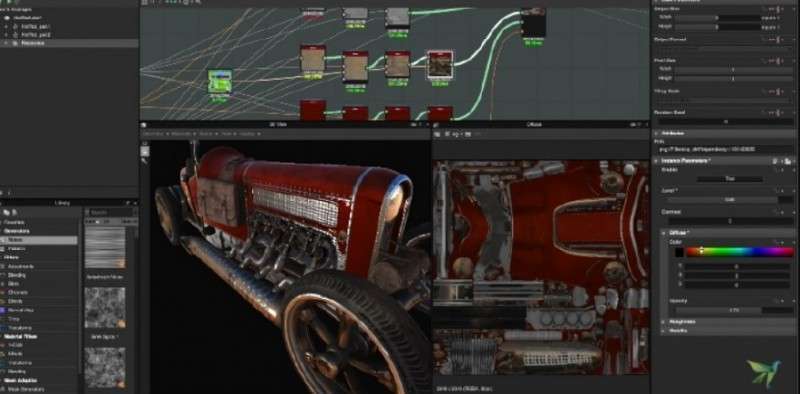
The software is built around a powerful node-based workflow, allowing users to construct procedural graphs that define the properties of a material. This approach facilitates non-destructive editing and enables the creation of highly complex and realistic textures. Key capabilities include:
- Procedural Texture Generation: Utilizing a node graph system, users can combine various filters, transformations, and generators to create intricate patterns and surface details.
- Material Authoring: The software excels at creating PBR (Physically Based Rendering) materials, ensuring realistic light interaction for game engines and rendering applications.
- 2D and 3D Workflows: Substance 3D Designer supports both planar (2D) texturing and direct manipulation of texture generation based on a 3D mesh, allowing for real-time adaptation to asset geometry.
- Real-time Rendering: Integrated rendering capabilities provide immediate visual feedback on material appearance, accelerating the iteration process.
- Pattern and Shape Manipulation: Extensive tools for sculpting, noise generation, and pattern design, offering fine-grained control over every aspect of a texture.
Industry Applications and Use Cases
Adobe Substance 3D Designer is heavily utilized across several demanding industries due to its robust feature set and adaptability. Its procedural nature reduces repetitive tasks and increases efficiency for complex projects.
- Video Game Development: Used to create high-fidelity textures for characters, environments, and props, ensuring visual consistency with game engines like Unity and Unreal Engine. Examples include detailed surfaces for realistic character models or complex terrain materials.
- Film Production and Visual Effects (VFX): Essential for generating photorealistic materials for digital sets, creatures, and props in feature films and high-end commercials, contributing to believable digital environments.
- Animation: Artists employ Substance 3D Designer to create compelling surface appearances for animated characters and assets, ensuring a distinct visual style and high quality.
- Architectural Visualization: Used to produce realistic materials for buildings, interiors, and landscapes in architectural renders, helping clients visualize spaces with an accurate representation of surfaces.
Integration with Other Tools
Seamless integration is a cornerstone of the Substance 3D ecosystem, ensuring that artists can incorporate Substance 3D Designer into their established workflows. The software’s output is designed to be compatible with a wide range of industry-standard applications.
- 3D Modeling Software: Works effectively with platforms like Blender, Maya, and 3ds Max, allowing generated textures to be applied to models created in these programs.
- Game Engines: Offers direct compatibility with leading engines such as Unity and Unreal Engine, facilitating the rapid implementation of materials into game environments.
- Rendering Software: Outputs can be used with various rendering engines, including Arnold, V-Ray, and Cycles, for offline rendering in film and architectural visualization.
- Adobe Creative Cloud: Integrates with other Adobe applications, supporting a cohesive digital art and design workflow.
Unique Advantages of Using Substance 3D Designer
Adobe Substance 3D Designer offers distinct advantages that set it apart from other texturing solutions, primarily stemming from its procedural generation core and adaptability.
- Procedural Texture Generation: The node-based system allows for infinite texture variations from a single graph, making it easy to tweak parameters and generate multiple assets quickly. This is a key differentiator for creating complex, non-repeating patterns.
- Efficiency and Iteration: Changes made in the node graph update almost instantly across all outputs and the 3D view, significantly speeding up the texture creation and refinement process.
- Adaptability to Mesh: Materials can be generated or modified to fit the specific UV layout and geometry of a 3D model, ensuring perfect tiling and seamless application.
- Non-Destructive Workflow: The node-based approach ensures that the original input and development steps are preserved, allowing for easy revisions at any stage of the creation process.
Comparison with Other Texturing Software
Compared to traditional texture painting applications, Adobe Substance 3D Designer emphasizes a procedural, node-based approach to material creation. While some software might focus on direct texture painting on a UV map, Substance 3D Designer allows users to build materials from scratch using algorithmic methods. This means that instead of manually painting every detail, users define rules and patterns that generate textures. This method is particularly beneficial for creating materials that require intricate details, logical variations (like weathering or wear), and the ability to upscale resolutions without losing quality. Its workflow is optimized for complex material libraries and real-time game development needs.
Frequently Asked Questions
What types of textures can I create with Adobe Substance 3D Designer?
Adobe Substance 3D Designer allows users to create a wide variety of textures including natural materials like wood, stone, and metal, as well as synthetic textures like ceramics and plastics. Its procedural generation features enable highly customized textures tailored to specific project needs.
Is Adobe Substance 3D Designer suitable for beginners?
While Adobe Substance 3D Designer offers powerful features for advanced users, it may be challenging for beginners due to its complexity. However, tutorials and community resources are available to help new users get started with texture creation.
Does Adobe Substance 3D Designer integrate with other applications?
Yes, Adobe Substance 3D Designer integrates well with various 3D modeling and game development tools, including Unity, Unreal Engine, and Blender, allowing for a seamless workflow in asset production.






Reviews
There are no reviews yet.