

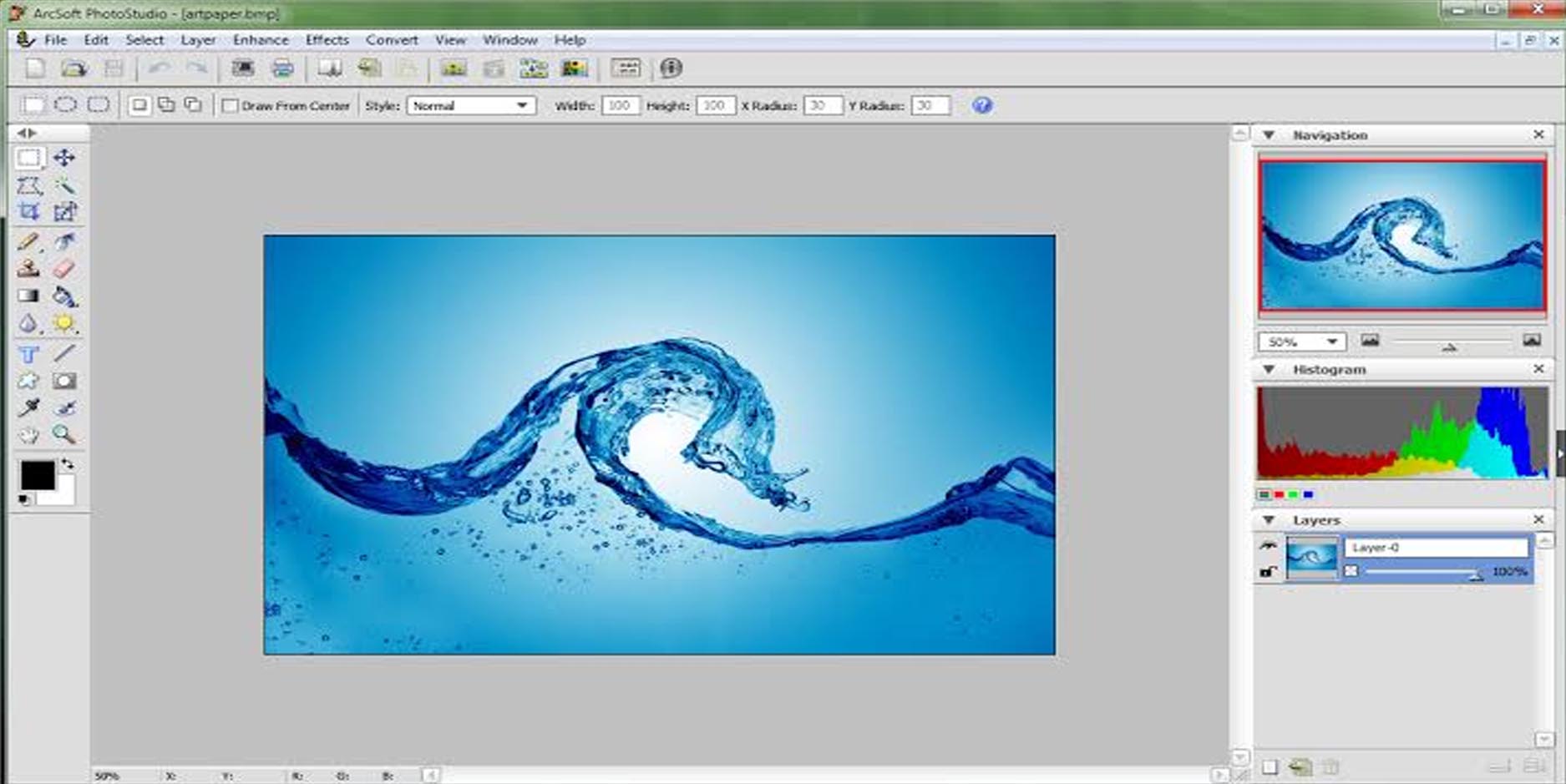
Download ArcSoft PhotoStudio 6.0.5.182 – Advanced Photo Editing Software
ArcSoft PhotoStudio 6.0.5.182 is a versatile photo editing software developed by ArcSoft, Inc., designed to bridge the gap between basic free tools and professional-grade applications. It serves the photography, digital imaging, and graphic design industries, offering a comprehensive suite of features for enhancement, retouching, and creative manipulation. This software aims to provide both immediate, AI-powered corrections and deep manual control, making it relevant for a broad spectrum of users from hobbyists to publishing professionals.
Overview of ArcSoft PhotoStudio and Its Role in Digital Imaging
Developed by ArcSoft, Inc., a company with a long history in imaging software since 1994, PhotoStudio 6.0.5.182 stands as a capable solution within the digital imaging landscape. It is positioned as a user-friendly yet powerful photo editing platform, applicable across creative and technical workflows. Its role is to empower users to achieve high-quality results, whether for print, web, or artistic expression, by providing a balanced set of automated and advanced editing capabilities. The software supports modern 64-bit Windows operating systems and offers improved RAW format compatibility, reflecting its adaptation to current digital photography standards.
Photo Correction and Retouching Tools for Enhanced Image Quality
ArcSoft PhotoStudio 6.0.5.182 integrates advanced tools for refining image quality. It features AI-powered one-click automatic corrections for lighting, color balance, and sharpness, enabling quick enhancements. For users requiring more detailed control, the software provides manual adjustments for tones and colors, alongside specialist tools such as red-eye removal and noise reduction. Advanced photo retouching capabilities allow for the precise manipulation of image details, ensuring a polished final output suitable for professional use or printed media.
Creative Effects and Artistic Capabilities
Beyond standard corrections, PhotoStudio offers a rich array of creative functionalities. Users can explore over 30 artistic filters to transform photographs into different styles, such as pencil sketches or watercolor paintings. The software supports non-destructive editing through layers, allowing for complex compositions and adjustments without altering original image data. An extensive library of frames and decorative elements is also available to enhance photographic projects, facilitating unique designs and personalized artwork.
Panorama Stitching and HDR Image Processing
For advanced photographic projects, ArcSoft PhotoStudio 6.0.5.182 includes built-in tools for creating panoramic images and High Dynamic Range (HDR) photos. The panorama stitching feature allows users to seamlessly merge multiple overlapping images into a wide, immersive scene. Similarly, the HDR processing tool combines multiple exposures of the same subject, captured at different lighting levels, to produce an image with a greater range of detail in both shadows and highlights. These features enhance usability for users undertaking ambitious photographic endeavors.
User Interface Improvements and Performance Optimizations
PhotoStudio 6.0.5.182 benefits from a revamped user interface designed for enhanced usability, including options for dark and light modes and customizable workspaces to suit individual preferences. Performance has been optimized for modern hardware, ensuring smoother operation and faster processing times. The software also boasts improved format support, including compatibility with new camera RAW file formats and HEIC files, ensuring seamless integration with contemporary digital imaging equipment and workflows.
Integration and Format Compatibility in Modern Workflows
ArcSoft PhotoStudio 6.0.5.182 supports a wide range of common and professional file formats, facilitating compatibility within photography and publishing pipelines. While it offers some cloud integration capabilities, its primary strength lies in its robust local file handling. This broad compatibility ensures that users can import images from various sources and export their edited work in formats suitable for different applications, contributing to efficient and effective professional workflows without significant compatibility hurdles.
Application Scenarios and Target User Base
This photo editing software is beneficial for a diverse user base. Amateur photographers can leverage its automated and user-friendly tools for quick photo enhancements. Graphic designers may utilize its layers, effects, and retouching capabilities for project assets. Professionals in the printing and publishing industries can create polished imagery for publication. Real-world use cases include enhancing family photos for printing, developing creative artistic images, processing landscapes requiring HDR or panorama techniques, and preparing product images for commercial use.
Frequently Asked Questions
How does ArcSoft PhotoStudio 6.0.5.182 simplify photo editing for beginners?
ArcSoft PhotoStudio offers AI-powered one-click fixes for lighting, color, and sharpness, making it easy for beginners to enhance photos without complex manual adjustments. Its intuitive interface also helps users navigate professional-level tools with ease.
Can ArcSoft PhotoStudio handle RAW image formats from modern cameras?
Yes, the latest version supports a wide range of newer camera RAW formats, allowing photographers to edit high-quality, uncompressed images directly within the software.
What advanced creative features does PhotoStudio provide beyond basic editing?
Beyond core corrections, PhotoStudio includes over 30 artistic filters, non-destructive layer editing, panorama stitching, and HDR merging tools to transform photos creatively and professionally.




Reviews
There are no reviews yet.