

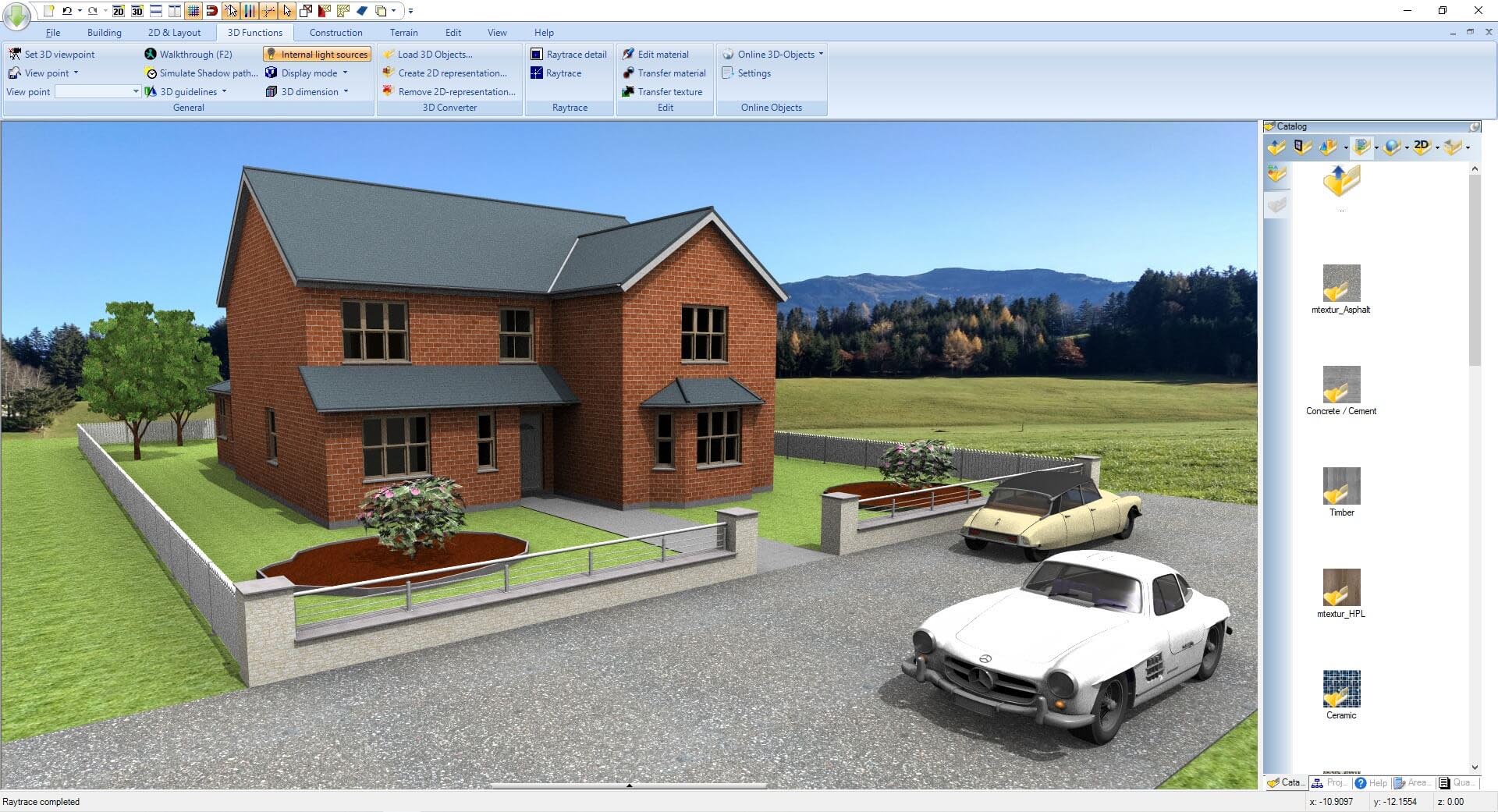
Ashampoo 3D CAD Architecture
Ashampoo 3D CAD Architecture is a powerful yet accessible architectural design software that enables professionals and enthusiasts to create detailed 2D floor plans and convert them into stunning 3D building models. Developed by Ashampoo, this software serves as an excellent alternative to more complex and expensive CAD applications like AutoCAD, offering a balanced combination of professional capabilities with an intuitive user interface. The latest version continues Ashampoo’s tradition of making complex architectural drafting accessible to users at all skill levels—from students learning the basics to experienced professionals needing efficient design tools. With support for exporting to industry-standard formats including 3DS, 3D-DXF, and VRML 1, Ashampoo 3D CAD Architecture provides the perfect bridge between conceptual design and professional documentation.
???? Primary Users
This professional architectural software is designed for:
-
Architects & Architectural Draftsmen creating detailed 2D plans and 3D building models.
-
Civil Engineers & Construction Professionals preparing construction documentation and technical drawings.
-
Interior Designers & Space Planners designing room layouts and visualizing interior spaces.
-
Students & Educators in Architecture learning CAD principles and architectural design.
-
Home Builders & Renovation Contractors planning and visualizing residential projects.
⚡ Key Features & Capabilities
???? 2D Drafting & Floor Plan Design
Drawing Tools:
-
Precise line, wall, and room creation tools
-
Automatic wall connections and clean junctions
-
Dimensioning and measurement tools
-
Layer management for complex drawings
-
Grid and snap functions for accuracy
-
Construction aids, 2D/3D guidelines
Floor Plan Elements:
-
Walls (interior, exterior, load-bearing)
-
Doors and windows with customizable sizes
-
Stairs (straight, L-shaped, U-shaped, spiral)
-
Roof structures (gable, hip, shed, flat)
-
Chimneys and ventilation shafts
-
Columns and beams
???? 3D Modeling & Visualization
3D Model Generation:
-
Automatic 3D model creation from 2D plans
-
Real-time 3D view while drafting
-
Multiple camera angles and perspectives
-
Walk-through and fly-around capabilities
-
Section and elevation views
-
Cut-away views for internal visualization
Visualization Features:
-
Realistic material and texture rendering
-
Lighting simulation (natural and artificial)
-
Shadow casting and sun position
-
Material library (brick, wood, concrete, glass)
-
Vegetation and landscaping elements
-
Furniture and fixture placement
???? Landscaping & Site Design
-
3D landscaping with pre-defined landscapes, paths, terraces
-
Terrain modeling and surface editing
-
Coordinate calculation for textures and point normals
-
Surface editor for terrain regions and sub-areas (editing in 2D/3D)
-
Outdoor elements: trees, plants, fences, garden furniture
???? Project Planning & Documentation
Project Management:
-
Multi-story building support
-
Project tree for easy navigation
-
Layer and object management
-
Calculation of areas and volumes
-
Bill of materials generation
-
Cost estimation tools
Documentation Outputs:
-
Automatic elevation generation
-
Cross-section creation from any cut line
-
Detail enlargement from any area
-
Dimensioning and labeling tools
-
Title block and project information
???? Import & Export
Import Formats:
-
DXF and DWG (AutoCAD compatibility)
-
Image files for reference (JPEG, PNG, BMP)
-
Existing project import
Export Formats:
-
3DS – For 3D modeling software
-
3D-DXF – For CAD applications
-
VRML 1 – For web-based 3D visualization
-
Image formats for presentations
-
PDF for documentation
???? Custom Symbols & Components
-
Individual 2D symbols for text blocks and components
-
Custom object and symbol library
-
Reusable component management
-
Symbol library for furniture, fixtures, and fittings
???? Professional Tools
Calculation Functions:
-
Automatic area calculation (room, living, footprint)
-
Volume calculations for materials
-
Wall and surface area takeoffs
-
Object quantity lists
Design Aids:
-
Grid and snap system for precision
-
Alignment and distribution tools
-
Copy, mirror, and array functions
-
Undo/redo with multiple steps
-
Template-based design
???? Material & Texture Library
Extensive Library:
-
Building materials (brick, stone, concrete)
-
Flooring materials (wood, tile, carpet)
-
Roof materials (tile, slate, metal)
-
Wallpapers and paint finishes
-
Glass and transparent materials
-
Vegetation and landscaping textures
Customization:
-
User-defined material properties
-
Texture scaling and rotation
-
Color and transparency adjustment
???? Lighting & Rendering
Lighting Types:
-
Natural sunlight (adjustable date/time/location)
-
Artificial lighting (ceiling, wall, floor lamps)
-
Spotlights and directional lights
-
Ambient lighting for general illumination
Rendering Features:
-
Real-time preview during design
-
High-quality final renderings
-
Shadow rendering and casting
-
Reflection and transparency effects
???? User-Friendly Interface
Design Philosophy:
-
Intuitive ribbon interface
-
Context-sensitive toolbars
-
Drag-and-drop object placement
-
Real-time property adjustment
-
Zoom and pan navigation
Accessibility:
-
Short learning curve for new users
-
Comprehensive help system
-
Tutorials and sample projects
-
Suitable for beginners and professionals
???? System Requirements
Minimum Requirements
-
OS: Windows 10/11 (64-bit)
-
CPU: 2.0 GHz processor
-
RAM: 4 GB
-
Storage: 3 GB free space
-
Display: 1280 × 768 resolution
-
Graphics: OpenGL 3.3 compatible with 1 GB VRAM




Reviews
There are no reviews yet.