

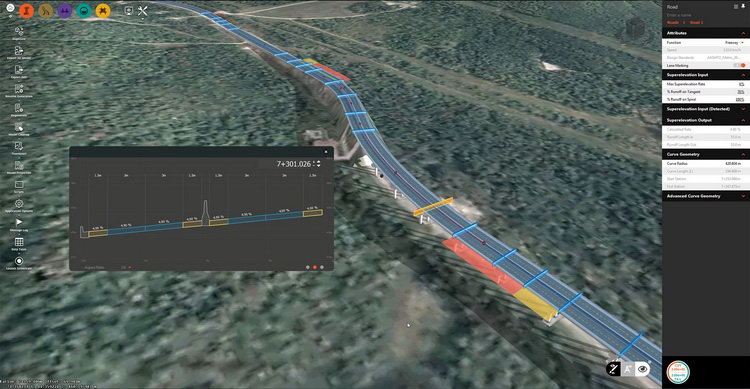
Download Autodesk InfraWorks – Innovative Software for Urban Infrastructure Design
Autodesk InfraWorks is a specialized civil engineering software developed by Autodesk, Inc. This comprehensive solution is engineered to enhance the planning, design, and analysis phases of urban infrastructure projects. It empowers civil engineers and urban planners by providing robust tools for creating detailed 3D models of infrastructure and facilitating collaboration within project teams.
Overview of Autodesk InfraWorks
History and Background
Autodesk InfraWorks emerged as a distinct platform to consolidate and advance infrastructure design capabilities, building upon the foundation established by earlier Autodesk products like InfraWorks 360. Its evolution has been driven by the increasing demand for integrated design and analysis tools in the civil engineering sector, aiming to bridge the gap between conceptual design and detailed construction documentation. The software’s development focuses on delivering a streamlined workflow for infrastructure projects, from initial planning through to construction and management.
Key Features of Autodesk InfraWorks
Collaboration and Cloud Integration
Autodesk InfraWorks excels in fostering real-time collaboration among project stakeholders. Its cloud integration capabilities allow multiple users to access, update, and review project designs concurrently, irrespective of their geographic location. This feature significantly enhances team communication and project efficiency, ensuring that all team members are working with the most current project data.
Geotechnical and Structural Modeling
The software offers advanced geotechnical modeling tools that enable engineers to incorporate subsurface data and analyze soil conditions. This capability is crucial for ensuring the stability and safety of infrastructure designs. Additionally, InfraWorks supports detailed structural modeling, allowing for the visualization and analysis of bridges, roads, and other civil structures against various engineering standards and requirements.
Data Integration and Analysis Tools
InfraWorks supports the integration of a wide range of data formats, including GIS data, point clouds, and existing CAD models. This extensive data compatibility allows engineers to build designs based on precise real-world conditions. The software’s analysis tools enable users to evaluate design performance, identify potential issues, and optimize solutions before construction begins, adhering to civil engineering software best practices.
Applications in Civil Engineering
Urban Infrastructure Projects
In the realm of civil engineering, Autodesk InfraWorks is instrumental in the design and planning of complex urban infrastructure. Real-world use cases include the development of intricate transportation systems, such as highways and public transit networks, as well as the modeling of utilities, drainage systems, and public spaces in urban environments. Its modeling facilities support detailed urban infrastructure planning.
Disaster Resilience and Risk Management
Autodesk InfraWorks provides essential tools for modeling infrastructure resilience against natural disasters. Engineers can simulate the potential impact of events like floods, earthquakes, and high winds on proposed or existing structures. This capability is vital for conducting hazard assessments, developing mitigation strategies, and ensuring that critical infrastructure can withstand adverse environmental conditions, supporting robust risk management.
Comparative Insights with Other CAD Software
While many CAD software solutions offer geometric design capabilities, Autodesk InfraWorks distinguishes itself through its specialized focus on civil infrastructure and integrated modeling environment. Key differentiators include its advanced geotechnical modeling tools and extensive support for diverse data formats, facilitating a more holistic approach to infrastructure projects compared to general-purpose CAD software. Its cloud collaboration features also provide a significant advantage for large, multi-disciplinary teams.
Best Practices for Using Autodesk InfraWorks
To maximize the utility of Autodesk InfraWorks, adopting a structured approach to project design and data management is recommended. Engineers should leverage real-time collaboration features extensively, ensuring consistent communication within the project team. Proper integration of diverse datasets early in the process and utilizing the software’s analytical tools for performance evaluation will lead to more robust and optimized infrastructure designs.
Frequently Asked Questions
What is Autodesk InfraWorks used for?
Autodesk InfraWorks is primarily used for designing and modeling urban infrastructure projects, enabling engineers to create detailed 3D representations of roads, bridges, and other essential structures. It facilitates collaboration and efficient project planning by integrating real-world data and supporting team workflows.
How does InfraWorks support team collaboration?
InfraWorks utilizes cloud-based platforms to enhance team collaboration, allowing multiple users to work together in real-time on infrastructure design and planning projects. This interconnected environment streamlines communication, improves project efficiency, and ensures all team members access the latest design iterations.
Can InfraWorks perform analyses for disaster resilience?
Yes, InfraWorks includes tools that allow users to analyze the impacts of natural disasters on infrastructure, which is vital for disaster resilience planning and risk assessment in civil engineering projects. This capability enables proactive design adjustments to mitigate potential damage and ensure structural integrity.






Reviews
There are no reviews yet.