

Download Canvas X Pro – Advanced Technical Illustration Software
Canvas X Pro is a sophisticated technical illustration software developed by Canvas GFX, engineered to meet the demanding needs of professionals in the engineering, design, and industrial graphics fields. It provides a robust platform for creating accurate and detailed technical graphics, facilitating efficient workflows for technical illustrators and engineers.
Introduction to Canvas X Pro
Overview and Purpose
Canvas X Pro serves as a powerful tool for technical illustration, enabling users to create, edit, and manage complex visual documentation. Its primary purpose is to provide engineers and technical illustrators with an intuitive yet comprehensive environment for producing high-quality graphics that are essential for product manuals, training materials, and design specifications.
Key Features and Capabilities
User Interface and Experience
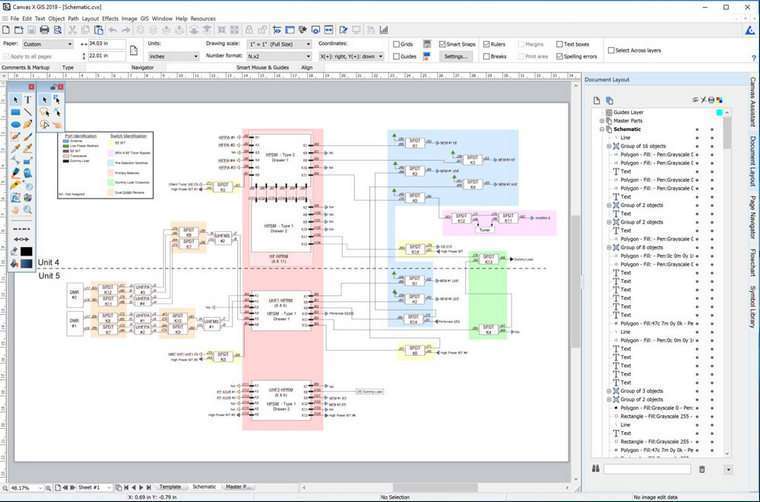
The software features a sophisticated user interface designed for efficiency and ease of use. It offers extensive customization options, allowing users to tailor the workspace to their preferences and optimize it for larger monitor setups, thereby enhancing productivity during intricate design tasks.
Compatibility with CAD Formats
A significant advantage of Canvas X Pro is its robust compatibility with industry-standard CAD formats. It provides seamless integration for importing and exporting DWG and DXF files, crucial for engineers working with AutoCAD documents and needing to incorporate them into technical illustrations.
Performance Enhancements
Canvas X Pro is engineered for performance, particularly when handling large and complex documents. The software efficiently manages projects containing a substantial number of objects, ensuring smooth operation and enabling users to multitask with multiple high-volume files simultaneously without compromising speed.
Industry Applications
The applications for Canvas X Pro span across several key industries that rely on precise visual communication. Professionals in engineering, aerospace, defense, and manufacturing utilize its capabilities for creating detailed schematics, assembly instructions, and maintenance guides. Its support for technical documentation needs makes it invaluable for producing accurate, print-ready visuals.
Comparative Analysis and Alternatives
Comparison to Similar Tools
Compared to other technical illustration software, Canvas X Pro distinguishes itself through its deep AutoCAD compatibility and its capacity to handle exceptionally large files with over a million objects. While other tools may offer specialized illustration features, Canvas X Pro provides a more integrated workflow for engineers who frequently interact with CAD data.
Real-World Use Cases
In engineering workflows, Canvas X Pro enables the rapid creation of annotated diagrams from CAD models, streamlining the process of generating assembly instructions for complex machinery. Technical documentation teams leverage its precision tools to ensure that instruction manuals accurately reflect product designs, minimizing errors and improving user comprehension. Furthermore, its ability to manage large and data-rich projects supports industrial graphics professionals in delivering comprehensive visual assets for diverse applications.
Conclusion
Canvas X Pro stands out as a premier solution for advanced technical illustration, offering unparalleled CAD compatibility, robust performance for large projects, and a user-centric interface. Professionals in engineering and design seeking to elevate their technical documentation and visual communication will find Canvas X Pro to be an indispensable tool for improving workflow efficiency and output quality.
Frequently Asked Questions
What are the main features of Canvas X Pro?
Canvas X Pro offers advanced tools for technical illustration, including extensive CAD compatibility, a customizable user interface, and the ability to manage complex documents containing over a million objects.
How does Canvas X integrate with other CAD software?
It supports importing and exporting DWG and DXF files, making it a versatile tool for professionals who rely on various CAD applications.
Is Canvas X suitable for large-scale industrial projects?
Yes, Canvas X is designed to handle extensive industrial projects efficiently with its ability to work with multiple high-volume files simultaneously, ensuring smooth project management.




Reviews
There are no reviews yet.