

Download Chaos Corona 14.1 for Cinema 4D – Advanced Unbiased Rendering Plugin
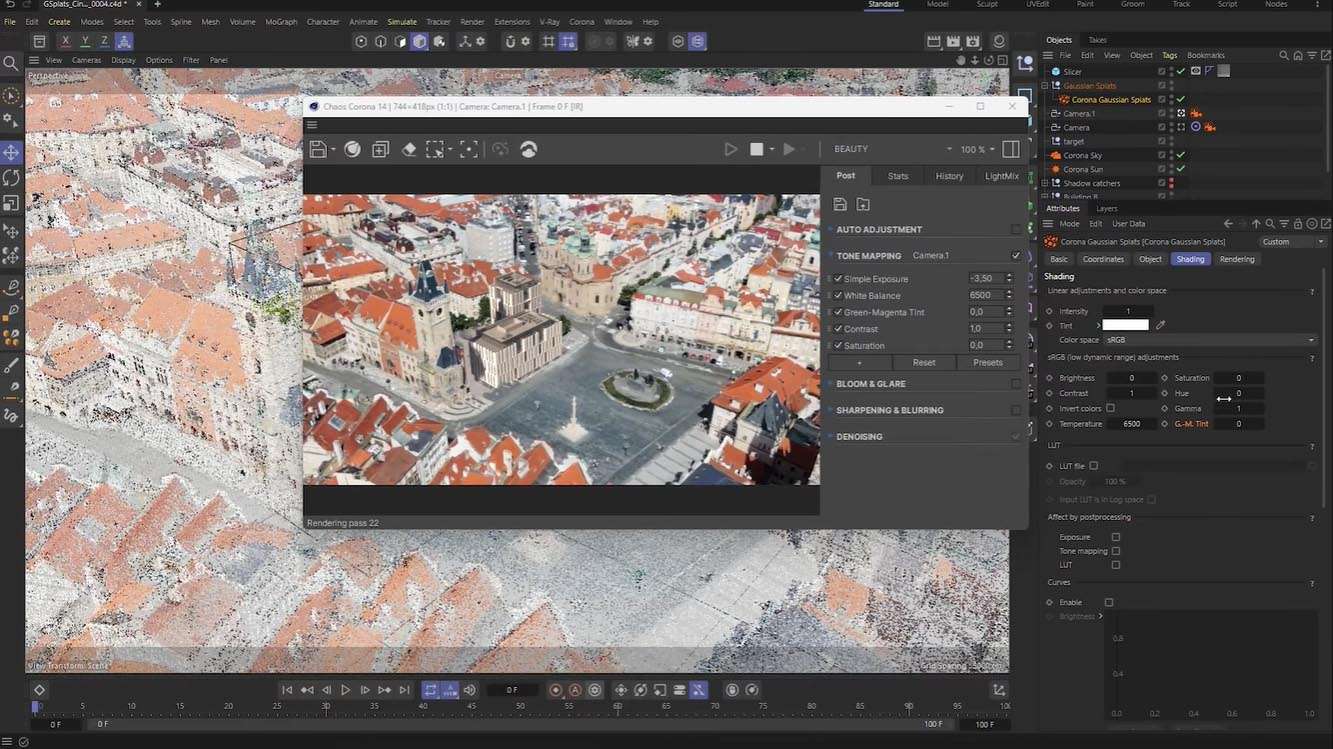
Chaos Corona 14.1 for Cinema 4D is an advanced unbiased rendering engine developed by Chaos Group, designed to seamlessly integrate with the Cinema 4D 3D modeling and animation software. It provides professionals in 3D animation, architectural visualization, product visualization, and broadcast design with a powerful tool for generating photorealistic imagery directly within their familiar Cinema 4D environment.
Overview of Corona Renderer in Cinema 4D Environments
Corona Renderer is recognized for its commitment to photorealism through unbiased rendering techniques. When integrated into Cinema 4D, it offers users a robust plugin that simplifies complex lighting and material setups, enabling the creation of high-quality visualizations without extensive technical expertise. This makes it a valuable asset for studios and individual artists seeking to achieve realistic output for a variety of visual media applications.
Rendering Architecture and Material System Enhancements
At its core, Chaos Corona 14.1 operates as an unbiased rendering engine, primarily leveraging CPU power to simulate light behavior accurately. This foundation ensures physically based rendering (PBR) accuracy for realistic material properties, including complex shaders like metals, glass, and subsurface scattering (SSS) effects. Version 14.1 introduces enhancements to its material system, featuring expanded libraries specifically tailored for motion design applications, offering a more diverse range of ready-to-use shaders for broadcast and advertising projects.
Interactive Rendering and Workflow Integration with Cinema 4D
A key feature of Corona Renderer is its interactive rendering capability, which provides immediate visual feedback as scenes are adjusted. This allows artists to fine-tune lighting and materials in real-time, significantly speeding up the look development process. Chaos Corona 14.1 enhances its integration with Cinema 4D by maintaining deep compatibility with the native material editor, object manager, and animation timeline, ensuring a fluid workflow for users accustomed to Cinema 4D’s interface and tools.
Lighting Tools and Scene Illumination Capabilities
Realistic scene illumination is critical for photorealism, and Corona Renderer provides a comprehensive suite of lighting tools. This includes the intuitive Corona Sun & Sky system for natural daylight simulation, robust support for High Dynamic Range Image (HDRI) environments for capturing complex lighting conditions, and the use of photometric lights for precise architectural and product lighting setups. These tools empower users to create diverse and believable lighting scenarios within their Cinema 4D projects.
Denoising Technologies and Performance Optimizations in Version 14.1
Version 14.1 of Chaos Corona for Cinema 4D places a strong emphasis on performance, particularly through its advanced denoising technologies. The release includes an enhanced CPU High Quality denoiser for clean, high-fidelity renderings. Additionally, it offers an optional NVIDIA OptiX GPU-accelerated denoiser, providing faster denoising speeds for users with compatible NVIDIA hardware. These optimizations are crucial for motion graphics workflows, where rapid iteration and final frame rendering speed are paramount, leading to quicker render convergence and reduced noise.
Compatibility and Workflow Enhancements for Motion Design and Visualization
Chaos Corona 14.1 has focused on improving workflow efficiency for various professional applications. Notably, it includes enhanced compatibility with Redshift materials, benefiting studios employing mixed rendering pipelines. The optimizations for motion design workflows assist users in creating dynamic visual content for broadcast and advertising more effectively. Real-world applications are varied, spanning from intricate architectural walkthroughs that demand precise lighting and material accuracy to dynamic product renders that highlight product design for advertising campaigns.
Real-World Applications: Case Studies in Motion Design and Architectural Rendering
Professionals leverage Chaos Corona 14.1 for a multitude of demanding projects. Motion designers utilize its accelerated rendering and extensive material libraries to produce complex broadcast graphics sequences and animated commercials. Architectural visualization artists use the unbiased renderer and advanced lighting tools to create compelling, photorealistic walkthroughs and marketing imagery for real estate and design projects. Furthermore, advertising agencies employ Corona Renderer for high-fidelity product visualizations, showcasing consumer goods with realistic material definition and lighting that drives customer engagement.
Frequently Asked Questions
How does Corona Renderer for Cinema 4D improve animation rendering quality and speed?
Corona 14.1 utilizes an unbiased CPU rendering engine complemented by advanced denoising technologies, including a high-quality CPU denoiser and the option for NVIDIA OptiX GPU-accelerated denoising. These improvements collectively facilitate faster render convergence and produce cleaner final images, which is particularly advantageous for animation sequences requiring high levels of visual fidelity and reduced render times.
Can Corona Renderer integrate seamlessly with Cinema 4D’s native tools and materials?
Yes, Chaos Corona Renderer offers extensive integration within Cinema 4D. It allows artists to utilize Cinema 4D’s native material editor, object manager, and animation timeline seamlessly, which helps streamline the look development and rendering workflow, ensuring a consistent visual style for shaders and lighting within the familiar Cinema 4D environment.
What are the system requirements for running Corona Renderer 14.1 with Cinema 4D?
Chaos Corona Renderer 14.1 operates on Cinema 4D R17 or newer versions, exclusively on 64-bit Windows systems equipped with a CPU that supports SSE 4.1 instructions. While rendering computation is CPU-intensive, an NVIDIA GPU (Maxwell architecture or newer) is recommended for leveraging faster GPU-accelerated denoising capabilities. For handling complex scenes, a minimum of 16 GB of RAM is advised.





Reviews
There are no reviews yet.