
Download CorelCAD 2023 v2022.5 – Leading CAD Software for Mechanical Design
CorelCAD 2023, developed by Alludo (formerly Corel Corporation), is a powerful 2D/3D CAD software designed for engineers, designers, and architects. Leveraging the ARES engine, it offers extensive CorelCAD features for mechanical and manufacturing design, providing a robust yet accessible environment for creating detailed technical drawings and 3D models. This application is tailored for professionals who require efficient and compatible CAD tools for a variety of design tasks.
Overview of CorelCAD
Introduction and Purpose
CorelCAD serves as a comprehensive Computer-Aided Design (CAD) application, enabling users to produce detailed 2D designs and sophisticated 3D models. Its core purpose is to support the entire design process, from initial concept to final technical documentation, within the engineering, manufacturing, and architectural sectors. The software is built to facilitate precision and efficiency in design workflows.
Key Features and Capabilities
2D and 3D Design Tools
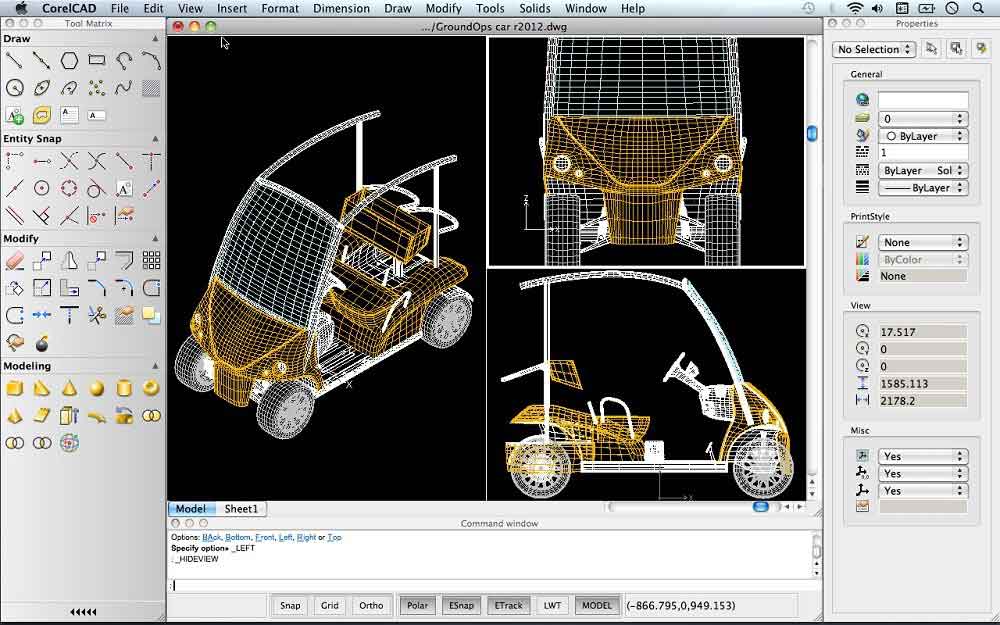
CorelCAD offers a versatile suite of tools essential for both drafting and modeling. Users can create precise 2D technical drawings and develop complex 3D conceptual models. The application provides capabilities for sketching, detailing, and visualizing designs to meet demanding project requirements.
File Compatibility and Formats
Ensuring seamless collaboration and data exchange, CorelCAD provides extensive file format support. It is natively compatible with industry-standard DWG files, allowing users to work directly with existing project data. Additionally, it supports other common formats such as DXF, PDF, SVG, and DWF, facilitating easy sharing and integration across different software platforms.
User Interface Advantages
CorelCAD distinguishes itself with a streamlined and intuitive user interface. This design philosophy prioritizes ease of use, making it an approachable option for users transitioning from other CAD packages or those new to the software. The cleaner interface aims to reduce complexity and enhance productivity compared to some competitors, allowing designers to focus on their work.
Integration with Corel Software
Coordination with CorelDraw and Designer
CorelCAD offers enhanced workflow integration when used in conjunction with other Corel products, such as CorelDraw and Corel Designer. This synergy allows for a more fluid process, where CAD designs can be easily incorporated into graphic design projects or enhanced with advanced illustration capabilities, streamlining the workflow for designers who utilize multiple software tools.
Real-World Applications and Use Cases
Industry Applications
The software finds significant application across various technical industries. Its robust 2D and 3D capabilities make it suitable for detailed engineering design, the creation of precise manufacturing components, and the development of architectural plans. The software supports professionals in producing precise technical documentation and visualizations.
- Mechanical and Manufacturing Design: Creating detailed part designs, assemblies, and production blueprints.
- Architecture and Construction: Developing floor plans, elevations, and structural models.
- Electrical Engineering: Designing schematics and layouts.
- Product Design: Conceptualizing and refining product aesthetics and functionality.
Example Projects
Engineers and designers utilize CorelCAD for a range of projects, from developing individual machine parts to complex installations. The software supports the creation of technical drawings needed for prototyping and manufacturing, as well as the generation of 3D models for visualization and client presentations. Its compatibility with DWG ensures that these designs can be shared and used by collaborators or manufacturing partners without issues.
CorelCAD vs Competing CAD Software
Comparative Analysis with AutoCAD
When compared to industry giants like AutoCAD, CorelCAD presents a distinct value proposition. While AutoCAD offers an extremely deep feature set, CorelCAD is often favored for its more accessible user interface and potentially lower learning curve, making it a practical choice for users who need strong 2D/3D CAD capabilities without the extensive complexity. CorelCAD provides a focused set of tools that are highly effective for standard design tasks.
Conclusion
Why Choose CorelCAD?
Choosing CorelCAD 2023 means opting for a powerful, user-friendly mechanical design software that balances advanced functionality with an intuitive interface. Its excellent file compatibility, integration with the Corel ecosystem, and specialized tools make it a compelling option for engineers and designers seeking efficient workflow solutions. The software is well-suited for professionals who require dependable CAD performance for detailed 2D and 3D design work.
Frequently Asked Questions
What file formats does CorelCAD support?
CorelCAD primarily supports DWG and DXF formats, along with other formats like PDF, SVG, and DWF, facilitating easy file sharing and compatibility with other CAD applications. This broad support ensures seamless integration into various design and production workflows.
How does CorelCAD compare to AutoCAD?
CorelCAD is recognized for its cleaner and more user-friendly interface compared to AutoCAD, though it may lack some advanced features found in AutoCAD. It is ideal for those looking for simplicity in 2D and 3D design without the complexity of more robust software, offering a focused toolset for efficient design work.
Can CorelCAD be customized?
Yes, CorelCAD allows users to customize the interface and utilize plugins through its automation interface, enabling tailored experiences to fit specific design needs. This level of customization helps professionals adapt the software to their unique project requirements and personal working style.






Reviews
There are no reviews yet.