

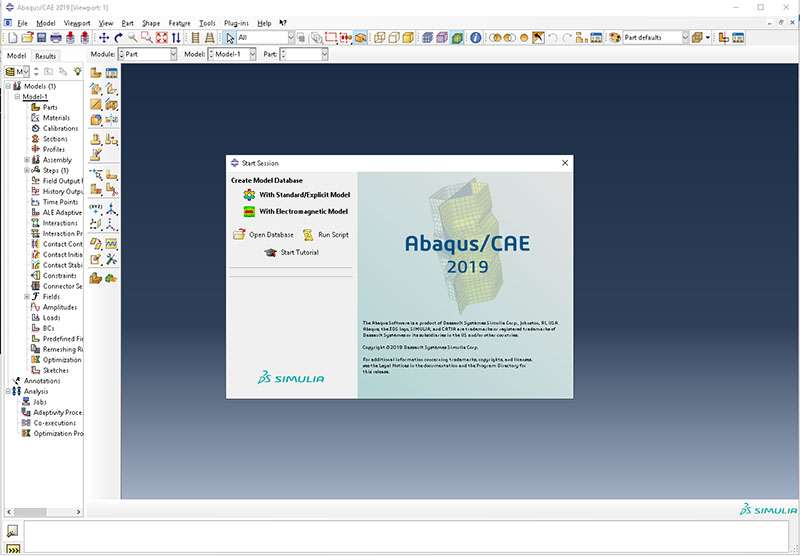
Download DS SIMULIA Suite Abaqus 2024 – Advanced Finite Element Analysis Software
DS SIMULIA Suite Abaqus 2024, developed by Dassault Systèmes, is a comprehensive suite of finite element analysis (FEA) and computer-aided engineering (CAE) software. It is designed for advanced users in industries such as aerospace, automotive, civil engineering, and manufacturing, providing powerful tools for simulating complex engineering phenomena and ensuring product performance and reliability.
Overview of Abaqus
History and Development
Originally released in 1978, Abaqus has a long-standing history as a pioneering finite element analysis tool. Over the decades, it has evolved into a suite that offers extensive capabilities for both pre-processing and post-processing of simulation models. Today, Abaqus is a significant part of Dassault Systèmes’ SIMULIA brand, continuing its legacy by providing advanced simulation solutions for complex engineering challenges across diverse industrial sectors.
Core Applications in Engineering
Abaqus is broadly applied across several critical engineering disciplines, enabling detailed analysis of performance under various conditions. Its versatile capabilities support simulations fundamental to product development and validation in fields like aerospace, automotive, and civil engineering.
- Structural Analysis: Provides robust tools for analyzing static and dynamic loads on components and assemblies, crucial for assessing material strength and structural integrity.
- Thermal Analysis: Enables the simulation of heat transfer processes, essential for understanding thermal performance and managing heat dissipation in electronic, automotive, and aerospace components.
- Nonlinear Dynamics: Abaqus/Explicit is particularly adept at simulating highly nonlinear events such as crash tests, impact analysis, and projectile penetration, which are common in automotive safety and defense applications.
- Materials Science: Supports advanced material models to simulate the behavior of metals, polymers, composites, and other advanced materials under complex loading scenarios.
Key Features and Capabilities
Advanced Simulation Techniques
The Abaqus suite offers a sophisticated toolkit for engineers requiring in-depth analysis. It supports a wide range of element types and advanced material models to accurately represent the behavior of real-world components and systems.
- Extensive Element Library: Includes a diverse selection of elements for various geometries and analysis types, from simple beams to complex shells and solids.
- Advanced Material Models: Supports numerous material behaviors, including plasticity, hyperelasticity, creep, and damage, allowing for accurate simulation of complex material responses.
- Contact Analysis: Provides robust algorithms for simulating contact between multiple bodies, which is critical for assembled structures and interactive components.
- Nonlinear Analysis: Capable of handling geometric nonlinearities, material nonlinearities, and contact nonlinearities that are prevalent in many engineering applications.
Integration with Python
A key strength of Abaqus lies in its extensive customization and automation capabilities, largely driven by its integration with the Python scripting language.
- Scripting for Automation: Users can write Python scripts to automate repetitive tasks, such as model generation, mesh refinement, and post-processing data extraction, significantly improving workflow efficiency.
- Customization of Workflows: Python allows for the development of custom features, analysis procedures, and user-defined element behaviors, tailoring the software to specific project requirements.
- Batch Processing: Facilitates the execution of multiple simulations or parameter studies without manual intervention, enabling engineers to explore a wider range of design variations.
Modeling and Pre-Processing Tools
Abaqus/CAE serves as the integrated environment for creating, editing, and managing finite element models. It provides a comprehensive set of tools to prepare simulations efficiently and accurately.
Within Abaqus/CAE, users can generate geometry, define material properties, select appropriate element types, generate meshes, and define analysis procedures. The user interface is structured to guide users through the simulation setup process, from initial model creation to defining boundary conditions and loads, ensuring that all necessary parameters for a successful analysis are addressed.
Post-Processing and Results Analysis
Once a simulation is complete, Abaqus/Viewer offers powerful tools for visualizing and analyzing the results. This phase is critical for interpreting model behavior and extracting meaningful engineering insights.
Engineers can visualize deformation, stress, strain, temperature, and other results in various formats, including contour plots, vector plots, and animations. The software allows for detailed data interrogation, such as creating XY plots of results at specific locations, performing field variable calculations, and generating comprehensive reports to document findings.
Case Studies and Real-World Applications
The capabilities of Abaqus are consistently leveraged in demanding engineering projects across multiple industries, demonstrating its value in complex problem-solving.
- Aerospace: Used for analyzing wing structures under aerodynamic loads, simulating fatigue life of critical components, and evaluating the behavior of composite materials in aircraft construction.
- Automotive: Applied in crashworthiness simulations for vehicle safety, analyzing the performance of powertrain components under high stress and thermal loads, and designing lightweight structures for fuel efficiency.
- Civil Engineering: Employed for analyzing the structural integrity of bridges, tunnels, and buildings under seismic and static loads, as well as simulating soil mechanics and foundation behavior.
- Manufacturing: Utilized for simulating metal forming processes, predicting tool wear, and analyzing the structural performance of manufactured goods.
Comparative Overview with Other CAE Tools
Abaqus distinguishes itself within the CAE software landscape through its robust handling of complex nonlinear problems and its extensive material modeling capabilities. While many CAE tools offer general-purpose FEA, Abaqus is particularly recognized for its strength in simulations involving complex material behaviors, large deformations, and intricate contact conditions.
Its integrated Python scripting environment provides a level of customization and automation that offers distinct advantages for engineers needing to develop bespoke analysis workflows or integrate simulation into larger product development processes. This focus on advanced, often nonlinear, simulation sets it apart for users tackling highly challenging engineering problems.
Frequently Asked Questions
What are the main applications of Abaqus software?
Abaqus is primarily used in finite element analysis for various applications including structural analysis, thermal analysis, and complex nonlinear dynamics in industries such as aerospace and automotive. Its versatility makes it suitable for a wide range of engineering problems.
How does Abaqus integrate with Python for customization?
Abaqus allows users to utilize Python scripting for automation and to customize their workflows. This feature enables engineers to integrate specific functionalities into their modeling processes, enhancing efficiency and precision.
What are the differences between Abaqus/Explicit and Abaqus/Standard?
Abaqus/Explicit is tailored for dynamic simulations that involve complex interactions under transient loading, while Abaqus/Standard is designed for static and general-purpose analyses employing implicit methods. Choosing between them depends on the nature of the problem being solved.






Reviews
There are no reviews yet.