

Download Embird Studio – Advanced Embroidery Design Software
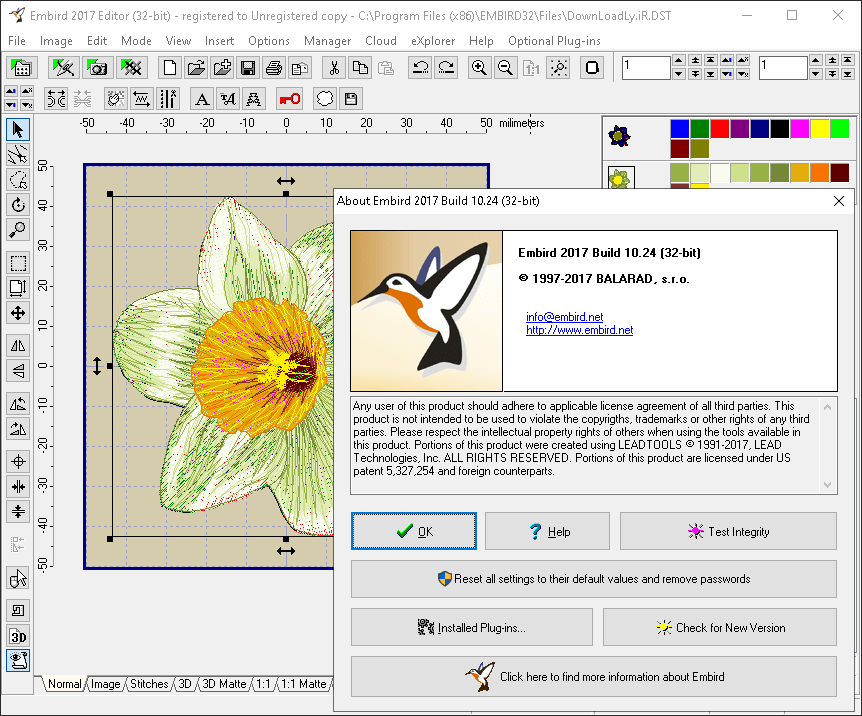
Embird Studio is a specialized embroidery software developed by Embird, designed to cater to professionals and enthusiasts in the textile and fashion design industries. This powerful application facilitates the creation and manipulation of digital embroidery designs, making it an essential tool for anyone involved in machine embroidery. With its focus on detailed pattern creation and broad compatibility, Embird Studio empowers users to bring their fabric design visions to life.
Introduction to Embird Studio
Embird Studio serves as a comprehensive platform for creating and editing intricate embroidery designs. Developed by Embird, this software is tailored for the textile and fashion sectors, enabling users to craft high-quality fabric designs for various applications. It is particularly valuable for small businesses, hobbyists, and professional garment designers looking for precise control over their machine embroidery projects.
Key Features of Embird Studio
Embird Studio offers a robust set of features for digital embroidery design, focusing on delivering professional results with flexibility and control. Users can expect advanced tools that support a wide range of customization options, ensuring designs meet specific aesthetic and machine requirements.
Supported Embroidery File Formats
A significant advantage of Embird Studio is its extensive support for a multitude of embroidery file formats. This broad compatibility ensures that designs created or edited within the software can be seamlessly transferred to a wide array of embroidery machines.
- Supports approximately 70 different embroidery file formats.
- Ensures compatibility with a diverse range of embroidery machines.
- Facilitates smooth workflow transitions between design software and stitching hardware.
Embroidery Design Tools and Capabilities
The software provides a powerful suite of tools designed for detailed image editing, resizing, and the addition of various elements to create intricate digital embroidery designs. These capabilities allow for significant customization, from basic modifications to complex pattern development.
- Advanced image editing features for preparing artwork for embroidery.
- Tools for precise resizing and scaling of designs without compromising quality.
- Functionality to add or modify decorative elements and text within designs.
- Capabilities for creating highly customized patterns suited for specific fabric types and project needs.
- Integrated design simulation for visualizing the final embroidered output.
Compatibility and Integration
Embird Studio is engineered for broad compatibility, ensuring that designs can be effectively used across different embroidery machines. Its development philosophy centers on making digital embroidery design accessible and efficient for users regardless of their preferred hardware.
- High compatibility with multiple embroidery machine brands and models.
- Designed to work efficiently within standard embroidery workflows.
- Facilitates easy transfer of designs, streamlining the machine embroidery process.
Professional Applications and Use Cases
Embird Studio is utilized across various professional and hobbyist sectors within the textile and fashion industries. Its versatility makes it suitable for both small-scale custom work and larger production needs.
- Small businesses creating custom embroidered apparel, accessories, and promotional items.
- Hobbyist embroiderers developing unique personal projects and gifts.
- Professional garment designers incorporating custom embroidery into fashion lines.
- Textile artists experimenting with digital patterns for unique fabric creations.
- Designers working with custom embroidery file formats for specialized applications.
User Community and Resources
While specific community details were not extensively researched, Embird Studio, like many specialized software applications, typically benefits from an active user base and available support resources. Such communities often share knowledge, provide tutorials, and offer solutions to common design challenges.
- Potential access to online forums for user support and knowledge sharing.
- Availability of tutorials and guides for learning advanced design techniques.
- User-generated content can provide inspiration and practical examples for fabric design.
Conclusion and Final Thoughts
Embird Studio stands out as a capable embroidery software solution, offering extensive file format support and robust design tools for a variety of users. Its emphasis on customization and compatibility makes it a valuable asset for anyone involved in digital embroidery design, whether for professional garments, small business products, or personal creative projects. The software empowers users to translate complex ideas into detailed machine embroidery with precision and ease.
Frequently Asked Questions
What types of embroidery file formats does Embird Studio support?
Embird Studio supports around 70 different embroidery file formats, making it compatible with a wide range of embroidery machines and projects. This extensive support ensures flexibility for users working with various types of embroidery hardware and design files.
Can I simulate embroidery designs in Embird Studio?
Yes, Embird Studio features a simulation tool that allows users to preview how their designs will look when embroidered in a 3D view. This capability is crucial for visualizing the final appearance of the design before committing to the stitching process.
Is Embird Studio suitable for basic and advanced users?
Yes, Embird Studio is designed to accommodate both beginners and experienced users, offering straightforward editing tools and advanced features for complex designs. Its intuitive interface combined with powerful capabilities ensures it can meet the needs of a wide skill spectrum.




Reviews
There are no reviews yet.