

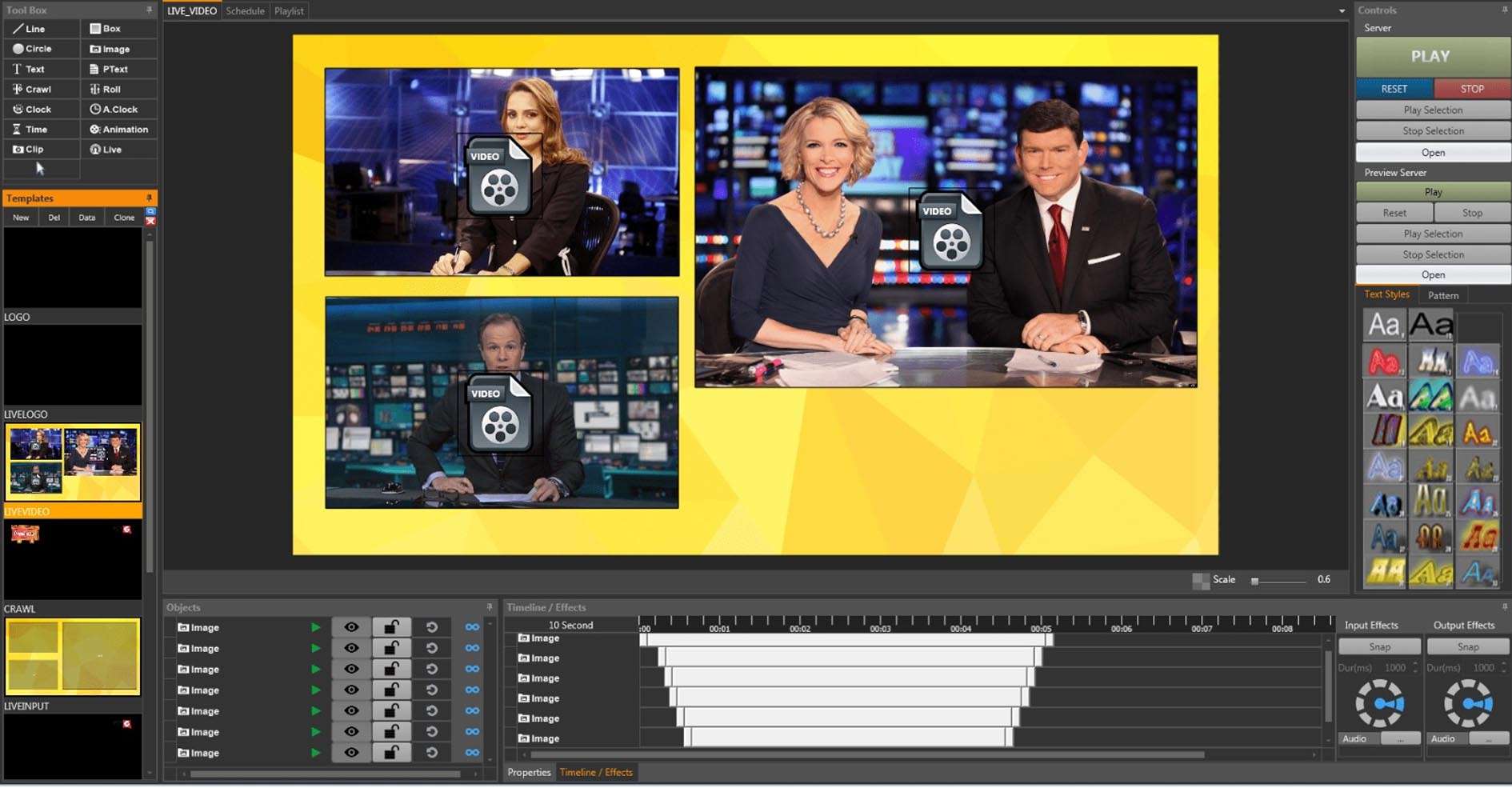
Download EMS Easy CG Plus 1.1.1.2 – Professional Character Generator Software for Live Video
EMS Easy CG Plus 1.1.1.2 is a professional character generator software designed for live video production environments. Developed by EMS, this application specializes in creating and managing dynamic on-screen graphics for broadcasts, events, and streaming. It is extensively used by church media teams, sports production crews, and video production professionals who require efficient and reliable graphic overlays for their live video content.
Overview of EMS Easy CG Plus in Live Broadcast Environments
Character generator (CG) software plays a crucial role in modern live video production by enabling the creation and display of essential graphic elements. EMS Easy CG Plus serves this purpose by offering a user-friendly yet robust platform for generating titles, lower thirds, scoreboards, tickers, and other textual or graphical overlays. Its design is optimized for speed and control, making it suitable for dynamic live settings such as sporting events, religious services requiring scripture displays, and corporate or public event streaming where announcements and branding are key.
Template Design and Dynamic Text Capabilities
Multi-Layered Page Templates
EMS Easy CG Plus utilizes a page-based template system that supports multiple layers. This allows users to construct complex graphic layouts with distinct elements such as text backgrounds, images, logos, and variable text boxes. Each layer can be managed independently, providing granular control over the composition and appearance of on-screen graphics.
Real-Time Text Editing and Data Import
The software facilitates live text updates directly within a broadcast session, enabling rapid changes to displayed information. Furthermore, it supports data-driven graphic creation through the import of external data sources. This includes updating text fields by importing data from plain text (.TXT) or comma-separated value (.CSV) files, as well as connections to databases, which is essential for dynamically changing content like sports scores or participant names.
Animation, Output Flexibility, and Integration
Built-in Animation and Transitions for Professional Presentation
To enhance visual appeal and professionalism, EMS Easy CG Plus includes built-in animation capabilities. Users can apply entry and exit animations to individual layers or entire pages, creating smooth transitions and dynamic graphic sequences. These features help in presenting information in a more engaging manner suitable for high-quality video productions.
Multiple Output Methods Including NDI 5 and DirectShow
Integration with modern video production workflows is a key aspect of EMS Easy CG Plus. The software offers flexible output options, including support for the NDI 5 protocol, which allows graphics to be sent over an IP network. Additionally, it provides DirectShow output, enabling it to function as a virtual camera for streaming applications. Support for hardware output via Blackmagic DeckLink devices and fullscreen window outputs are also available, catering to diverse setup requirements.
External Control and Automation Support
Streamlining operations, especially for single operators, EMS Easy CG Plus supports a range of external control methods. These include MIDI commands for hardware controllers, GPIO triggers for integration with broadcast hardware, and an HTTP API or WebSocket for custom automation solutions. Integration with popular devices like Stream Deck further enhances the ability to trigger graphics rapidly and accurately during live events.
Use Cases and Industry Applications
EMS Easy CG Plus finds application across various live video production scenarios. In live sports broadcasts, it is used for displaying scores, player statistics, and team names dynamically. For church media teams, it simplifies the display of bible verses, song lyrics, and announcements for congregants. Event streamers can use it for overlays, sponsor logos, and real-time audience interaction graphics. News productions can leverage it for tickers and on-screen readouts.
Single-Operator Efficiencies and Workflow Integration
The software is particularly well-suited for setups where a single operator manages multiple aspects of a production. Its intuitive interface, template-driven design, and extensive external control options allow for fast, reliable triggering of graphic elements. This capability is critical in fast-paced live environments where timely graphic application directly impacts the viewer experience and the overall professionalism of the broadcast.
Improvements and Features in Version 1.1.1.2
The recent update to version 1.1.1.2 of EMS Easy CG Plus brings several enhancements focused on improving performance, integration, and user experience. Key updates include significantly improved support for NDI 5, offering more robust connectivity for IP-based workflows. Enhancements to DirectShow output ensure better compatibility and stability with various video capture and streaming applications. The update also addresses font rendering for clearer text display and includes general user interface refinements and bug fixes to boost overall stability during live operations.
Frequently Asked Questions
How does EMS Easy CG Plus integrate with popular streaming software?
EMS Easy CG Plus supports output via DirectShow virtual camera and NDI 5, allowing seamless integration with streaming applications like OBS Studio, vMix, and Wirecast. This enables live overlay graphics to be captured or streamed directly in these programs.
Can EMS Easy CG Plus display live data like sports scores or Bible verses automatically?
Yes, the software allows live text editing and importing data from external text files or databases, making it suitable for real-time scoreboards, announcements, and scripture verse displays during broadcasts.
What types of external control are supported for operating EMS Easy CG Plus during live shows?
EMS Easy CG Plus supports external control inputs via MIDI devices, GPIO, HTTP API/WebSocket commands, and stream deck integration, enabling broadcasters to trigger graphics quickly and accurately without manual software navigation.




Reviews
There are no reviews yet.