

Download Fritzing 1.0.6 – Intuitive Electronics Design and PCB Prototyping Software
Fritzing 1.0.6 is an open-source electronic design automation (EDA) software developed originally by the Fritzing Project and backed by the University of Applied Sciences Potsdam. It serves as a vital tool in the electrical and electronics sector, specifically for education, hobbyist communities, and open hardware development. This software is designed to simplify the transition from physical breadboard prototypes to professional PCB manufacturing, making it an accessible solution for students, educators, makers, and amateur electronics designers.
An Overview of Fritzing in Electronics Design and Education
Fritzing uniquely bridges the gap between physical circuit prototyping and digital design for PCB fabrication. Its primary goal is to make electronics accessible to a broader audience, including those without formal engineering backgrounds. The software is particularly valuable in educational settings for teaching fundamental electronics principles and project development, as well as within the maker community for creating custom hardware. Its intuitive interface supports users in easily translating their breadboard circuits into functional, manufacturable PCBs.
Exploring Fritzing’s Three-View Design Environment
Breadboard View: Visual Circuit Prototyping
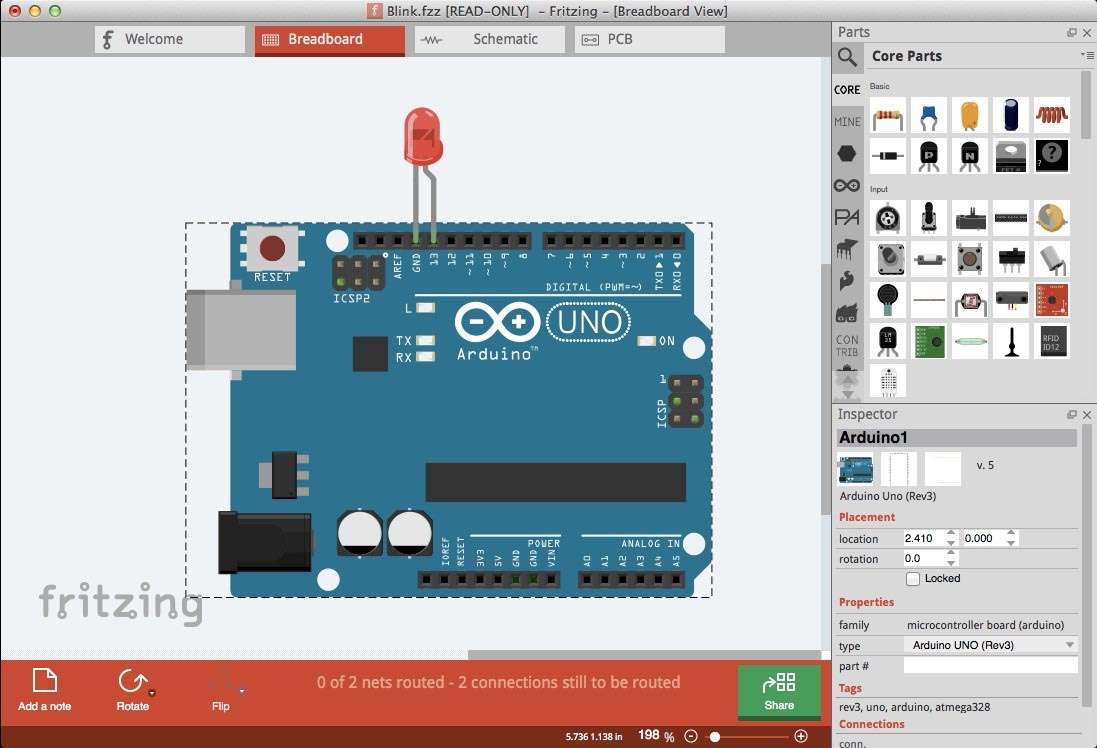
The Breadboard View in Fritzing offers a realistic, visual representation of a solderless breadboard. Users can drag and drop components from the extensive library and connect them using virtual wires, mirroring the physical act of breadboarding. This view is central to Fritzing’s approach to making circuit design intuitive and easy to understand for beginners, allowing for rapid prototyping and validation of circuit ideas before moving to more complex design stages.
Schematic View: Accurate Electrical Diagrams
Fritzing automatically generates a corresponding schematic diagram based on the connections made in the Breadboard View. This synchronized approach ensures that the electrical connections are accurately represented in a standard schematic format. While it offers automatic generation, users can also manually draw and edit schematic diagrams using traditional EDA conventions, providing flexibility for those who prefer or need a more formal electrical diagram representation.
PCB View: From Prototype to Manufacturable Circuit Board
The PCB View is where breadboard prototypes are translated into manufacturable printed circuit boards. This view allows users to arrange component footprints and create copper traces to establish the electrical connections. Fritzing supports manual routing for precise control and includes an autorouter to assist in generating PCB layouts. Users can customize board shapes, add multiple layers, and prepare designs for professional fabrication.
Extensive Component Library and Customization Options
A significant strength of Fritzing lies in its comprehensive component library. It includes built-in support for popular platforms such as Arduino boards and Raspberry Pi hats, along with a wide array of sensors, actuators, integrated circuits, and basic electronic components. Beyond the pre-loaded parts, Fritzing fosters a community-driven ecosystem where users can share and import custom components, further expanding its versatility and enabling support for even niche hardware.
Advanced PCB Design Features and Manufacturing Outputs
Fritzing provides essential features for professional PCB design, including enhancements to its autorouting capabilities. The software supports design rule checking (DRC) to help identify potential design issues, copper pours for grounding or power planes, and the generation of solder masks. For manufacturing, Fritzing can export industry-standard Gerber files, which are crucial for PCB fabrication, as well as Bill of Materials (BOM) and Pick-and-Place files necessary for automated assembly processes.
Highlights of Version 1.0.6 Updates and Improvements
Fritzing version 1.0.6 introduces several key updates aimed at enhancing user experience and functionality. This release features improvements to the autorouting algorithm, expanded support for the latest hardware, and numerous bug fixes, particularly concerning Gerber file export accuracy. Users will also experience optimizations in UI responsiveness and overall performance, making the design process smoother and more reliable.
Practical Use Cases and Community Impact
Fritzing is widely adopted in various practical applications. In educational settings, it serves as an indispensable tool for teaching electronics, allowing students to visualize circuit behavior and design their own projects. Maker projects often leverage Fritzing to develop custom boards for Arduino and Raspberry Pi-based inventions. Furthermore, its open-source nature and focus on documentation make it ideal for sharing open hardware designs and creating effective STEM teaching aids.
Frequently Asked Questions
How does Fritzing help beginners transition from breadboard to PCB design?
Fritzing offers a synchronized three-view environment where you can design circuits visually on a breadboard layout, which automatically generates the corresponding schematic and PCB layouts. This intuitive approach helps beginners understand and translate physical prototypes into manufacturable circuit boards without requiring advanced EDA skills.
What types of electronic components are supported in Fritzing?
Fritzing includes a vast built-in library of thousands of components, including Arduino boards, Raspberry Pi hats, sensors, actuators, ICs, and passive components. It also supports user-created custom parts and community contributions, making it versatile for a wide range of projects.
What file formats can Fritzing export for PCB manufacturing?
Fritzing can export Gerber files in the industry-standard RS-274X format for PCB fabrication, along with PDFs for schematics and layouts, SVG/PNG images for sharing, and bill of materials and pick-and-place files for assembly automation.




Reviews
There are no reviews yet.