

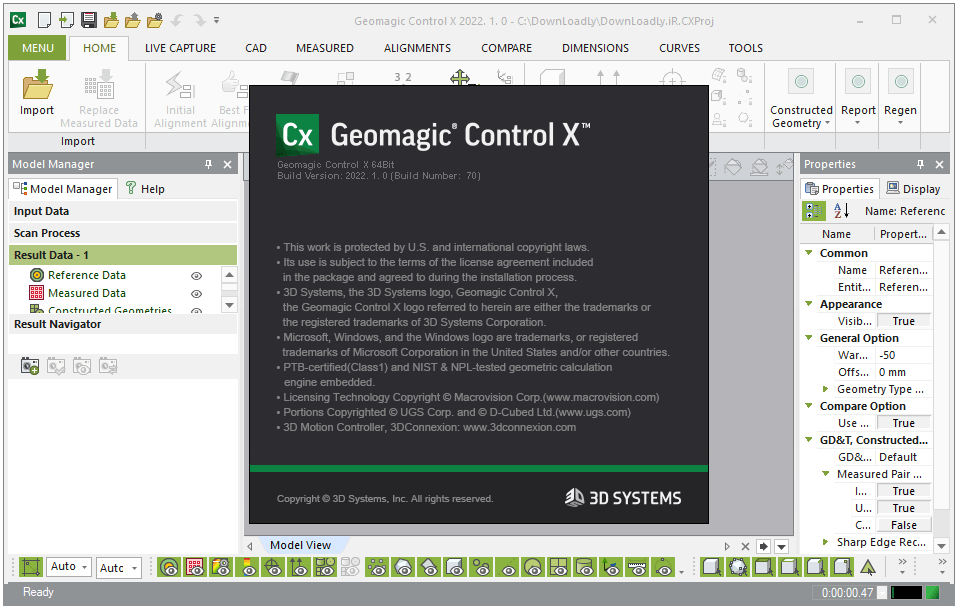
Download Geomagic Control X 2022.1 – Advanced Metrology Software for Quality Control
Geomagic Control X 2022.1, developed by 3D Systems, is a sophisticated metrology software designed for the manufacturing sector, focusing on quality control and engineering inspection processes. This software is instrumental in enabling highly accurate and efficient metrology, accommodating users who require detailed analysis of 3D data for quality assurance. It plays a critical role in ensuring manufactured parts meet stringent industry standards.
Overview of Geomagic Control X
Introduction to the Software
Geomagic Control X is a leading solution in the field of metrology software, specifically engineered for comprehensive quality inspection within manufacturing environments. It empowers quality managers and engineers to conduct detailed analyses by comparing 3D CAD data against scanned physical parts. The software’s significance lies in its ability to provide accurate, reliable, and efficient inspection workflows, crucial for maintaining product quality and compliance.
Key Features of Geomagic Control X
User-Friendly Interface
Geomagic Control X features a user-friendly interface that simplifies complex metrology tasks. This design focuses on enhancing usability and reducing the learning curve, allowing professionals to perform detailed inspections more efficiently. Improvements in the interface aim to make powerful metrology tools accessible and manageable for various engineering and quality control roles.
Inspection Automation and Efficiency
The software facilitates simultaneous inspections, enabling users to perform multiple checks on a single part or across different parts in a batch. This capability significantly enhances automation and speeds up the overall inspection process, which is vital in fast-paced manufacturing settings where time-to-market and production throughput are critical metrics.
Support for Industry Standards
Geomagic Control X offers robust support for a wide range of industry-standard hardware and 3D file formats. This includes seamless CAD integration, allowing users to import native CAD files and PMI (Product Manufacturing Information) data. Such compatibility ensures that engineers can work with their existing design data without conversion issues, streamlining the inspection workflow from design to production.
LiveInspect: Streamlining Processes
LiveInspect is a specialized feature within Geomagic Control X designed to streamline repeatable inspection processes. By enabling users to plan inspections in advance and execute them with guided workflows, LiveInspect enhances the consistency and reliability of quality checks. This feature is particularly beneficial for managing recurring inspection tasks and standardizing quality assurance procedures.
Custom Reporting Flexibility
The custom reporting capabilities of Geomagic Control X provide users with the flexibility to tailor inspection results communication. Users can create detailed, presentable reports that include specific measurements, annotations, and graphical representations, ensuring that all relevant stakeholders receive clear and concise information aligned with their needs and industry requirements.
Applications in Manufacturing and Quality Assurance
Geomagic Control X is widely applied across various manufacturing sectors to ensure the highest standards of product quality. Its advanced metrology and inspection tools are critical for industries such as automotive and aerospace, where precision and compliance are paramount. The software supports detailed 3D inspection of components, helping manufacturers identify deviations from design specifications and maintain rigorous quality control throughout the production lifecycle. This includes verifying the accuracy of components produced using additive manufacturing (3D printing) and traditional subtractive methods.
Comparative Analysis with Other Metrology Tools
Compared to other metrology software, Geomagic Control X distinguishes itself through its comprehensive CAD integration, including support for PMI data, and its powerful automation features. While many tools offer basic inspection capabilities, Geomagic Control X provides a more integrated workflow for complex quality control challenges. Its focus on creating repeatable processes through features like LiveInspect further sets it apart, offering enhanced efficiency and reliability for demanding manufacturing quality control environments.
Conclusion
Employing Geomagic Control X in manufacturing workflows offers significant advantages, particularly in quality assurance and inspection. The software provides a robust platform for detailed 3D inspection, efficient automation, and flexible reporting, all supported by seamless CAD integration. For businesses prioritizing precision and compliance, Geomagic Control X is a valuable tool for ensuring manufactured products meet all quality standards.
Frequently Asked Questions
What is Geomagic Control X primarily used for?
Geomagic Control X is utilized for precise quality control inspection in manufacturing. It assists quality managers in performing detailed analyses of 3D CAD files and the physical parts produced, ensuring compliance with industry standards and design specifications.
How does Geomagic Control X support integration with CAD software?
Geomagic Control X seamlessly imports various 3D CAD file formats including PMI data from industry-standard software like SOLIDWORKS and CATIA, facilitating easy analysis and comparison of designs and manufactured products.
What are the advantages of using the LiveInspect feature?
The LiveInspect feature allows users to create repeatable and reliable inspection processes, enhancing workflow efficiency by planning inspections and streamlining reporting procedures for consistent quality assurance.



Reviews
There are no reviews yet.