

Download Graitec Advance PowerPack 2026.1 for Advance Steel – Steel Detailing Productivity Suite
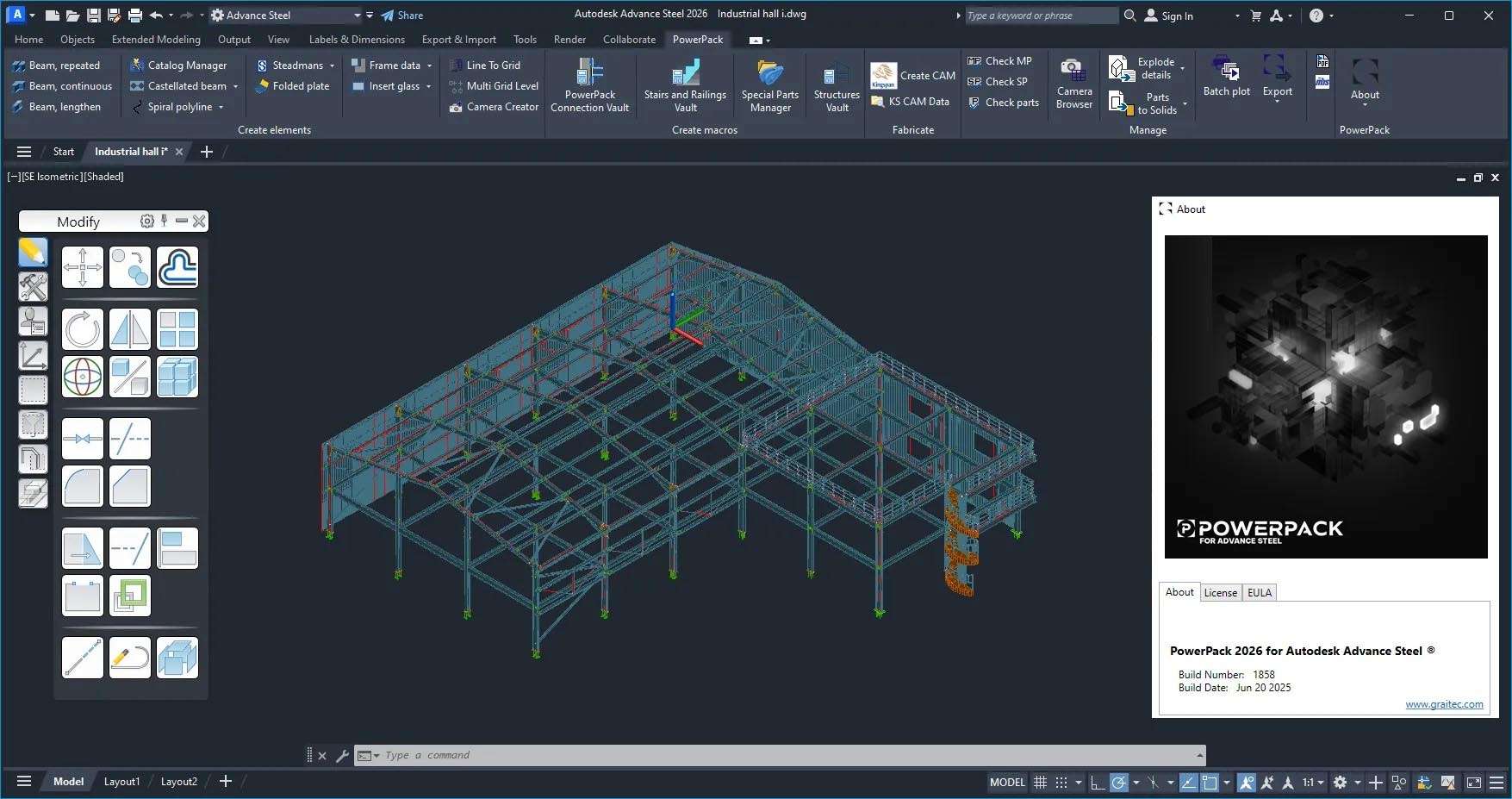
Graitec Advance PowerPack 2026.1 is a comprehensive productivity suite designed to extend the capabilities of Autodesk Advance Steel. Developed by Graitec, a specialist in BIM and structural engineering software, this extension integrates seamlessly with the Advance Steel CAD platform, empowering structural engineers, steel detailers, and fabricators with hundreds of additional features. The 2026.1 version enhances detailing workflows, automates repetitive tasks, and optimizes outputs for fabrication, making it an essential upgrade for professionals in the construction and industrial sectors.
Introducing the PowerPack Extension for Advance Steel
The Graitec Advance PowerPack 2026.1 acts as a powerful add-on for Autodesk Advance Steel, significantly boosting detailing and fabrication efficiency. It introduces an extensive library of parametric steel connections and advanced automation tools that go beyond Advance Steel’s native functionalities. This extension is particularly valuable for streamlining complex projects, ensuring consistency, and reducing manual intervention in the structural steel detailing and fabrication processes, thereby enhancing the overall BIM workflow.
Comprehensive Parametric Connection Vault
Expanded Library of Steel Connections
The PowerPack 2026.1 features an expanded library containing hundreds of parametric steel connections. This includes a wide array of moment connections, shear connections, bracing connections, base-plate configurations, and splice connections. Specialized types such as seismic-resistant connections are also integrated, providing users with robust options for various structural demands.
Smart Parametric Behaviors
Each connection in the vault is equipped with smart parametric behaviors. This means connections can automatically resize and adjust based on the geometry of connected members. Intelligent update rules ensure that modifications to the main model are reflected in the connections, and users can save custom-designed connections to the library for future use, ensuring consistency and efficiency across projects.
Automated Plate, Bolt, and Weld Detailing
Intelligent Plate Generation
PowerPack automates the generation of critical steel components such as gussets, end plates, and stiffeners. It also streamlines detailing tasks like coping and notching of beams and columns, significantly reducing the manual effort required for these common fabrication preparations and ensuring accurate fit-ups on site.
Bolt Pattern and Configuration Tools
Users can leverage advanced tools for creating bolt patterns and configurations, supporting various standards like ANSI, ISO, and DIN. The software optimizes bolt spacing, manages different hole types, and ensures accurate placement, which is crucial for structural integrity and efficient assembly on the fabrication floor.
Weld Sizing and Annotation
The extension automates weld detailing by providing tools for automatic weld symbol placement and throat calculations. It streamlines the annotation process for welds, ensuring that all necessary information is clearly marked on fabrication drawings, which helps to prevent errors and misunderstandings in the workshop.
Advanced Stair and Railing Macros
Complex Stair Geometry in Minutes
Creating intricate staircases becomes a rapid process with PowerPack’s dedicated macros. The tool supports various stair types, including straight, L-shaped, U-shaped, and spiral designs. Parameter-driven stringers, treads, and landings allow for quick modifications while maintaining structural integrity and adherence to design specifications.
Customizable Railing Systems
Designing guardrails and handrails is simplified with a range of customizable options. Users can select from various baluster patterns and specify code-compliant end treatments. The macros ensure that railings are not only aesthetically consistent but also meet safety and regulatory requirements for different project types.
Streamlined Drawing and Documentation Workflows
Automated GA and Fabrication Drawings
PowerPack enhances the creation of general arrangement (GA) and fabrication drawings. It automates view creation, dimensioning, annotation, and the generation of parts lists, ensuring that drawings are accurate and ready for fabrication. Users can control scales and ensure adherence to project standards.
Comprehensive Bill of Materials Export
The suite provides comprehensive tools for generating detailed Bills of Materials (BOMs). This includes accurate material take-offs, advanced sorting options, and the ability to export data to Excel or CSV formats, facilitating efficient procurement and inventory management within the fabrication workflow.
NC/CAM Output Optimization
Multi-Format CNC Support
For fabricators, PowerPack offers robust support for CNC (Computer Numerical Control) machinery. It generates output in standard formats such as DSTV, DXF, and NC. The software allows for the creation of machine-specific templates and enables batch output of parts, streamlining the data transfer to fabrication equipment.
Toolpath and Nesting Efficiency
The extension includes features for optimizing toolpaths and material nesting. This directly contributes to reduced material waste and improved fabrication speed. By intelligently arranging parts on raw material sheets, fabricators can maximize efficiency and minimize costs associated with steel stock.
Productivity Enhancers and BIM Integration
Batch Editing and Connection Copy Tools
PowerPack introduces powerful batch editing capabilities, allowing for global updates and modifications across multiple elements simultaneously. Tools for mirroring, rotating, and multi-bay copying of connections further accelerate the modeling process, especially on large-scale or repetitive structures.
BIM Workflow Compatibility
Seamless integration within the BIM (Building Information Modeling) ecosystem is a key strength. PowerPack supports IFC and CIS-2 export formats, enabling better coordination with other disciplines. It enhances interoperability with tools like Autodesk Revit for BIM coordination and can interface with clash detection software to identify potential issues early in the design process.
Frequently Asked Questions
How does the Connection Vault in Advance PowerPack 2026.1 improve steel detailing?
The enhanced Connection Vault delivers hundreds of new parametric steel connections—moment, shear, base-plate, splice, and seismic types—that automatically resize and update as your model evolves. This library speeds up the design process and ensures engineering-grade accuracy for structural steel detailing tasks.
Can I customize CNC output templates with PowerPack for different fabrication machines?
Yes—PowerPack supports DSTV, DXF, and NC formats and lets you define machine-specific output templates, custom numbering, and batch export multiple parts for streamlined fabrication. You can also optimize nesting and toolpaths to maximize material efficiency during the CNC output process.
Is Graitec Advance PowerPack 2026.1 fully compatible with Autodesk Advance Steel 2026?
Absolutely—version 2026.1 is built to integrate seamlessly with Advance Steel 2026’s UI and data structures, preserving your existing models and workflows while adding new detailing and automation tools directly into the ribbon interface.





Reviews
There are no reviews yet.