

Download Luminar Neo 1.26 – Advanced AI-Driven Photo Editing Software
Luminar Neo 1.26 is an advanced photo editing application developed by Skylum, a specialist in AI-powered imaging software. This AI-driven application is designed for photographers, photo editors, and creative professionals seeking sophisticated tools for image manipulation and artistic creation. It evolves beyond simpler AI editing by offering a powerful, non-destructive layered workflow that facilitates complex compositions and advanced relighting techniques.
Overview of Luminar Neo and its Role in Modern Photo Editing
Luminar Neo represents a significant advancement in digital photo editing, focusing heavily on artificial intelligence to automate complex tasks and enable new creative possibilities. Developed by Skylum, it builds upon the foundation of earlier Luminar AI iterations but introduces a more robust, layer-based editing system. This approach grants users greater control and flexibility, moving beyond one-click presets to allow for intricate manipulations previously only achievable with traditional, more time-consuming methods. The software is engineered for professionals and enthusiasts who require both powerful corrective tools and expansive creative capabilities within a streamlined interface.
Innovative Layered Editing and Compositing Capabilities
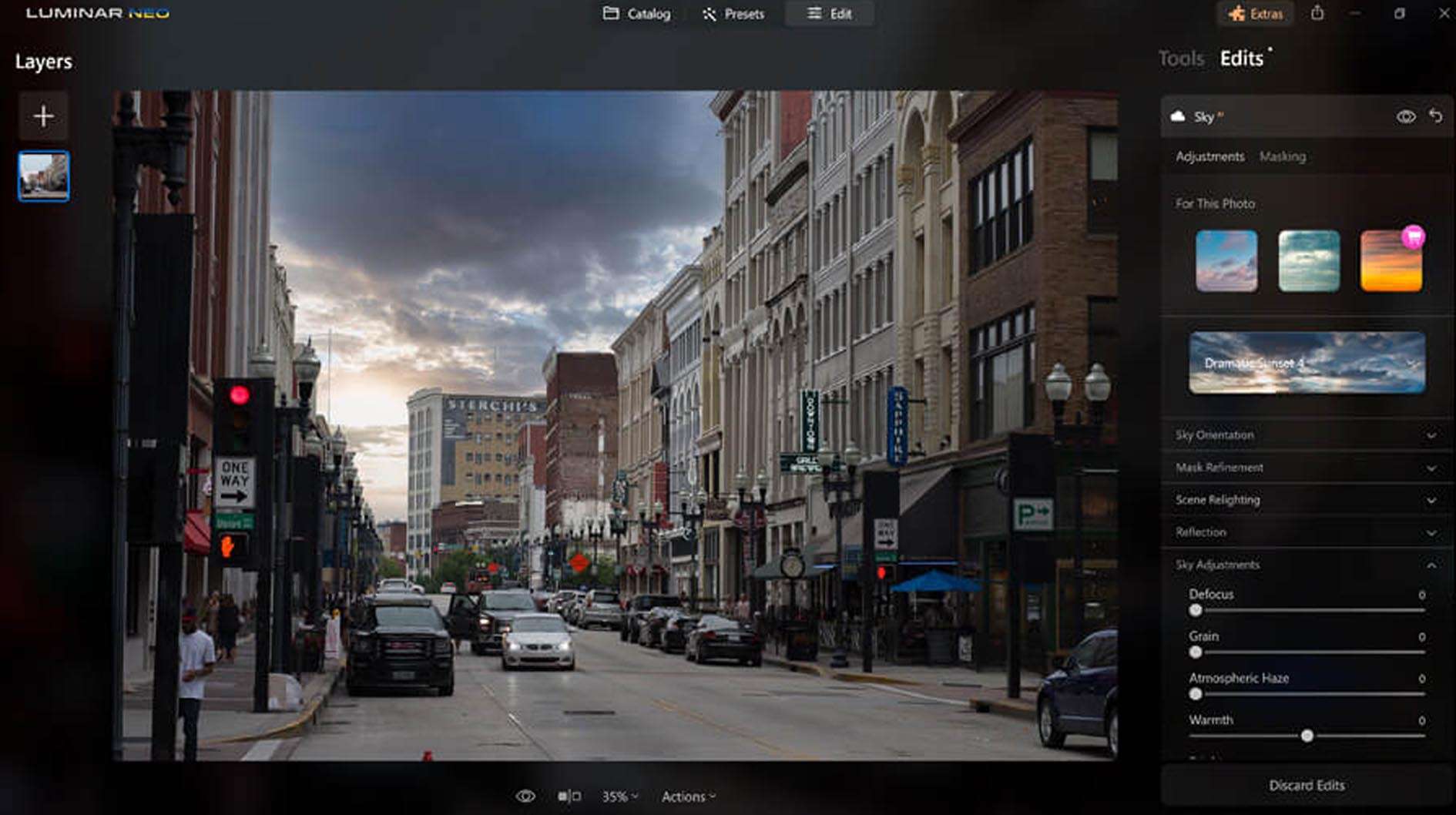
A cornerstone of Luminar Neo’s functionality is its support for a non-destructive, layered editing workflow. This system allows users to apply adjustments, AI tools, and effects as distinct layers, which can be modified, reordered, or masked independently without altering the underlying pixels of the original image. This methodology is crucial for advanced photo compositing, enabling the seamless integration of multiple elements, and complex scene creation. Users can leverage adjustable opacity, blending modes, and AI-driven masks to precisely control how each layer interacts with others, offering unparalleled creative freedom and editing flexibility.
Cutting-Edge AI Tools Transforming Photo Enhancement
Luminar Neo integrates a suite of sophisticated AI-powered tools designed to enhance various aspects of an image intelligently. These include:
- Sky AI: For realistic and automated sky replacement, including necessary relighting adjustments to match the new sky.
- Face AI and Skin AI: Tools dedicated to portrait retouching, offering subtle enhancements to facial features and skin texture.
- Structure AI: Enhances details and clarity in images by intelligently identifying and sharpening specific areas.
- Portrait Bokeh AI: Adds realistic background blur to portraits after the image has been captured.
- Atmosphere AI: Introduces atmospheric effects like fog or mist to images with naturalistic results.
- GenErase: A powerful extension that uses AI for intelligent object removal, capable of eliminating unwanted elements and seamlessly reconstructing the background.
Advanced Relighting and Composition Features
Beyond its object manipulation tools, Luminar Neo offers advanced features for controlling light and composition within photographs. Relight AI allows photographers to adjust the light source and direction within an image after it has been taken, offering precise control over illumination and mood. The Composition AI tool analyzes images and suggests optimal crops, helping users refine their framing and adhere to photographic principles, thereby improving the overall impact of their shots. These features are integral to creative workflows, enabling photographers to achieve their artistic vision more effectively.
Integration with Adobe Ecosystem and Extension Packs
Recognizing the importance of established professional workflows, Luminar Neo provides updated plugin compatibility with Adobe Photoshop and Adobe Lightroom Classic. This integration allows users to incorporate Luminar Neo’s AI editing capabilities directly into their existing Adobe-centric workflows, accessing its advanced features without leaving their familiar software environment. The software also offers various Extensions, such as HDR Merge for creating high dynamic range images, Focus Stacking for landscape and macro photography, and Noiseless AI for noise reduction, further expanding its utility.
Real-World Applications and Creative Use Cases
Luminar Neo is utilized across a spectrum of photographic disciplines and creative endeavors. In portrait photography, its AI tools facilitate rapid portrait retouching and background enhancement. For landscape photographers, Sky AI and intelligent detail enhancement tools assist in creating dramatic and realistic scenes. Commercial photographers can benefit from precise object removal and retouching capabilities for product images and advertising content. Likewise, digital artists and visual content creators leverage the software’s layered editing and compositing features for imaginative projects and multimedia production.
Performance Enhancements and New Features in Luminar Neo 1.26
The 1.26 update for Luminar Neo introduces several key advancements focused on performance and new AI capabilities. A notable addition is the GenErase AI tool, which significantly enhances the ability to remove unwanted objects from images with remarkable contextual accuracy. The update also introduces AI-powered background separation as a layer, streamlining composite creation. Beyond these new tools, Luminar Neo 1.26 prioritizes overall performance optimizations and stability improvements, alongside the release of new preset content to inspire users and accelerate their creative editing process.
Frequently Asked Questions
How does Luminar Neo’s AI-powered GenErase feature improve object removal compared to traditional tools?
GenErase utilizes advanced artificial intelligence to intelligently detect and eliminate complex objects, such as people or signs, from photographs. It seamlessly reconstructs the background using context-aware filling, resulting in a natural and complete edit. This capability surpasses traditional cloning or healing tools by deeply understanding the scene’s context for truly seamless results.
Can Luminar Neo be used alongside Adobe Photoshop and Lightroom?
Yes, Luminar Neo is designed for compatibility with professional workflows and offers updated plugin integration for both Adobe Photoshop and Lightroom Classic. This allows users to seamlessly incorporate Luminar Neo’s AI-powered editing tools into their existing creative processes, thereby augmenting the functionality of their preferred Adobe applications.
What advantages does layered, non-destructive editing in Luminar Neo provide?
The layered, non-destructive editing approach in Luminar Neo allows users to build complex photographic compositions by stacking multiple adjustments and AI features. Crucially, these edits do not alter the original image data, preserving the source file. This ensures that any adjustment can be easily modified, reverted, or refined at any stage of the editing process, offering maximum creative flexibility and technical control.





Reviews
There are no reviews yet.