

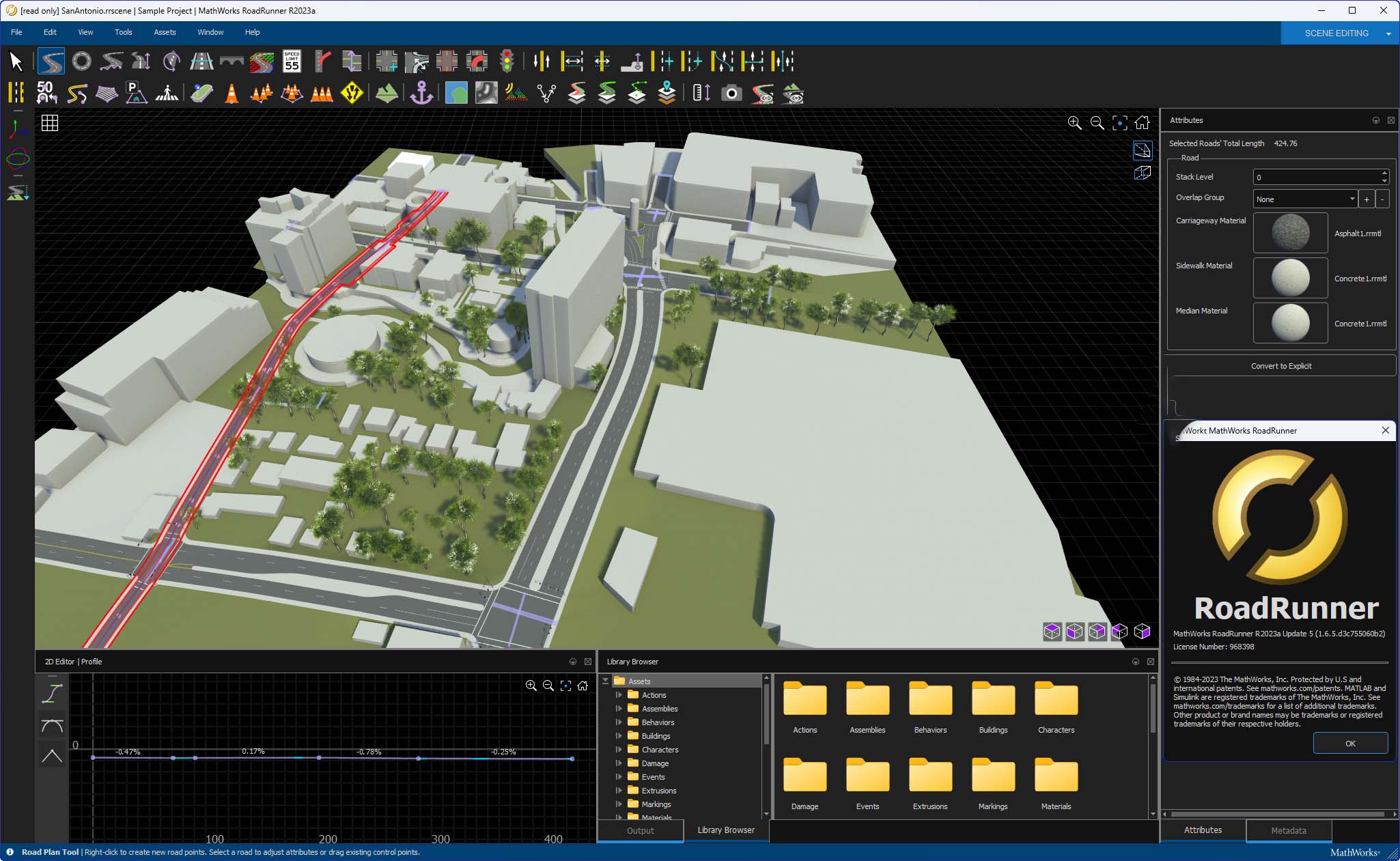
Download MathWorks RoadRunner R2025a – Advanced 3D Scene Design Software for Automated Driving
MathWorks RoadRunner R2025a is a specialized 3D scene design software developed by MathWorks, Inc. It is engineered for the automotive industry, specifically targeting the creation and testing of automated driving systems. This software plays a critical role in simulating complex scenarios required for the development and validation of autonomous vehicles.
Overview of MathWorks RoadRunner
MathWorks RoadRunner is a comprehensive tool designed for the creation of realistic 3D environments essential for the simulation and testing of automated driving systems. Developed by MathWorks, a company renowned for its engineering and data analysis software like MATLAB and Simulink, RoadRunner focuses on enabling engineers to build, customize, and validate virtual driving scenarios. Its significance lies in providing a controlled and repeatable environment for developing and refining the sophisticated algorithms that power autonomous vehicles, thereby accelerating innovation in this rapidly evolving field.
Key Features of RoadRunner R2025a
3D Scene Design and Customization
RoadRunner offers robust tools for crafting intricate 3D environments that mimic real-world driving conditions. Users can construct dynamic road networks, design urban and rural landscapes, and populate scenes with various objects and elements. The software’s asset library provides pre-built components, while its scene builder capabilities allow for deep customization, crucial for generating diverse test cases for automated driving systems.
Traffic Signal Configuration and Management
Effective simulation of urban driving requires precise control over traffic infrastructure. RoadRunner enables engineers to configure traffic signals, including their timing and phasing, and define complex traffic patterns with various vehicle types and behaviors. This granular control over traffic management systems is vital for testing how automated driving systems respond to dynamic road conditions and intersections.
Support for Lidar and GIS Data
To enhance the realism and accuracy of simulations, MathWorks RoadRunner incorporates support for advanced visualization and data integration. It allows for the visualization of lidar point clouds, enabling engineers to assess how sensor data translates within the simulated environment. Furthermore, integration with Geographic Information System (GIS) data helps in creating geographically accurate representations of real-world locations, further increasing the fidelity of the driving simulations.
Export Options and Compatibility
To ensure interoperability within the automated driving development ecosystem, MathWorks RoadRunner R2025a supports a wide array of export formats. These include industry-standard options such as FBX, glTF, OpenFlight, OpenSceneGraph, OBJ, and USD. This broad compatibility allows engineers to seamlessly transfer their designed 3D scenes from RoadRunner into various simulation platforms like CARLA, NVIDIA DRIVE Sim, and Unity. Such flexibility is crucial for integrating RoadRunner’s scene design capabilities into existing simulation workflows and pipelines.
Use Cases and Industry Applications
MathWorks RoadRunner is instrumental in numerous real-world applications within the automotive engineering sector. Its primary use is in the development and validation of automated driving systems, where engineers create complex scenarios to test vehicle perception, planning, and control algorithms. Beyond testing, it is employed in training these algorithms through simulated data and for virtual validation of safety-critical driving functions. Collaborations with automotive manufacturers underscore its practical value in bringing advanced driver-assistance systems (ADAS) and fully autonomous vehicles to market.
Getting Started with MathWorks RoadRunner
For professionals looking to leverage MathWorks RoadRunner R2025a for their automated driving simulation needs, the initial steps involve obtaining the software and proceeding with its installation according to MathWorks’ provided guidelines. Once installed, the focus shifts to exploring the intuitive interface for scene creation. Familiarizing oneself with the asset library and the core functionalities of the scene builder is key to efficiently designing complex 3D environments for simulation purposes.
Frequently Asked Questions
What is MathWorks RoadRunner used for?
MathWorks RoadRunner is primarily used for designing 3D scenes that simulate and test automated driving systems, making it essential for engineers working in the autonomous vehicle sector. It allows for the creation of realistic virtual environments where autonomous driving algorithms can be developed, trained, and validated safely and efficiently.
Can RoadRunner integrate with other simulation tools?
Yes, RoadRunner supports integration with various simulation platforms, including CARLA, NVIDIA DRIVE Sim, and Unity, allowing for flexible application in packaged environments. This broad compatibility ensures that RoadRunner scenes can be seamlessly incorporated into diverse simulation workflows and testing pipelines.
What formats can I export my 3D scenes in?
Users can export 3D scenes created in RoadRunner to formats such as FBX, glTF, OpenFlight, OpenSceneGraph, OBJ, and USD, which enhances the interoperability of designs across different platforms. This diversity of export options facilitates seamless data exchange with a wide range of simulation and visualization tools.






Reviews
There are no reviews yet.