

Download Microsoft Power BI Report Server 2025 – Comprehensive Data Analysis and Reporting Tool
Microsoft Power BI Report Server 2025 is a comprehensive business intelligence and data reporting solution developed by Microsoft. As a key component of the Power BI suite, it enables organizations to effectively analyze data, generate insightful reports, and manage their reporting infrastructure on-premises. This tool is crucial for professionals in business intelligence and data analytics roles seeking robust data governance and reporting capabilities.
Introduction to Power BI Report Server
Overview of Business Intelligence Solutions
Microsoft Power BI Report Server plays a vital role in the modern business intelligence landscape, providing organizations with the tools necessary to transform raw data into actionable insights. Its adoption is driven by the increasing need for accessible, secure, and timely reporting to support strategic decision-making. The platform empowers users to create sophisticated reports and dashboards, ensuring that data analysis remains a core function within business operations.
Key Features of Power BI Report Server
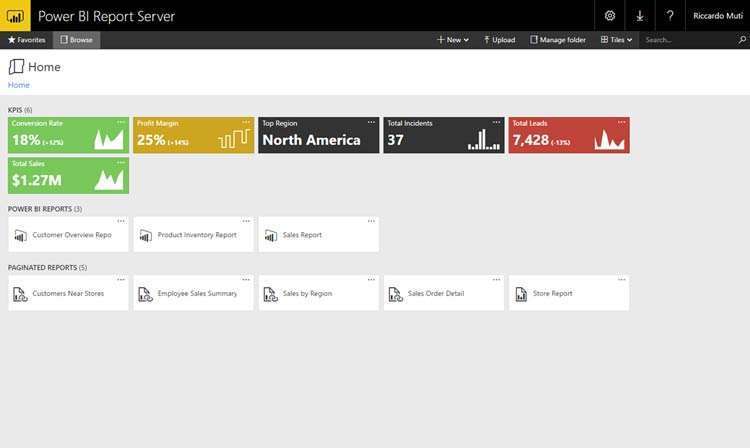
Power BI Report Server offers a robust set of features designed for effective data report creation and visualization. Users can leverage its capabilities to build detailed reports from diverse datasets and present them through an accessible web portal.
- Report Creation: Facilitates the development of interactive reports, including paginated reports, which are essential for structured business documentation and analysis.
- Data Visualization Tools: Incorporates tools that allow for the creation of compelling charts, graphs, and maps to represent data trends and insights visually.
- Dashboard Integration: Enables the creation and management of dashboards that consolidate key performance indicators and critical data points for quick review.
- On-Premises Operation: Provides a dedicated server environment for organizations that require reports and data to remain within their own data centers for security and compliance reasons.
- Customization Options: Offers flexibility in report design and deployment to meet specific organizational needs.
Supported Data Sources and Integration
A significant advantage of Power BI Report Server is its extensive connectivity to a wide array of data sources. This flexibility ensures that organizations can consolidate data from various systems for comprehensive analysis.
- Relational Databases: Supports connections to SQL Server, Oracle, and other common relational database management systems.
- Analysis Services: Integrates seamlessly with SQL Server Analysis Services for advanced data modeling and querying.
- Cloud Data Sources: Can connect to cloud-based data services, offering a hybrid approach to data management.
- Azure Integration: Provides capabilities to link with Microsoft Azure services, enhancing analytical power and scalability.
- Custom Connectors: Potentially allows for custom data source connections to accommodate unique organizational data structures.
User Access and Security Features
Microsoft Power BI Report Server is built with a strong emphasis on security and data governance, ensuring that sensitive information is protected and accessed appropriately within an organization.
- Role-Based Access Control: Allows administrators to define user roles and permissions, controlling who can view, create, or manage reports.
- Data Security: Implements robust security measures to protect data both at rest and in transit.
- Authentication Integration: Works with existing enterprise authentication systems, such as Active Directory, for secure user sign-in.
- Compliance Support: Aids organizations in meeting regulatory compliance requirements through structured data management and access logging.
- Secure Web Portal: Provides a protected web interface for users to access their assigned reports and dashboards.
Real-World Applications and Use Cases
Power BI Report Server is utilized across numerous industries to enhance decision-making through effective data analysis and reporting. Its versatility makes it a valuable tool for diverse business challenges.
- Finance: Used for generating financial statements, tracking budget performance, and analyzing investment portfolios.
- Healthcare: Applied to monitor patient outcomes, manage hospital operations, and analyze clinical trial data.
- Retail: Employed for sales forecasting, inventory management, customer behavior analysis, and marketing campaign performance tracking.
- Manufacturing: Utilized for production performance monitoring, supply chain optimization, and quality control analysis.
- Human Resources: Applied to track employee performance, manage workforce analytics, and analyze recruitment data.
Comparison with Other Reporting Tools
When considering business intelligence tools, Power BI Report Server offers a distinct value proposition, particularly within the Microsoft ecosystem. While other reporting tools may offer similar functionalities, Power BI Report Server excels in its integration capabilities and on-premises deployment options.
Compared to standalone reporting solutions, Power BI Report Server benefits from seamless integration with Azure services and other Microsoft products, providing a unified data strategy. Its robust security framework and focus on user-friendly report generation further differentiate it for organizations prioritizing internal data control and ease of use for non-technical staff.
Future Enhancements and Updates
Microsoft is committed to the continuous improvement of its Power BI offerings. While specific details for future versions may evolve, the general direction points towards enhanced cloud integration, advanced AI-driven analytics, and further optimizations for performance and user experience.
Users can anticipate ongoing updates that refine existing features, expand data connectivity options, and introduce new visualization capabilities. Microsoft’s consistent investment in the Power BI platform suggests a future with even more powerful tools for data analysis, reporting, and business intelligence.
Frequently Asked Questions
What is Microsoft Power BI Report Server used for?
Microsoft Power BI Report Server is primarily used for creating and managing reports that help organizations leverage their data for better decision-making. It enables users to publish reports and dashboards that can be easily accessed through a web interface, facilitating internal data governance and accessibility.
How does Power BI Report Server differ from Power BI Desktop?
Power BI Report Server is designed for web-based report hosting and sharing, allowing for on-premises storage and management, while Power BI Desktop is a client application specifically for creating reports. The former focuses on governance, data security, and enterprise-level deployment within organizations.
Can I use Power BI Report Server without programming knowledge?
Yes, Power BI Report Server is designed to be user-friendly and does not require programming skills. Users can create and manage reports using its intuitive interface and built-in tools, making powerful data analysis accessible to a broader audience within an organization.








Reviews
There are no reviews yet.