

Download NCPlot 2.34 – Versatile CNC Programming Software
NCPlot 2.34 is a specialized CNC programming software designed for manipulating and verifying G-Code, particularly for lathe operations. Developed to assist CNC programmers in manufacturing, it offers a comprehensive suite of tools for editing, backplotting, and converting designs into executable machining instructions. This software is essential for professionals involved in both the prototyping and production phases of CNC machining.
Overview of NCPlot 2.34
What is NCPlot?
NCPlot serves as a pivotal application in the realm of CNC programming and machining. It provides specialized functionalities that streamline the process of creating and managing G-Code, the language used to control CNC machines. By offering robust editing and verification capabilities, NCPlot aims to improve efficiency and accuracy in automated manufacturing workflows.
Key Features and Capabilities
Editing and Formatting Tools
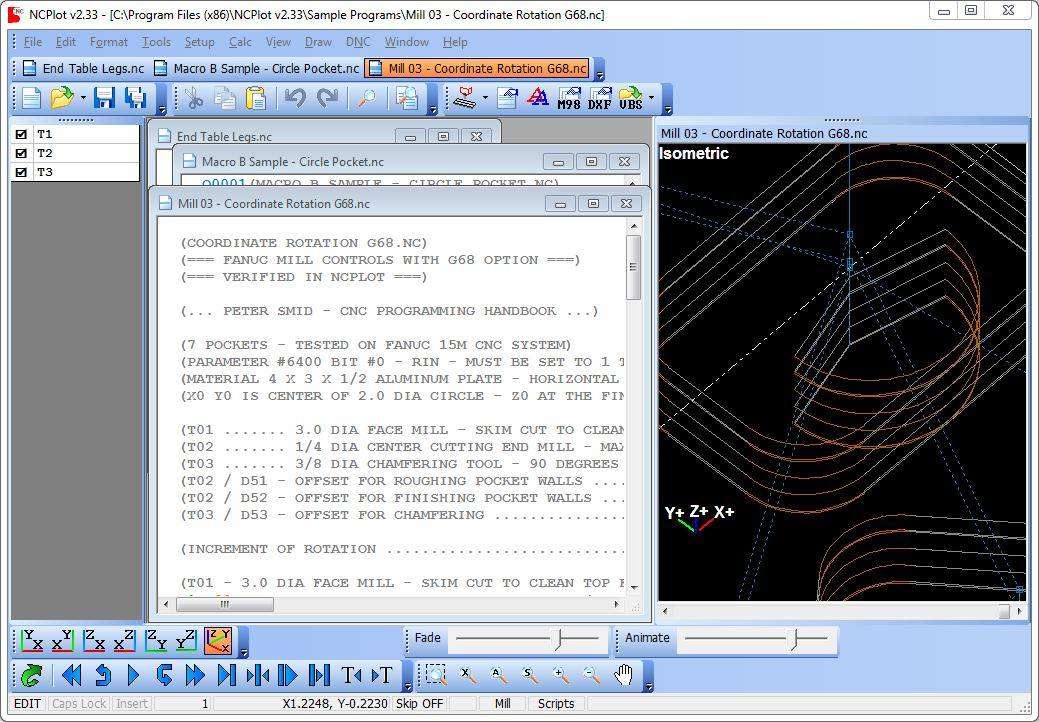
NCPlot 2.34 includes a robust set of editing tools designed for efficient G-Code manipulation. These features are crucial for programmers who need to make precise adjustments or debug existing code.
- Comprehensive cut, copy, and paste functionalities for G-Code segments.
- Advanced find and replace options to quickly locate and modify specific G-Code commands or parameters.
- Unlimited undo and redo capabilities, allowing for non-destructive editing and experimentation with code modifications.
- Customizable toolbars and menus to tailor the editing environment to individual user preferences.
Backplotting and Verification
The software features an integrated backplotter, which is essential for visualizing G-Code paths and ensuring the accuracy of machining operations before they are executed on a physical machine.
- Accurate graphical representation of tool paths generated from G-Code.
- Dynamic interactivity, allowing users to zoom, pan, and rotate the backplot visualization for detailed inspection.
- Support for 3D device interaction, enhancing the user’s ability to manipulate the graphical display.
- Machining time estimation based on the backplotted tool path, aiding in production planning.
Applications in CNC Programming
NCPlot 2.34 finds practical application in various scenarios within manufacturing environments, aiding programmers in developing and refining CNC operations.
- G-Code Troubleshooting: Pinpointing and correcting errors in existing G-Code files, preventing costly machining mistakes.
- Lathe Programming: Creating and editing specific G-Code programs tailored for CNC lathe machines, optimizing for turning operations.
- Prototyping: Quickly generating and verifying code for new part designs during the prototyping phase.
- Production Optimization: Refining G-Code for efficiency and reduced cycle times in mass production runs.
Integration and Compatibility
NCPlot is designed to work seamlessly within existing CAD/CAM workflows, offering support for common design file formats.
- DXF File Support: Ability to import DXF drawings, enabling the direct generation of G-Code for lathe machining from 2D designs.
- General CAM Integration: While not a full CAM package, its editing and verification tools complement standard CAM software by providing a specialized environment for G-Code finalization.
User Interface and Experience
The design of NCPlot prioritizes user efficiency and comfort, especially for users who spend extended periods working with G-Code.
- Multi-User Interface: The software allows for the management of multiple G-Code files simultaneously, facilitating comparison and transfer of information between different programs.
- Customization Options: Users can configure various aspects of the interface, including color schemes and command layouts, to suit their working style.
- Intuitive Controls: Emphasis on straightforward navigation and accessible features for a smooth user experience.
Advantages Over Competitors
NCPlot distinguishes itself through a combination of specialized features and user-centric design choices that enhance productivity for CNC programmers.
- Advanced Editing Suite: Offers a more comprehensive set of direct G-Code editing tools compared to basic text editors or less specialized CNC software.
- Visual Verification: The powerful backplotting engine and interactive 3D view provide superior G-Code verification capabilities.
- Customizable Environment: Greater flexibility in customizing the user interface and toolbars allows for a personalized workflow.
- Efficient DXF to G-Code Conversion: Streamlined import and conversion process specifically optimized for lathe programming needs.
Frequently Asked Questions
What is NCPlot used for?
NCPlot is primarily used as a G-Code editor and backplotter for CNC lathe programming, allowing users to create, edit, and verify G-Code for machining processes. Its functionalities aid in ensuring that machine instructions are accurate and efficient before physical production begins.
Can NCPlot convert DXF files?
Yes, NCPlot can import DXF drawings and generate G-Code specifically for lathe operations, making it easier to turn designs into machining instructions. This feature simplifies the workflow for programmers by translating geometric data directly into executable machine commands.
How does NCPlot enhance G-Code verification?
With its integrated backplotting feature, NCPlot allows users to visually verify G-Code execution, identifying potential errors before actual machining begins. This visual feedback loop helps prevent costly mistakes and ensures the integrity of the machining path.





Reviews
There are no reviews yet.