
Download Plandroid 6.0.1.10555 – Intuitive HVAC Ductwork Design & Quoting Software
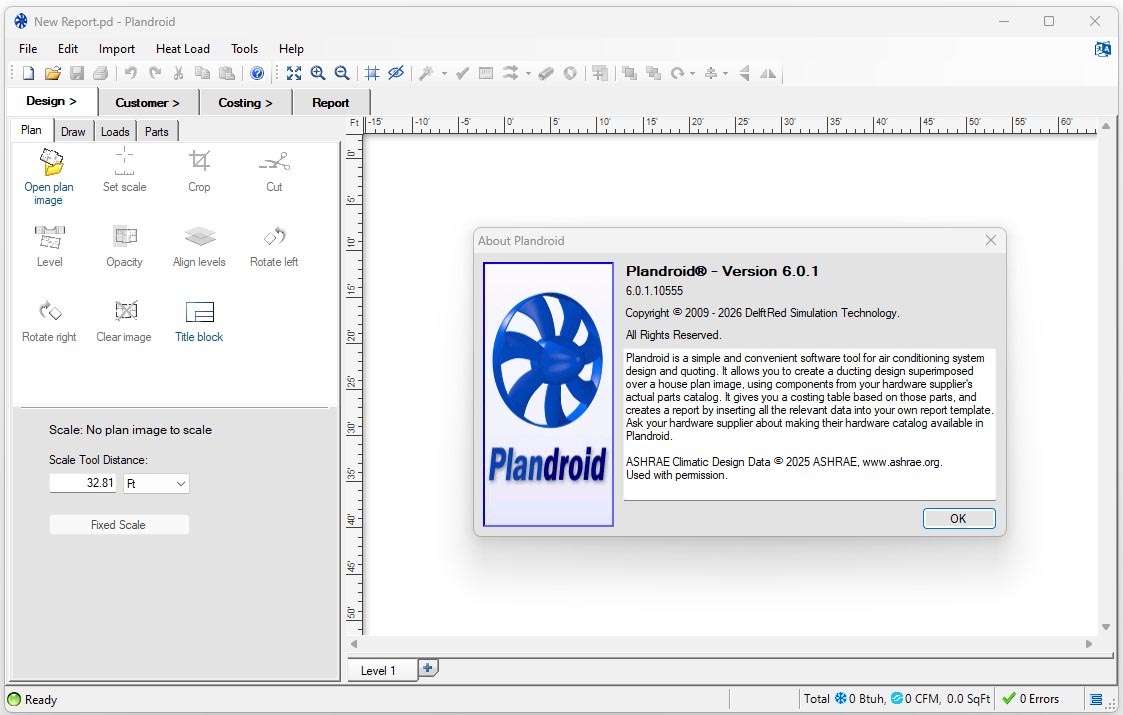
Plandroid 6.0.1.10555 is specialized HVAC design CAD software developed to streamline workflows for HVAC contractors and mechanical engineers. This application integrates essential design, calculation, and quoting functions into a single package, offering a comprehensive solution for designing ductwork and other HVAC system components. Its intuitive interface and focus on real-world component compatibility make it a valuable tool for professionals in the mechanical, engineering, and construction fields.
Streamlined HVAC Design for Contractors and Engineers
Overview of Plandroid’s Workflow
Plandroid consolidates the typical HVAC design process into a unified workflow. Professionals can begin by importing existing architectural plans, then proceed directly to CAD-style ductwork layout using intelligent routing features. The software automatically integrates component data from supplier catalogs, enabling real-time heat-load calculations and immediate generation of accurate quotes and detailed project reports, all within the same application environment.
Supported HVAC System Types
<p>The software is equipped to handle a wide range of HVAC system configurations, supporting the following modes:</p>
<ul>
  <li>Refrigerated systems</li>
  <li>Evaporative cooling</li>
  <li>Gas heating</li>
  <li>Hydronics</li>
  <li>General ventilation</li>
  <li>High-velocity “Venturi” systems</li>
</ul>
Advanced CAD-Style Duct Layout Tools
Drag-and-Drop Duct Routing
Plandroid facilitates rapid ductwork design through an intuitive drag-and-drop interface. The software offers intelligent routing suggestions, automatically connecting duct sections and generating layouts based on project requirements. It also supports auto-sizing of ducts to meet specified airflow demands efficiently.
Custom Component Definitions
<p>Beyond its integrated libraries, Plandroid allows users to define and modify custom components. This feature ensures that the software can accommodate unique project specifications or specialized equipment from various manufacturers, enhancing design flexibility.</p>
Real-World Component Libraries and Compatibility
Supplier Catalog Integration
A key capability of Plandroid is its integration with extensive real-component supplier catalogs. This feature provides access to manufacturer-specific parts, allowing for accurate material selection and costing. These catalogs can be updated to reflect the latest product offerings from HVAC equipment suppliers.
File Import/Export Formats
<p>The software supports importing various plan formats, including PDF and common image files like JPEG and PNG, for tracing. For project deliverables, Plandroid can export detailed plans and comprehensive reports, ensuring clear documentation for clients and installers.</p>
Automated Heat Load and Airflow Calculations
Calculation Methods
Plandroid incorporates automated calculation functionalities to support design decisions. It offers both simplified calculation methods for quick estimations and more detailed material-based calculations for precise system analysis, providing flexibility based on project complexity.
Standards Compliance and Validation
<p>The software aids in adhering to industry best practices by performing essential validation checks. These include calculations for friction loss and velocity, ensuring that the designed ductwork meets established HVAC engineering standards for optimal performance and efficiency.</p>
Professional Quoting and Reporting Workflows
Automated Quote Generation
Plandroid automates the creation of project quotes by incorporating all cost components, including materials, labor, and overhead. Users can define markups, taxes, and discounts to generate accurate client proposals quickly.
Customizable Report Templates
<p>To meet diverse project needs, Plandroid provides customizable report templates. These include options for detailed client proposals, installer summaries, and supplier order lists, ensuring all stakeholders receive relevant and easy-to-understand documentation.</p>
Integration with Floor Plans and Project Management
Accurate Plan Tracing and Scaling
Users can precisely trace imported floor plans within Plandroid, utilizing scaling features to ensure accurate dimensions. This capability allows for the realistic placement and routing of ductwork and system components directly onto architectural drawings.
Project Template Reuse
<p>To enhance efficiency on recurring project types, Plandroid enables users to save and reuse project templates. This feature speeds up the design process by allowing designers to start new projects with pre-configured settings, component lists, and standard layouts.</p>
Case Studies: From Residential Home to Commercial Installation
Residential Split-System Design
For a residential project involving a split-system installation, Plandroid enabled rapid design of the ductwork by importing the home’s floor plan. The drag-and-drop functionality and intelligent routing simplified the placement of supply and return air ducts, while automated sizing calculations ensured efficient airflow. The integrated quoting tool then provided an accurate project cost estimate in minutes, saving significant time compared to manual methods.
Commercial Ventilation Project
<p>In designing a large-scale ventilation network for a commercial building, Plandroid's ability to handle extensive duct runs and complex layouts proved crucial. The software's capacity for detailed heat-load calculations and adherence to industrial standards for friction loss and velocity guided the optimal configuration of the system. The comprehensive reporting features facilitated clear communication with the construction team and client regarding the system's specifications and projected performance.</p>
Frequently Asked Questions
What file formats can I import into Plandroid for plan tracing?
Plandroid supports importing floor plans as PDF and common image formats such as JPEG, PNG, and TIFF. Once imported, these plans can be accurately scaled and traced directly within the software, facilitating precise ductwork placement and design.
How does Plandroid handle duct sizing and airflow calculations?
Plandroid offers both simplified and detailed material-based calculation methods to assist with HVAC system design. It automatically sizes ducts based on airflow requirements, computes friction loss, and checks velocities against established industry standards, ensuring optimal system performance.
Can I update component catalogs from my preferred HVAC supplier?
Yes. Plandroid integrates manufacturer-specific component catalogs that can be refreshed for the latest product information. Additionally, users have the flexibility to import custom component definitions to precisely match any supplier’s current product offerings.





Reviews
There are no reviews yet.