

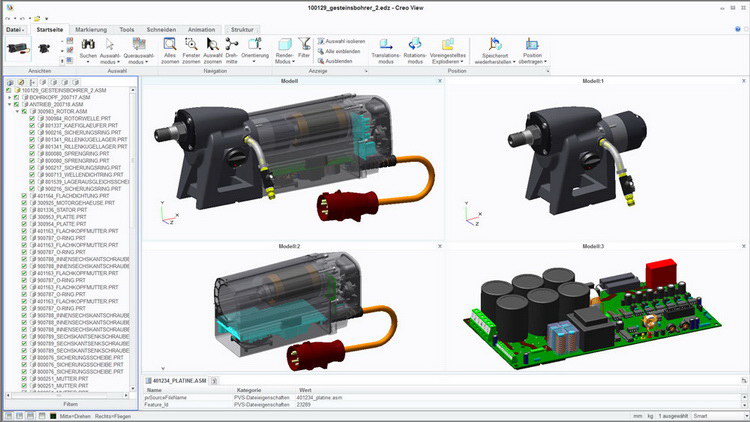
Download PTC Creo View – Leading 3D CAD Visualization Tool
Download PTC Creo View, a premier 3D CAD visualization tool developed by PTC Inc. This software is designed for mechanical engineers, manufacturing professionals, and design teams, enabling them to share and review complex 3D CAD models efficiently. PTC, a pioneer in CAD technology, offers Creo View as a solution to enhance collaboration and streamline product documentation processes within the engineering and design industries.
Introduction to PTC Creo View
Overview and Purpose
PTC Creo View is a robust visualization application engineered to provide a streamlined experience for viewing and interacting with 3D CAD data. Its primary purpose is to democratize access to design information, allowing stakeholders across an organization—from designers and engineers to manufacturing personnel and management—to visualize intricate models without requiring full CAD software licenses. This capability is crucial for effective communication and decision-making throughout the product development lifecycle.
Key Features and Capabilities
Collaboration and Visualization
PTC Creo View significantly enhances team collaboration through its advanced visualization features. Users can not only view complex 3D assemblies but also inspect them with tools for measurement, sectioning, and annotation. This allows for detailed design reviews and the clear communication of feedback, ensuring that all team members are aligned on design intent and potential issues. The software supports a dynamic workflow for reviewing product designs, fostering a more interactive and efficient collaborative environment.
File Format Support
A standout capability of PTC Creo View is its extensive support for over 200 file formats. This broad compatibility ensures that virtually any CAD data can be imported and visualized, regardless of its origin. For organizations working with multiple CAD systems or external partners, this feature eliminates the need for complex file conversions, streamlining workflows and reducing potential errors. It makes PTC Creo View an indispensable tool for comprehensive product data management.
Integration with Other PTC Products
PTC Creo View integrates seamlessly within the broader PTC product ecosystem, particularly with Creo design software and Windchill Product Lifecycle Management (PLM) solutions. This integration allows users to access and visualize the latest design revisions directly from Windchill, ensuring they are always working with the most current data. By connecting visualization with PLM, Creo View supports an enhanced product lifecycle management strategy, driving efficiency from initial design through manufacturing and beyond.
Real-World Applications
PTC Creo View is extensively utilized in various industries that rely heavily on precise 3D modeling and collaborative design. Key sectors include mechanical engineering, automotive, aerospace, and heavy equipment manufacturing. Specific use cases involve:
- Enabling manufacturing floor personnel to access and interpret complex assembly instructions and 3D models.
- Facilitating design reviews between engineering teams and non-technical stakeholders, such as marketing or sales departments.
- Supporting field service technicians with detailed 3D model visualizations for maintenance and repair tasks.
- Streamlining the creation of technical documentation and work instructions that incorporate 3D model views.
Competitive Analysis
When compared to other visualization and CAD solutions like CATIA or SolidWorks, PTC Creo View differentiates itself through its specialized focus on visualization and collaboration for engineering data. While CATIA and SolidWorks offer robust CAD design capabilities, PTC Creo View excels in providing accessible, light-weight viewing and review across a vast array of file formats, including those from competing CAD systems. Its deep integration with PTC’s PLM suite, particularly Windchill, provides a more unified environment for product data management and review processes than standalone viewers or less integrated CAD packages.
Conclusion and Future Scope
PTC Creo View stands as a powerful visualization tool, essential for modern engineering and manufacturing workflows. Its extensive file format support, strong collaboration features, and tight integration with the PTC product suite make it invaluable for organizations seeking to improve design review processes and internal communication. As product development continues to evolve towards more complex, integrated, and cloud-based solutions, PTC Creo View is well-positioned to remain a critical component in managing and sharing product design data effectively.
Frequently Asked Questions
What types of files can I view with PTC Creo View?
PTC Creo View supports over 200 different file formats, allowing users to visualize a wide variety of CAD data without needing CAD software. This versatility is crucial for collaboration with team members who may use different design tools, ensuring all stakeholders can access and review product designs.
How does PTC Creo View assist in product documentation?
PTC Creo View enables users to create comprehensive product documentation by allowing them to assemble and illustrate 3D models with annotations and measurements, thus improving clarity and communication across teams. This capability helps in generating detailed instructions and reports that are easily understandable by various departments.
Can PTC Creo View be used for collaborative reviews of designs?
Yes, PTC Creo View facilitates collaborative reviews by allowing team members to share visualized models and provide feedback in real-time, making it easier to identify and correct design issues before production. This real-time interaction and shared access to design data help accelerate the review cycle and improve overall product quality.






Reviews
There are no reviews yet.