
Download Smart MindMap 11.1 – Versatile Diagramming and Mind Mapping Software
Smart MindMap 11.1 is a productivity application designed for creating a wide array of diagrams, including mind maps, business charts, and engineering drawings. Developed as a versatile diagramming tool, it caters to students in the educational sector, professionals in business planning, and engineers requiring technical diagramming solutions. The software aims to simplify visual organization and communication through an intuitive interface.
Overview and Usability for Diverse Users
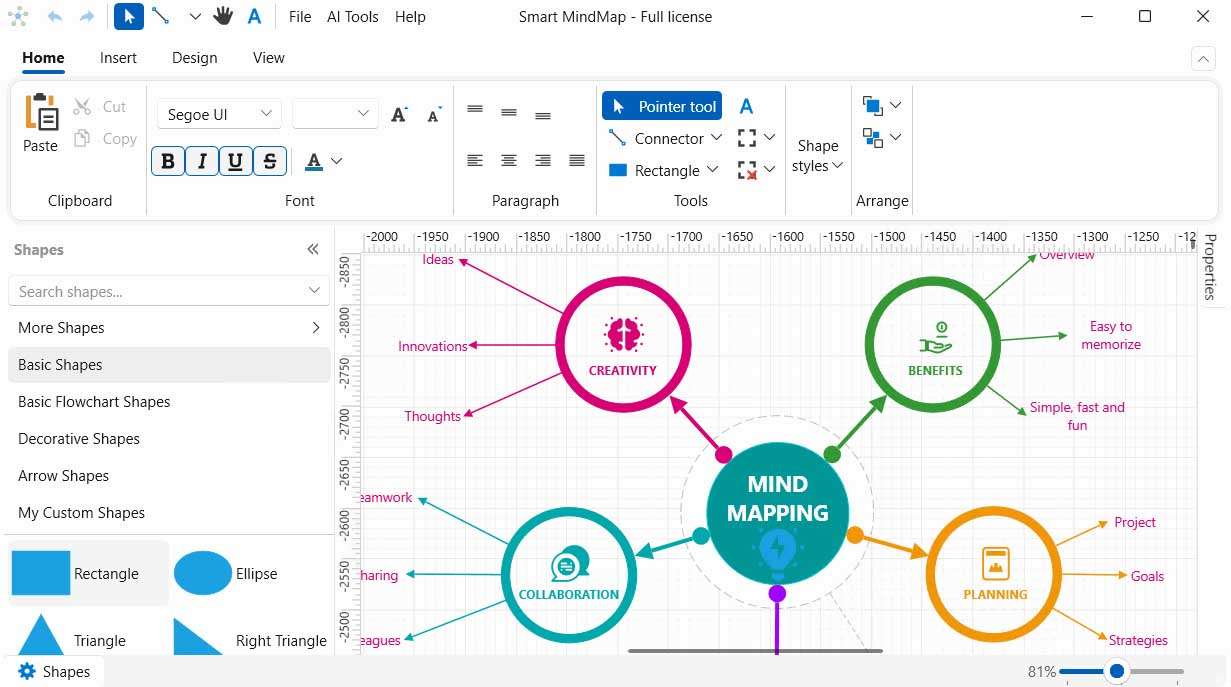
Smart MindMap 11.1 offers a user-friendly experience suitable for a broad audience, from students to seasoned professionals and engineers. Its interface is designed to be accessible, resembling the familiar layout of tools like Visio, which reduces the learning curve. The software supports the creation of numerous diagram types, facilitating visual organization of information for various purposes.
- Mind Maps
- Business Diagrams
- Engineering Drawings
- UML Diagrams
- ER Diagrams
- Organizational Charts
- SDL Diagrams
Comprehensive Tools and Visual Elements
The application is equipped with extensive resources to facilitate efficient and detailed diagram creation. It features a large library of over 7,200 vector images, providing a rich selection of icons and shapes for diverse diagramming needs. Advanced functionalities such as versatile container and grouping options, alongside customizable connector styles and intelligent snapping, ensure precision and streamline the process of building complex diagrams.
Flexible Diagram Creation and Export Options
Smart MindMap 11.1 provides users with robust customization options to tailor their diagrams precisely. Users can apply themes and manage shapes to align with specific project requirements or branding. Furthermore, the software offers flexible export capabilities, allowing diagrams to be saved in a variety of professional formats including SVG for scalable vector graphics, PDF for document sharing, and raster formats like GIF, PNG, BMP, and JPG, ensuring compatibility across different platforms and applications.
Applications in Education, Business, and Engineering
The versatility of Smart MindMap 11.1 makes it applicable across multiple domains. In academic settings, students can utilize it for organizing lecture notes and study materials visually. Business professionals can leverage its capabilities for project planning, strategic outlining, and creating organizational charts. For software developers and engineers, the tool supports the creation of complex UML diagrams for software architecture design and detailed ER diagrams for database structures, as well as various technical engineering drawings.
Comparison with Other Diagramming Tools
When compared to similar diagramming software such as Microsoft Visio, Smart MindMap distinguishes itself with specific features tailored for efficiency and comprehensiveness. While both offer robust diagramming solutions, Smart MindMap provides an exceptionally large library of vector graphics and integrated container system, which can accelerate the creation of visually rich and organized diagrams. Its focus on usability, combined with extensive export options, makes it a strong contender for users seeking a versatile and productive diagramming tool.
Frequently Asked Questions
What types of diagrams can I create with Smart MindMap 11.1?
Smart MindMap supports a wide variety of diagram types including mind maps, business diagrams, flowcharts, UML diagrams, ER diagrams, engineering drawings, SDL diagrams, and organizational charts. This makes it suitable for education, business planning, and technical documentation.
Can I export my diagrams to different file formats in Smart MindMap?
Yes, Smart MindMap allows you to export your diagrams to multiple formats such as SVG, PDF, GIF, PNG, BMP, and JPG. This flexibility helps you share or print your work in high-quality vector or raster formats.
How does Smart MindMap 11.1 improve productivity compared to other mind mapping tools?
Smart MindMap enhances productivity with its user-friendly interface, a vast library of over 7,200 vector images, multiple connector styles, and container grouping features. These tools enable quick diagram creation, modification, and organization, making it efficient for diverse users.






Reviews
There are no reviews yet.