

Download SynaptiCAD Product Suite 20.51 – Advanced EDA Tools for Circuit Design
SynaptiCAD Product Suite 20.51, developed by SynaptiCAD, Inc., is a comprehensive collection of electronic design automation (EDA) software designed for electrical engineers. This suite offers advanced tools that enhance the productivity and accuracy of circuit design, simulation, and analysis. It caters to professionals in electrical engineering who require robust solutions for complex circuit development and testing.
Introduction to SynaptiCAD
Company Background
SynaptiCAD, Inc. has established itself as a specialized provider of EDA software. The company focuses on developing innovative solutions that streamline the electronic design process, particularly for circuit analysis and simulation. Its mission revolves around enhancing engineers’ capabilities through user-friendly yet powerful tools, contributing to more efficient design automation.
Target Applications and Industries
The SynaptiCAD Product Suite is primarily targeted at the electrical engineering sector, serving professionals involved in the design and verification of electronic circuits. Typical scenarios include the development of integrated circuits, FPGA designs, and embedded systems where precise circuit simulation and rigorous testing are essential. Industries benefiting from these tools range from telecommunications and computing to aerospace and consumer electronics.
Overview of SynaptiCAD Product Suite Features
Key Components of the Suite
The SynaptiCAD Product Suite integrates several specialized tools to cover a broad spectrum of the electronic design flow:
- TestBencher Pro: Facilitates automatic test bench generation for efficient simulation setup.
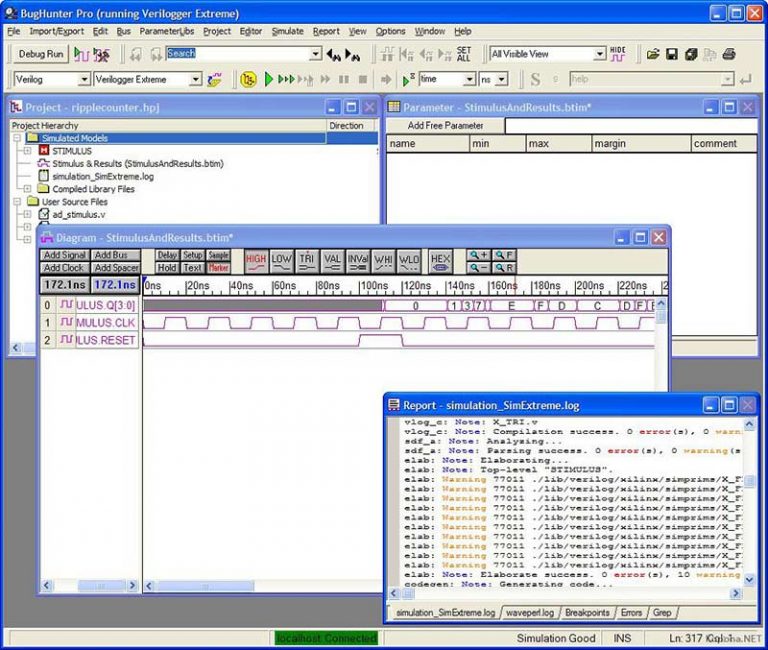
- BugHunter: Provides advanced debugging capabilities for HDL (Hardware Description Language) code.
- DataSheet Pro: Streamlines the process of creating technical documentation and reports.
- WaveFormer Pro: Offers powerful features for waveform analysis and design schematic capture.
Workflow Efficiency
This suite is engineered to improve workflow efficiency through its integrated nature and automated features. By combining schematic design, simulation analysis, debugging, and documentation within a cohesive environment, SynaptiCAD reduces the time engineers spend on repetitive tasks. This integration allows for a more fluid transition between different stages of the design process, minimizing data conversion issues and enhancing overall productivity.
Specific Tools Explained
TestBencher Pro
TestBencher Pro is designed to automate the creation of simulation test benches. It allows engineers to quickly generate setup files and scripts for various HDL simulators, significantly reducing the manual effort required for simulation environments. This tool is particularly useful for complex designs where extensive testing is necessary, enabling rapid iteration and validation.
BugHunter
BugHunter is an essential tool for debugging complex circuitry and HDL code. It integrates with major HDL simulators, providing engineers with advanced techniques to identify and resolve design errors efficiently. Its compatibility across different simulation platforms makes it a versatile asset for troubleshooting challenging circuit behaviors and logic inconsistencies.
DataSheet Pro
This component of the suite focuses on the critical task of documentation. DataSheet Pro helps engineers generate accurate and professional technical documentation, including datasheets and reports, directly from their design data. This feature ensures that all design specifications and simulation results are clearly presented, streamlining the communication and review process.
WaveFormer Pro
WaveFormer Pro provides advanced capabilities for waveform analysis and schematic design. Engineers can use this tool to visually analyze simulation results, create custom test vectors, and perform schematic capture with a focus on clarity and precision. Its features support detailed examination of circuit behavior at the signal level.
Comparison with Other EDA Tools
Compared to other electronic design automation tools, the SynaptiCAD Product Suite distinguishes itself through its emphasis on an integrated user experience and specific automation features. While many EDA suites offer broad functionality, SynaptiCAD’s tools like TestBencher Pro and DataSheet Pro provide highly specialized and efficient solutions for simulation management and documentation. The suite’s ability to seamlessly connect different aspects of the design cycle, from simulation setup to debugging and reporting, offers a distinct advantage in enhancing overall engineer productivity.
Real-World Applications of SynaptiCAD
Companies in the electronics industry leverage the SynaptiCAD Product Suite for various critical design tasks. For instance, hardware engineers use TestBencher Pro to rapidly set up and run simulations for new integrated circuit designs, accelerating the verification phase. Debugging complex issues in FPGA designs is often handled using BugHunter, ensuring the deployed hardware functions as intended. Furthermore, DataSheet Pro is instrumental in creating comprehensive product documentation, which is vital for manufacturing and customer relations.
Conclusion
The SynaptiCAD Product Suite 20.51 represents a powerful and integrated solution for modern electronic design automation challenges. Its collection of specialized tools, including TestBencher Pro, BugHunter, DataSheet Pro, and WaveFormer Pro, empowers electrical engineers to design, simulate, debug, and document circuits with increased efficiency and accuracy. By addressing key pain points in the design flow, SynaptiCAD offers a valuable asset for professionals seeking to optimize their circuit development processes.
Frequently Asked Questions
What is SynaptiCAD Product Suite used for?
SynaptiCAD Product Suite is an integrated software environment used for electronic design automation. It helps engineers simulate and analyze circuit designs efficiently through various specialized tools tailored for different aspects of the design process.
How does TestBencher Pro enhance circuit simulation?
TestBencher Pro allows users to quickly set up and manage simulation environments, significantly reducing setup time while providing powerful debugging capabilities. It streamlines the testing process, allowing engineers to focus more on design optimization rather than technical setup.
Can BugHunter be integrated with other simulation tools?
Yes, BugHunter is designed to work seamlessly with all major HDL simulators, enhancing its adaptability within various design workflows and allowing users to leverage its debugging capabilities across different platforms.





Reviews
There are no reviews yet.