

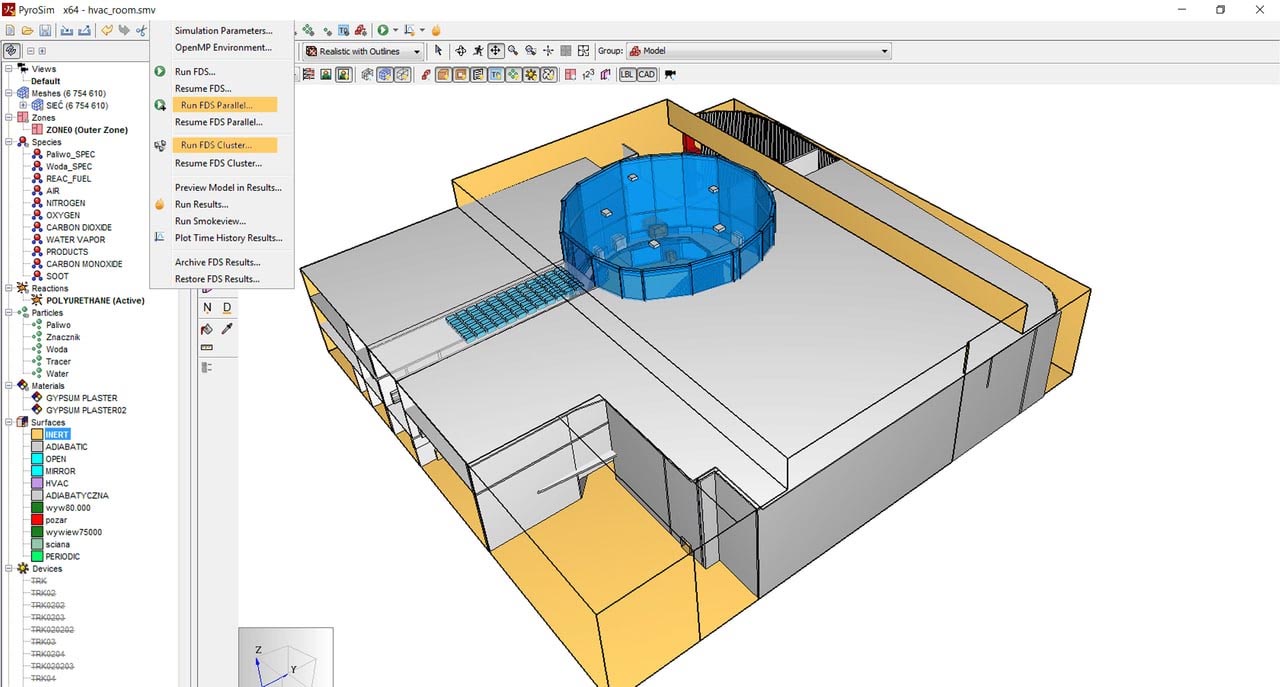
Download Thunderhead PyroSim 2026.1 – Advanced Fire Simulation Software
Thunderhead PyroSim 2026.1, developed by Thunderhead Engineering, is an advanced fire simulation software designed for fire safety engineering, architecture, and construction. It functions as a graphical user interface (GUI) for the powerful Fire Dynamics Simulator (FDS), enabling users to create and analyze complex fire scenarios with greater ease and clarity. This tool is essential for professionals involved in designing safer buildings and urban environments.
Understanding Thunderhead PyroSim
Thunderhead PyroSim serves as an intuitive graphical front-end for the Fire Dynamics Simulator (FDS), a widely recognized computational fluid dynamics (CFD) model for simulating fire scenarios. Its primary purpose is to simplify the complex process of setting up and visualizing fire and smoke dynamics, making advanced fire modeling accessible to a broader range of fire safety professionals. By providing a visual environment, PyroSim significantly enhances the usability of FDS for analyzing fire behavior in various environments.
Key Features and Functional Capabilities
Thunderhead PyroSim offers a suite of features designed to streamline the fire simulation process and enhance analytical capabilities. These features ensure that users can create detailed models and obtain accurate results for critical fire safety assessments.
- CAD Import: Supports importing Computer-Aided Design (CAD) files, such as DXF and DWG formats, facilitating the efficient creation of simulation models from existing architectural plans.
- Advanced Shading Options: Provides sophisticated shading capabilities for visualizing simulation results, making it easier to understand smoke and heat distribution.
- Parallel Processing: Utilizes parallel processing to accelerate simulation times, allowing for quicker analysis of complex fire scenarios.
- HVAC System Integration: Allows for the integration of heating, ventilation, and air conditioning (HVAC) systems into fire models, simulating their impact on smoke spread and ventilation.
- Cross-Platform Support: Available on multiple operating systems, ensuring accessibility for a wide range of users and existing hardware configurations.
Applications in Fire Safety Engineering
The application of Thunderhead PyroSim extends across various professional domains where fire safety is paramount. Its capabilities provide critical insights for design, planning, and emergency response.
- Building Design: Assists architects and fire safety engineers in designing structures that meet stringent fire codes by simulating potential fire events and validating passive and active fire protection measures.
- Urban Design: Enables the analysis of fire spread in larger environments, such as city districts or campuses, aiding in urban planning and the development of evacuation strategies.
- Emergency Management: Supports disaster management efforts by simulating fire behavior in complex scenarios, helping authorities to develop effective emergency response and evacuation plans.
- Retrofit Analysis: Allows for the assessment of fire safety in existing buildings undergoing renovations or upgrades, ensuring safety improvements are adequate.
Innovative Design Tools for Model Creation
PyroSim provides a robust set of design tools that empower users to construct intricate fire simulation models with precision and efficiency. These tools are central to translating real-world scenarios into analyzable digital environments.
- Geometric Modeling: Facilitates the creation and manipulation of complex geometries that represent different aspects of a building or environment, such as walls, floors, and furniture.
- Material Properties: Allows users to assign specific thermal properties to various materials, accurately simulating how different substances would react to fire.
- Ignition Source Definition: Enables the precise placement and characterization of ignition sources, defining the starting point and intensity of a fire within the simulation.
- Ventilation Control: Offers detailed control over ventilation parameters, including fans, dampers, and natural vents, to simulate airflow and its impact on fire spread.
Integration with Fire Dynamics Simulator
Thunderhead PyroSim’s core strength lies in its seamless integration with the Fire Dynamics Simulator (FDS). This synergy transforms the underlying complex code of FDS into an accessible and visual platform for fire modeling.
By acting as an FDS graphical interface, PyroSim streamlines the process of preparing input files for FDS. Users can define all simulation parameters, including geometry, materials, fire sources, and ventilation conditions, through an intuitive visual environment. PyroSim then generates the necessary input files for FDS and processes the output data, often creating visualizations of smoke movement and toxic gas concentrations. This integration allows fire safety engineers to leverage the sophisticated CFD capabilities of FDS without requiring deep expertise in command-line interfaces or input file coding.
Real-World Use Cases of PyroSim
The practical application of Thunderhead PyroSim is evident in various critical scenarios, demonstrating its value in ensuring safety and informing design decisions.
- Firefighting Training: Fire departments utilize PyroSim to simulate various fire scenarios, such as building fires or tunnel incidents. These simulations allow firefighters to train on different response strategies, understand smoke behavior in complex environments, and improve their decision-making under pressure.
- Building Code Compliance: Architectural firms and fire safety consultants employ PyroSim to demonstrate compliance with building codes and fire safety regulations. By simulating fire events, they can validate the effectiveness of proposed safety systems, such as sprinkler systems, smoke control mechanisms, and evacuation routes.
- Complex Structure Analysis: Industries dealing with specialized structures like aircraft hangars, industrial facilities, or large public venues use PyroSim to analyze unique fire risks and ensure adequate safety measures are in place. This includes assessing risks associated with specific materials or operational processes within these environments.
- Research and Development: Researchers in fire science use PyroSim to study fire dynamics under various conditions, contributing to advancements in fire prevention and protection technologies.
Conclusion and Download Access
Thunderhead PyroSim 2026.1 stands as an indispensable tool for fire safety engineers, architects, and urban planners seeking to perform accurate and detailed fire simulations. Its user-friendly graphical interface, combined with the power of FDS, empowers professionals to design safer environments and implement effective fire protection strategies. By visualizing complex phenomena like smoke movement and toxic gas concentration, users can make informed decisions to mitigate risks.
For professionals and organizations committed to enhancing fire safety through advanced simulation, accessing Thunderhead PyroSim is a crucial step. Obtaining the latest version ensures access to the most current features and analytical capabilities for critical fire safety engineering projects.
Frequently Asked Questions
What is Thunderhead PyroSim used for?
Thunderhead PyroSim is primarily used for simulating and analyzing fire dynamics, including the movement of smoke and gases, which is critical for fire safety engineering and building design. It simplifies the complex process of modeling fire scenarios for better risk assessment and planning.
How does PyroSim integrate with FDS?
PyroSim serves as a graphical interface for the Fire Dynamics Simulator (FDS), allowing users to easily set up complex fire scenarios and visualizations without needing to code. It translates user inputs into FDS input files and helps in visualizing the simulation outputs.
Can I import CAD files into PyroSim?
Yes, Thunderhead PyroSim supports importing CAD models, including formats like DXF and DWG, enabling efficient model creation and analysis. This integration allows users to base their fire simulations on existing architectural designs.



Reviews
There are no reviews yet.