

Download Total Network Inventory 6.7.1.7318 – Comprehensive Network Asset Management Software
Total Network Inventory 6.7.1.7318 is an IT software solution designed for detailed network asset management, developed to assist IT administrators, system auditors, and managed service providers. It facilitates comprehensive tracking and auditing of network hardware and software assets through an agentless scanning approach, thereby simplifying the management of IT infrastructure and ensuring regulatory compliance.
Overview of Total Network Inventory and Its Role in IT Network Management
Total Network Inventory serves as a vital tool for IT professionals responsible for maintaining and auditing network environments. Its primary function is to automate the discovery and cataloging of network devices, servers, workstations, and installed software. By employing agentless network scanning, the software eliminates the need for software installation on every individual machine, significantly reducing deployment overhead and complexity. This approach ensures that a broad spectrum of network assets, including Windows, macOS, Linux, and FreeBSD systems, as well as network appliances like routers and printers, can be efficiently inventoried from a central console. Network administrators, IT managers, and auditors rely on such tools to maintain an accurate understanding of their network’s configuration and asset status.
Advanced Network Scanning and Inventory Collection Technologies
The software leverages sophisticated agentless scanning techniques to gather detailed information about network assets. Utilizing industry-standard protocols, Total Network Inventory can perform comprehensive scans across heterogeneous environments. Key protocols include WMI (Windows Management Instrumentation) for Windows systems, SNMP (Simple Network Management Protocol) for network devices like routers and switches, and SSH (Secure Shell) for Unix-like systems (Linux, macOS, FreeBSD). This multi-protocol support ensures broad device compatibility and efficient data acquisition. All collected hardware and software data is then consolidated into a centralized inventory database, providing a single source of truth for all network assets and their configurations.
Software License Compliance and Change Tracking Capabilities
A critical aspect of IT asset management is ensuring software license compliance, and Total Network Inventory offers robust features to address this challenge. The software performs thorough audits of installed software applications and their associated licenses across the entire network. It monitors compliance status by comparing installed software against procured licenses, helping organizations avoid costly penalties and legal issues. Customizable alerts can be configured to notify administrators of upcoming license expirations or any detected discrepancies. Furthermore, the tool tracks changes in system hardware and software configurations over time, creating a historical record that aids in troubleshooting, security auditing, and capacity planning.
Reporting Tools and Integration with Other IT Management Solutions
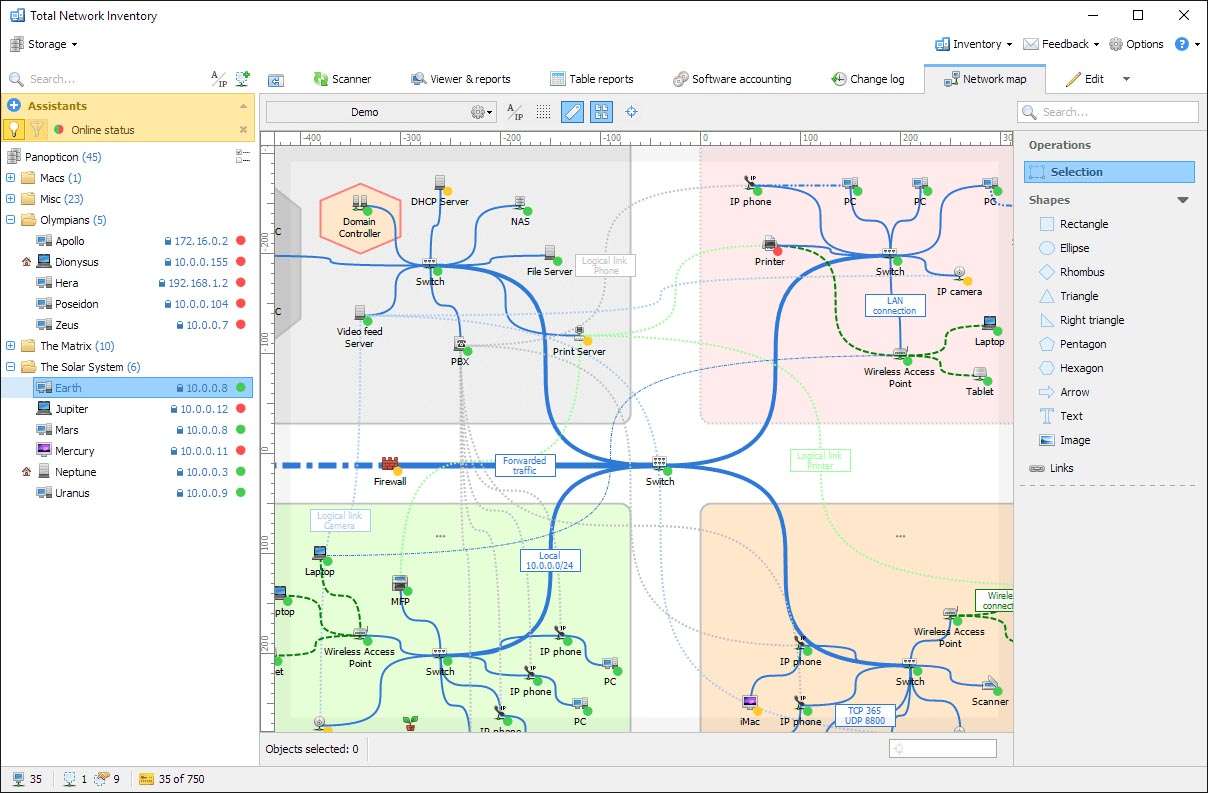
Total Network Inventory provides powerful and flexible reporting capabilities to present inventory data in actionable formats. Users can generate a wide array of customizable reports detailing hardware specifications, installed software, network configurations, and license compliance statuses. These reports can be exported in various popular formats, including PDF, Excel, and HTML, facilitating easy sharing and further analysis. The software also includes network mapping features to visually represent the network topology and device connections. Enhancements in version 6.7.1.7318 offer improved integration options with other IT management platforms, enabling automated workflows and a more cohesive IT management ecosystem for enhanced efficiency.
Real-World Applications and Use Cases in IT Environments
In enterprise environments, Total Network Inventory is instrumental for maintaining an accurate asset register, essential for budgeting, procurement, and security. For IT service providers and managed service providers (MSPs), it forms the backbone of effective client IT management, allowing for standardized auditing, remote support, and proactive issue resolution. Typical use cases include conducting regular IT audits to verify hardware and software inventories, optimizing resource allocation by identifying underutilized assets or redundant software, and ensuring compliance with software licensing agreements. By providing a clear overview of the IT landscape, the software empowers IT professionals to make informed decisions, improve operational efficiency, and reduce IT-related risks.
Frequently Asked Questions
How does Total Network Inventory perform agentless scanning across different operating systems?
Total Network Inventory utilizes protocols such as WMI for Windows, SNMP for network devices, and SSH for Unix-based systems to gather information without installing agents on client machines, enabling seamless cross-platform inventory management.
Can Total Network Inventory help in monitoring software license compliance?
Yes, it audits installed software licenses across the network, monitors compliance status, and sends alerts for expirations or discrepancies to ensure organizations stay compliant with license agreements.
What types of devices and systems does Total Network Inventory support?
The software supports a wide range of devices including Windows, macOS, Linux, FreeBSD machines, routers, printers, and other network hardware, providing comprehensive network asset management.




Reviews
There are no reviews yet.