

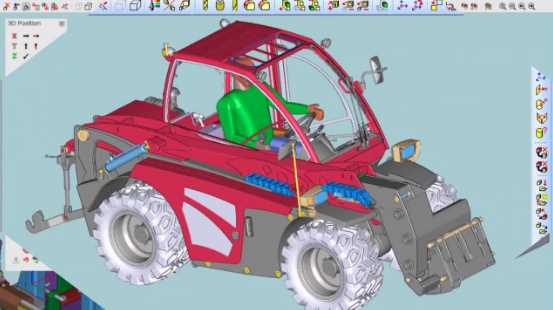
Download VariCAD 2023 v2.05 – Advanced 3D/2D Mechanical CAD Software
VariCAD 2023 v2.05 is a comprehensive mechanical CAD software developed by VariCAD s.r.o., designed for professionals in mechanical design, engineering, and manufacturing. Since its inception in 1988, VariCAD has evolved to offer robust 3D and 2D modeling capabilities, supporting a wide range of engineering tasks with a focus on efficiency and precision.
Overview of VariCAD
Historical Context and Development
VariCAD has been a consistent presence in the CAD landscape since 1988. Developed in the Czech Republic by VariCAD s.r.o., the software has continuously expanded its feature set to cater to the evolving needs of the mechanical engineering sector. Its development journey has prioritized the integration of powerful modeling tools with practical calculation modules, establishing it as a reliable option for detailed design work.
Key Features of VariCAD 2023 v2.05
3D Modeling and 2D Drafting Tools
VariCAD provides an extensive suite of tools for both 3D CAD modeling and 2D drafting. The software incorporates advanced functionalities such as geometric constraints and parametric design, enabling users to create editable and maintainable models. This approach ensures that design modifications can be implemented efficiently while preserving design integrity.
- Parametric design capabilities for flexible model manipulation.
- Support for geometric constraints to lock design relationships.
- Tools for creating detailed 3D assemblies and complex part designs.
- Comprehensive 2D drafting features for creating manufacturing drawings and schematics.
Part Libraries and Calculation Modules
A significant advantage of VariCAD is its extensive library of predefined mechanical parts, including screws, nuts, bearings, and other standard components. This feature accelerates the design process by allowing users to easily insert and configure common elements. In addition, VariCAD includes integrated calculation modules for various engineering disciplines, such as stress analysis and forces, aiding in design validation and optimization.
- Extensive catalog of standard mechanical parts for quick insertion.
- Integrated calculation tools for engineering analysis (e.g., beam, screw, and spring calculations).
- Support for generating bills of materials (BOM) directly from designs.
File Compatibility and Integration
VariCAD offers strong interoperability features, facilitating a smooth workflow within diverse engineering environments. It allows users to edit DWG files directly without requiring conversion, maintaining compatibility with common industry standards. Furthermore, VariCAD supports various industrial file exchange formats, including STEP/STP, ensuring seamless data transfer with other CAD systems and manufacturing equipment.
- Direct editing of DWG files without conversion.
- Support for exporting to and importing from STEP/STP formats.
- Ability to exchange data with other software used in mechanical design and manufacturing.
Real-World Applications
VariCAD serves a wide array of applications within the mechanical design and manufacturing industries. Its robust feature set makes it suitable for everything from conceptual design to detailed production drawings. The software is utilized across sectors that require precise mechanical component design, assembly management, and simulation.
- Design and detailing of machine parts and mechanical assemblies.
- Creation of manufacturing documentation, including 2D drawings and BOMs.
- Use in educational institutions for teaching mechanical engineering and CAD principles.
- Development of sheet metal components and designs.
Comparison with Similar CAD Tools
Compared to some other general-purpose CAD software, VariCAD distinguishes itself with its specialized focus on mechanical engineering workflows and its integrated calculation modules. While many CAD tools offer extensive 3D modeling, VariCAD’s direct DWG editing capability and comprehensive native part libraries provide distinct advantages for users who frequently work with these formats and standard components. Its interface is noted for being somewhat less complex than some high-end, enterprise-level CAD systems, potentially offering a more accessible learning curve for specific mechanical design tasks.
User Experience and Interface
VariCAD features a graphical interface designed for efficient manipulation of CAD data. The user interface is structured to provide relatively straightforward access to its powerful tools, including the 3D modeling and 2D drafting environments. While complex software often requires extensive training, VariCAD aims to offer a more intuitive experience for mechanical engineers by organizing its functions logically and supporting Unicode for multilingual character sets.
Conclusion and Further Information
VariCAD 2023 v2.05 continues to be a valuable engineering software download for mechanical designers and manufacturers. Its combination of precise 3D/2D CAD tools, extensive part libraries, calculation modules, and strong file compatibility makes it a capable solution for a variety of engineering projects. Professionals seeking specialized mechanical CAD software will find VariCAD a robust and efficient option.
Frequently Asked Questions
What types of projects can VariCAD be used for?
VariCAD is primarily designed for mechanical engineering projects, allowing users to create and modify 2D drawings and 3D models. It is well-suited for designing mechanical components, assemblies, and conducting simulations like crash tests, offering a complete environment for mechanical design tasks.
How does VariCAD support file interoperability?
VariCAD supports seamless editing of DWG files without the need for conversion. It also supports STEP/STP format for industrial product data exchange, making it adaptable for various engineering workflows and ensuring compatibility with other CAD systems and manufacturing tools.
What educational resources are available for learning VariCAD?
VariCAD offers extensive user manuals and online resources for beginners and advanced users, facilitating a smooth learning curve. Additionally, community forums and tutorials enhance the learning experience, providing support for users navigating the software’s functionalities.




Reviews
There are no reviews yet.