

Download Visual Micro 2023.1 – Seamless Arduino Programming in Visual Studio
Visual Micro 2023.1 is an advanced plugin for Microsoft Visual Studio developed by Visual Micro Ltd. in collaboration with the Arduino project. It is designed to streamline the process of embedded systems software development for Arduino microcontrollers. This tool is particularly beneficial for professionals and students in the fields of embedded systems, educational technology, and DIY electronics projects who seek a more powerful and integrated development environment than the standard Arduino IDE.
Introduction to Visual Micro
Overview of the Software Functionality
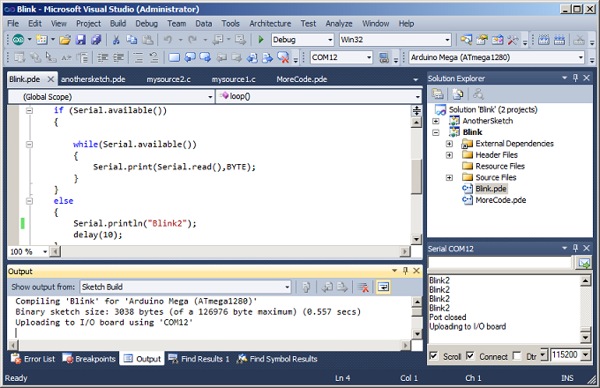
Visual Micro serves as a powerful extension for Microsoft Visual Studio, enabling users to write, debug, and manage code for a wide array of Arduino boards directly within their familiar Visual Studio environment. It bridges the gap between the robust features of a professional IDE and the accessibility of the Arduino platform. The plugin enhances the core Arduino philosophy of making microcontrollers accessible, providing a rich feature set that supports both novice programmers and experienced embedded systems engineers.
Integration with Visual Studio
Benefits of Using Visual Micro
Integrating Visual Micro with Visual Studio provides a significantly enhanced development workflow for Arduino projects. Users benefit from Visual Studio’s advanced code editor, intelligent code completion, and sophisticated debugging capabilities, which are not natively available in the standard Arduino IDE. This integration streamlines the entire development cycle, from writing code to testing and deployment.
- Advanced Debugging: Offers real-time debugging features, allowing developers to set breakpoints, inspect variables, and step through code execution on the Arduino board.
- Rich Library Management: Provides a more organized and efficient system for managing Arduino libraries, including easy searching, adding, and updating of library packages.
- Project Templates: Comes with pre-configured project templates that simplify the setup for common Arduino projects, speeding up the initial development phase.
- Code Refactoring: Leverages Visual Studio’s powerful code analysis and refactoring tools to improve code quality and maintainability.
Supported Arduino Boards and Features
Visual Micro is designed to support a comprehensive range of Arduino boards and compatible hardware, ensuring flexibility for diverse projects. Its robust feature set empowers developers to create complex applications for these microcontrollers.
- Wide Board Compatibility: Supports official Arduino boards such as Arduino Uno, Mega, Leonardo, Due, and Zero, as well as numerous third-party boards and custom designs based on ATmega, SAM, and ESP microcontrollers.
- Microcontroller Programming: Facilitates efficient programming of microcontrollers for tasks requiring direct hardware interaction.
- Real-time Debugging Integration: Enables hardware debugging capabilities directly within Visual Studio, offering deep insights into program execution on the target board.
- Code Assistance: Includes IntelliSense-like code completion, syntax highlighting, and error checking tailored for Arduino sketches.
Typical Use Cases for Visual Micro
The capabilities offered by Visual Micro are instrumental in a variety of real-world applications, spanning educational settings to advanced commercial projects. Its robust integration and debugging features make it suitable for developing sophisticated embedded systems.
- Robotics and Automation: Developing control systems for robots, automated machinery, and industrial control panels.
- Home Automation Systems: Creating smart devices for controlling lighting, temperature, security, and appliances.
- Internet of Things (IoT) Devices: Building connected devices that interact with networks and cloud services for data collection and remote control.
- Educational Tools: Facilitating learning for students and hobbyists by providing a powerful yet accessible platform for microcontroller programming.
- Custom Electronic Projects: Enabling makers and innovators to develop unique hardware solutions for specific challenges.
Enhanced Development Tools
Development Environment Features
Visual Micro significantly enhances the embedded systems development experience by incorporating sophisticated tools within the Visual Studio interface. These features are geared towards improving developer productivity and the quality of the final application.
- Advanced IntelliSense: Provides intelligent code completion, function suggestions, and syntax checking that significantly speeds up coding and reduces errors.
- Build System Integration: Seamlessly integrates with Visual Studio’s build system, allowing for efficient compilation of Arduino sketches.
- Board Manager Integration: Facilitates easy installation and management of board support packages directly within the IDE.
- Code Folding and Navigation: Offers advanced text editing features that improve code readability and navigation within large projects.
Comparison with Other Arduino IDEs
Visual Micro offers a distinct set of advantages when compared to the standard Arduino IDE and other development environments. Its integration with Visual Studio positions it as a powerful tool for professional embedded systems development.
While the standard Arduino IDE provides a straightforward environment for beginners, Visual Micro leverages the comprehensive features of Visual Studio. This includes superior debugging tools, advanced code editing assistance, and a more robust project management system. For developers accustomed to professional IDEs, Visual Micro offers a familiar and more capable environment for programming Arduino boards, significantly enhancing productivity and code quality for complex projects and commercial applications.
Frequently Asked Questions
What is Visual Micro and how does it work with Arduino?
Visual Micro is a Visual Studio plugin that allows users to program Arduino boards using the rich features of Visual Studio. It simplifies the Arduino programming process by providing advanced debugging tools, project templates, and a comprehensive library system, integrating these capabilities directly within the Visual Studio IDE.
Which Arduino boards are compatible with Visual Micro?
Visual Micro supports a wide range of Arduino boards, including popular models like Arduino Uno, Mega, and Leonardo. Beyond these, it also accommodates custom and third-party Arduino-compatible boards and other microcontroller architectures supported by Visual Studio.
How does Visual Micro differ from the standard Arduino IDE?
Unlike the standard Arduino IDE, Visual Micro integrates with Visual Studio, offering powerful features such as code refactoring, enhanced debugging, code completion, and a more sophisticated user interface, which significantly enhance the programming experience for complex embedded systems projects.





Reviews
There are no reviews yet.