
Download Adobe Premiere Rush 2.10 – Seamless Video Editing on Any Device
Adobe Premiere Rush 2.10 is a simplified video editing application developed by Adobe Inc., designed for users who need efficient and powerful tools for quick video production across various platforms, including mobile devices. As part of the Adobe Creative Cloud family, Premiere Rush offers a streamlined workflow that bridges the gap between basic mobile editing and the professional capabilities of Adobe Premiere Pro, making it an ideal solution for multimedia production, content creation, and social media marketing professionals.
Introduction to Adobe Premiere Rush
Overview and Origin
Adobe Premiere Rush is a part of Adobe’s comprehensive suite of creative tools, offering a user-friendly video editing experience that emphasizes speed and versatility. Developed to cater to the growing demand for accessible content creation tools, it provides essential editing functionalities in a single, intuitive application. Its cross-device compatibility ensures that creators can work on their projects whether they are using a desktop or a mobile device, maintaining continuity in their workflow.
Key Features of Adobe Premiere Rush
User-Friendly Editing Tools
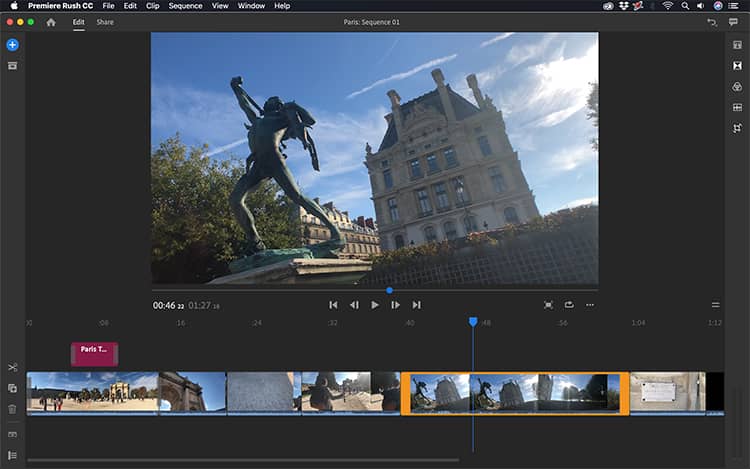
Premiere Rush simplifies the non-linear editing process with a range of tools designed for ease of use without compromising on functionality. Users can perform essential editing tasks such as trimming clips, arranging sequences, and adding transitions. The application also includes features like automated color correction, built-in music and sound effects, and title templates that can be customized, empowering creators to produce polished videos quickly.
Cross-Platform Capabilities
A significant advantage of Adobe Premiere Rush is its availability and seamless synchronization across multiple platforms. Users can edit videos on Windows, macOS, iOS, and Android devices. Projects started on a smartphone can be effortlessly continued on a desktop, thanks to cloud synchronization. This flexibility ensures that content creators can work efficiently wherever they are, adapting to different editing environments without hassle.
How Adobe Premiere Rush Supports Content Creators
Social Media Integration
Designed with social media in mind, Premiere Rush offers direct sharing capabilities to popular platforms such as YouTube, Facebook, Instagram, and TikTok. The application allows creators to select aspect ratios optimized for different social networks and export videos in formats suitable for online distribution. This integrated sharing feature streamlines the process of getting content from edit to upload, which is crucial for maintaining an active online presence.
Automatic and Manual Adjustments
Premiere Rush balances intelligent automation with manual control to enhance video quality. Its auto-color correction feature analyzes footage and applies enhancements to balance exposure and color. For users seeking more precise control, manual color adjustments are available, along with tools for audio mixing and balancing. Variable speed adjustments also allow for creative pacing within the video timeline.
Real-World Applications and Use Cases
Projects and Industries Benefiting from Premiere Rush
Adobe Premiere Rush is particularly beneficial for social media influencers, small businesses, and educational content creators who require efficient video production workflows. It is ideal for producing short-form content, vlogs, social media campaigns, product demonstrations, and online course materials. The application’s portable nature and quick editing capabilities make it a staple for creating timely and engaging content for diverse digital audiences.
Comparison with Other Video Editing Tools
While Adobe Premiere Pro offers extensive professional-grade features for complex video post-production, Adobe Premiere Rush focuses on a streamlined and accessible editing experience. Premiere Rush excels in its cross-device synchronization and direct social media sharing, making it more user-friendly for individuals who prioritize speed and convenience for online content. Its simplified interface and automated features distinguish it from more complex editing suites.
Getting Started with Adobe Premiere Rush
To begin creating with Adobe Premiere Rush, users can import video clips, images, and audio into the media bin. From there, clips can be arranged on the timeline to build the narrative. Essential editing actions such as cutting, splitting, and reordering clips are straightforward. Enhancements can be applied using tools for color correction, text overlays, transitions, and audio mixing, culminating in exporting the final video for sharing.
Conclusion: Why Choose Adobe Premiere Rush?
Adobe Premiere Rush offers a compelling solution for content creators seeking a powerful yet accessible video editing software. Its intuitive interface, cross-device synchronization, and direct social media integration empower users to produce and share high-quality videos efficiently. For those who need to create engaging video content rapidly across different platforms, Premiere Rush provides an optimized and connected editing experience within the Adobe ecosystem.
Frequently Asked Questions
What is Adobe Premiere Rush and how is it different from Adobe Premiere Pro?
Adobe Premiere Rush is a simplified video editing application designed for quick edits across devices, while Adobe Premiere Pro is a more advanced tool aimed at professional editors with comprehensive features. Premiere Rush allows for quick video production particularly suited for social media content.
Can I use Adobe Premiere Rush on multiple devices?
Yes, Adobe Premiere Rush is available on Windows, macOS, iOS, and Android, allowing you to start editing on one device and continue on another seamlessly. This flexibility is great for creators on the go.
What kind of editing features can I find in Adobe Premiere Rush?
Premiere Rush features user-friendly editing tools including automatic color correction, audio editing options, text overlays, and variable speed adjustments, making it suitable for both novices and experienced users.





Reviews
There are no reviews yet.