

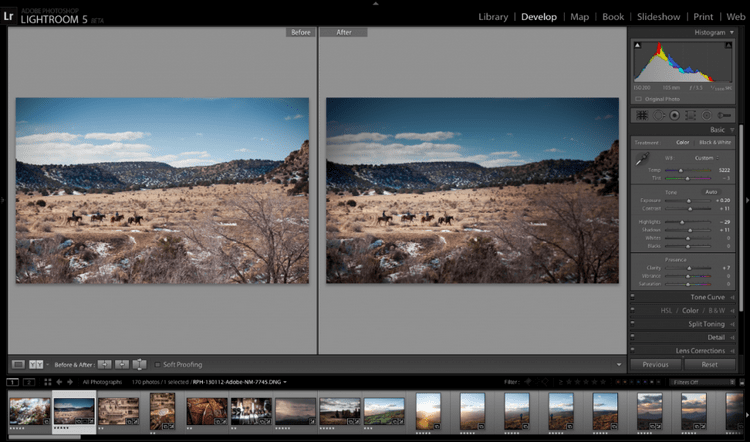
Download Adobe Lightroom Classic 2026 v15.2 – Professional Photo Editing Software
Adobe Lightroom Classic 2026 v15.2, developed by Adobe Systems Incorporated, is a premier photo editing and management application tailored for photographers. This software is essential for professionals and enthusiasts looking to refine their images using a non-destructive editing workflow. It provides robust tools for both enhancing image quality and efficiently organizing extensive photo libraries, making it a cornerstone for modern photography practices.
Introduction to Adobe Lightroom Classic
Adobe Lightroom Classic stands as a powerful solution in photo editing and management, offering photographers a dedicated environment to refine and organize their work. A principal aspect of its design is the commitment to non-destructive editing, ensuring that original image data remains unaltered throughout the correction process. This approach allows for maximum flexibility and preserves the integrity of every photograph. The software has evolved significantly since its inception, with the latest version, 2026 v15.2, focusing on enhanced performance and expanded capabilities for handling professional photography workflows.
Key Features and Editing Tools
Lightroom Classic 2026 v15.2 offers a comprehensive suite of tools designed to elevate photographic work. These features enable detailed corrections and creative enhancements, supporting a high standard of image output.
- Non-Destructive Editing: Apply adjustments such as exposure, contrast, highlights, and shadows without permanently altering the original image files.
- Advanced Color Correction: Utilize a sophisticated color grading system, including HSL (Hue, Saturation, Luminance) adjustments, color balance, and white balance tools for precise color refinement.
- Retouching Tools: Employ healing brushes, spot removal tools, and cloning capabilities to clean up imperfections and select areas for targeted edits.
- Detail and Local Adjustments: Fine-tune sharpness, reduce noise, and apply edits selectively to specific parts of an image using gradient filters, radial filters, and adjustment brushes.
- Updated Enhancements: Version 15.2 introduces performance improvements and refined editing tools for quicker and more intuitive adjustments.
Image Management and Organization
Managing large volumes of photographic assets is streamlined with Lightroom Classic’s advanced organizational features. These tools are critical for photographers who handle extensive portfolios and need quick access to specific images.
- Catalog Management: Maintain a central catalog of all your photos, storing metadata and editing information, which allows for rapid searching and retrieval.
- Keyword Tagging: Apply keywords to images for detailed searchability, enabling users to find specific shots based on subjects, locations, or events.
- Rating and Labeling: Use star ratings, color labels, and flags to sort and prioritize images, helping to identify the best shots or those requiring further attention.
- Collections: Create virtual collections of images from various locations within your catalog, ideal for grouping photos for specific projects, clients, or exhibitions without duplicating files.
Integration with Adobe Ecosystem
Adobe Lightroom Classic 2026 v15.2 is designed to work harmoniously within the Adobe Creative Cloud ecosystem, providing a connected workflow for creative professionals.
- Adobe Photoshop Integration: Seamlessly send images from Lightroom Classic to Adobe Photoshop for advanced compositing, manipulation, or detailed retouching, with changes automatically updated back in the Lightroom catalog.
- Adobe Creative Cloud: Leverage cloud synchronization to access Lightroom libraries, edits, and images across multiple devices, including mobile apps, facilitating a flexible workflow.
- Other Adobe Applications: Connect with tools like Adobe Premiere Pro for video editing workflows that may use similar assets managed within Lightroom.
Real-Life Applications in Photography
Photographers across various specializations utilize Adobe Lightroom Classic to manage and enhance their work effectively. Its capabilities are integral to professional output, whether for print, digital media, or client delivery.
- Professional Photo Shoots: Wedding, portrait, and event photographers use Lightroom Classic to efficiently cull, edit, and deliver large numbers of high-quality images to clients.
- Landscape and Nature Photography: This software aids in bringing out the detail and color in expansive scenes, managing vast archives of location-based imagery.
- Commercial and Product Photography: Precise color correction and retouching ensure products are represented accurately for e-commerce or advertising purposes.
- Photojournalism: The cataloging and metadata features help journalists manage and track images for publication, ensuring rapid turnaround times.
- Enthusiast Workflow Enhancement: Amateur photographers benefit from the structured approach to editing and organizing, improving their skills and output quality.
System Compatibility and Installation Information
Adobe Lightroom Classic 2026 v15.2 is developed to run on standard professional creative workstations. For optimal performance, especially with its enhanced features in this version, ensuring your system meets recommended specifications is advisable. The software is compatible with current versions of Windows and macOS operating systems.
Frequently Asked Questions
What are the main features of Adobe Lightroom Classic?
Adobe Lightroom Classic offers powerful photo editing tools, including non-destructive editing, advanced color corrections, organizational features, and seamless integration with other Adobe software. It helps photographers manage their portfolios efficiently.
How does Lightroom Classic differ from Adobe Lightroom?
Lightroom Classic is designed for desktop users with advanced library and editing capabilities, while Adobe Lightroom (the cloud-based version) offers a more streamlined workflow for mobile and on-the-go editing and sharing.
Can Lightroom Classic handle RAW image files?
Yes, Adobe Lightroom Classic supports a wide range of RAW file formats, allowing photographers to edit high-quality images while preserving their original data.






Reviews
There are no reviews yet.