
Download InventorCAM 2026 – Streamline Your CNC Machining Projects
InventorCAM 2026 is a powerful CAM plugin developed by SolidCAM, designed to enhance the capabilities of Autodesk Inventor for CNC machining and manufacturing industries. This comprehensive solution provides advanced functionalities for designing complex machining systems, leveraging unique iMachining technology to significantly improve user efficiency and reduce project times. It is an essential tool for professionals in the manufacturing sector seeking to optimize their CNC operations.
Overview of InventorCAM 2026
A Comprehensive CAM Solution
InventorCAM 2026 serves as an integrated Computer-Aided Manufacturing (CAM) plugin, specifically engineered for seamless operation within the Autodesk Inventor environment. Its primary purpose is to empower CNC machinists and manufacturing engineers with advanced tools for designing, simulating, and optimizing machining processes. By offering a unified workflow, InventorCAM simplifies complex tasks, allowing users to transition from design to production more efficiently.
Key Features and Functionalities
Seamless Integration with Autodesk Inventor
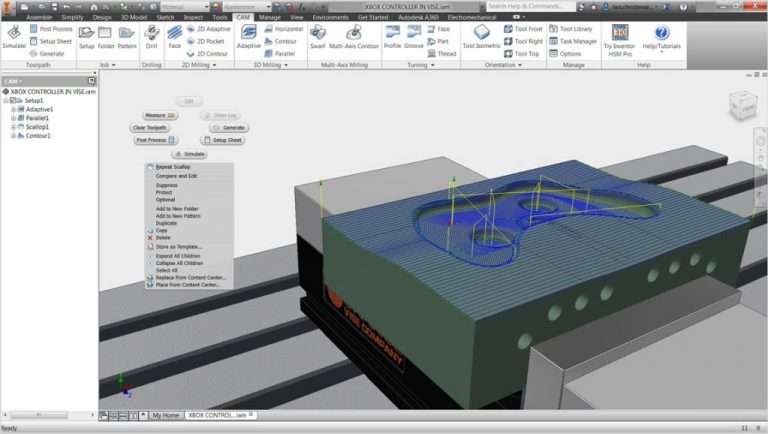
The core strength of InventorCAM 2026 lies in its deep and seamless integration with Autodesk Inventor. This integration ensures that all CAM operations are performed directly within the familiar Inventor interface, eliminating the need to switch between different software applications. This unified environment streamlines the design-to-manufacturing workflow, reduces errors, and enhances overall user productivity by maintaining data associativity.
Key aspects of this integration include:
- Direct access to Inventor’s design data without importing or exporting files.
- Consistent user interface that mirrors Autodesk Inventor.
- Real-time updates reflecting design changes in the machining strategy.
- Simplified setup and management of machining tasks.
Utilization of iMachining Technology
InventorCAM 2026 features the proprietary iMachining technology, a groundbreaking innovation in CAM software that significantly optimizes CNC machining. iMachining analyzes the tool’s geometry and material stock to automatically generate efficient and safe tool paths. This technology dynamically adapts cutting parameters in real-time based on the material and the tool’s instantaneous load.
The benefits of iMachining include:
- Substantial reductions in machining cycle times, often reported as over 70%.
- Extended tool life due to optimized cutting conditions, leading to lower tooling costs.
- Automatic generation of roughing, finishing, and other machining strategies.
- Simplified CAM programming with intelligent automation.
Applications in CNC Machining
Designing Complex Machining Systems
InventorCAM 2026 provides robust tools for users to design and generate tool paths for complex 2D and 3D machining operations. Whether dealing with intricate contours, multi-axis machining, or varied material types, the software offers pre-defined operations and customizable settings to achieve precise results. Users can simulate the entire machining process to detect potential collisions or errors before actual production.
Specific applications include:
- Generating tool paths for 2.5D milling operations.
- Programming advanced 3-axis and multi-axis milling.
- Creating tool paths for single and swiss-type lathes for turning operations.
- Visualizing and verifying machining paths through integrated simulation tools.
Real-World Use Cases
Industries that rely heavily on precision and efficiency in their manufacturing processes find significant value in InventorCAM 2026. Sectors such as aerospace, automotive, medical device manufacturing, and general custom parts fabrication benefit from its advanced CAM capabilities and integration with Autodesk Inventor. Projects requiring high-tolerance components, complex geometries, or rapid production cycles are prime examples where InventorCAM’s features, particularly iMachining technology, demonstrate their effectiveness.
Comparison with Other CAM Solutions
Compared to standalone CAM software, InventorCAM 2026’s primary advantage is its seamless integration within the Autodesk Inventor environment. While other CAM solutions may offer extensive feature sets, InventorCAM provides a more unified workflow by operating directly inside Inventor, thus reducing data translation issues and enhancing operational efficiency. Its unique iMachining technology also sets it apart, offering automated optimization that many other CAM systems do not provide natively.
Conclusion and Recommendations
InventorCAM 2026, developed by SolidCAM, stands out as a highly integrated and intelligent CAM plugin for Autodesk Inventor. Its seamless integration and powerful iMachining technology offer significant advantages in efficiency, time savings, and tool life optimization for CNC machining projects. For manufacturing professionals seeking to enhance their production capabilities within the Inventor ecosystem, downloading and utilizing InventorCAM 2026 is a recommended step towards achieving greater productivity and precision in their operations.
Frequently Asked Questions
What is InventorCAM 2026 used for?
InventorCAM 2026 is a plugin for Autodesk Inventor that enhances capabilities for CNC machining and manufacturing. It enables users to design complex machining systems and utilizes advanced iMachining technology for improved efficiency and optimized cutting processes.
How does the iMachining technology in InventorCAM work?
iMachining technology optimizes machining processes by adapting cutting parameters in real-time based on the tool’s geometry and material stock. This dynamic adaptation leads to significant time savings and improved tool life during CNC operations, ensuring efficient and safe machining.
Can I integrate InventorCAM with other CAD software?
InventorCAM is specifically designed for integration with Autodesk Inventor. While it may offer some interoperability features for data exchange, its primary efficiency and seamless workflow are realized when used directly within the Inventor environment.






Reviews
There are no reviews yet.