

Download Adobe Photoshop Elements 2026 – Simplified Photo Editing Software
Adobe Photoshop Elements 2026, developed by Adobe Inc., is a graphics application designed for simplified photo editing and image management. It is tailored for users in the photography and graphic design fields who need essential tools without the complexity of professional-grade software, serving as an accessible entry point into photo enhancement and organization.
Overview and Target Audience
Adobe Photoshop Elements 2026 offers a user-friendly environment for individuals seeking to enhance their digital photos. This version is specifically curated for beginner users and casual photographers who require straightforward tools for image editing and organization. It bridges the gap for those who find the full Adobe Photoshop suite overly complex, providing a more accessible platform for creative expression with images.
Core Features and Functions
This comprehensive photo editing software provides a range of tools designed to simplify image enhancement and manipulation. Users can achieve professional-looking results through accessible features and intuitive workflows:
- Essential Editing Tools: Includes straightforward tools for cropping, resizing, removing blemishes, and adjusting colors and exposure.
- Filters and Effects: A wide array of pre-set filters and artistic effects can be applied to photos with a single click to alter mood and style.
- Guided Edits: Step-by-step instructions guide users through common editing tasks, making advanced techniques accessible to beginners.
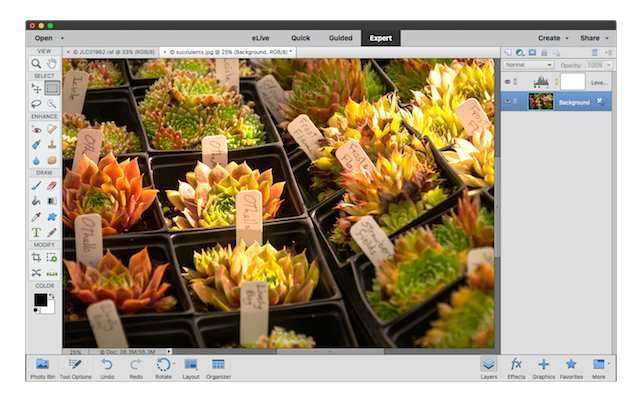
- User Interface: Features a clean and organized interface with distinct modes (Quick, Guided, Expert) to cater to different user experience levels.
- Automated Options: Offers automated enhancements that can intelligently improve photos, such as auto-sharpening or color correction.
Image Management Capabilities
Beyond editing, Adobe Photoshop Elements 2026 supports effective image management, allowing users to organize their growing photo collections with ease. The software provides tools to maintain order and quickly locate specific images:
- Photo Organizer: Facilitates the management of photo libraries through features like tagging, rating, and categorization.
- Smart Tags: Automatically identifies subjects and scenes in photos, simplifying the organization process.
- Facial Recognition: Automatically detects and identifies faces in imported photos, making it easier to find pictures of specific people.
- Search and Sort Functions: Allows users to sort photos by date, filename, or media type, and search using keywords or criteria.
Comparison with Adobe Photoshop
Adobe Photoshop Elements 2026 is intentionally designed as a more accessible alternative to the professional standard, Adobe Photoshop. While both applications are developed by Adobe Inc., they cater to different user needs and skill sets.
- Target User: Photoshop Elements is aimed at beginner and hobbyist photographers, whereas Adobe Photoshop is geared towards professional designers, photographers, and artists.
- Feature Set: Elements focuses on essential photo editing and organization tools, often with guided assistance. Photoshop offers a vastly more extensive suite of advanced features, including complex layer management, precise color grading, 3D design, and advanced compositing.
- Interface Complexity: Elements features a simplified user interface with single-click options and guided workflows. Photoshop’s interface is more complex, offering granular control over every aspect of image manipulation.
- Cost: Photoshop Elements typically represents a more cost-effective solution for personal use compared to the subscription-based Adobe Photoshop.
Applications in Photography and Graphic Design
Photoshop Elements 2026 finds practical applications for photographers and designers engaged in various projects, particularly those prioritizing ease of use and efficient workflows. Its capabilities are well-suited for common creative tasks:
- Personal Photography Enhancement: Ideal for everyday users wanting to improve family photos, vacation pictures, or portraits before sharing them online or printing.
- Basic Graphic Design Tasks: Suitable for creating simple graphics for social media, greeting cards, or personal invitations, leveraging templates and easy-to-use design tools.
- Photo Album Creation: Assists in organizing and curating collections of images for digital scrapbooks or photo albums.
- Quick Fixes and Retouching: Efficiently handles common photo corrections such as red-eye removal, blemish removal, and background adjustments.
Getting Started with Photoshop Elements 2026
Embarking on your photo editing journey with Photoshop Elements 2026 is designed to be intuitive. The software offers multiple ways to interact with your images, ensuring a smooth learning curve for all users.
- Interface Navigation: Familiarize yourself with the three main edit modes: Quick Edit for simple adjustments, Guided Edit for step-by-step assistance, and Expert Edit for more control similar to the full Photoshop interface.
- Importing Photos: Use the File > Get Photos menu to import images from cameras, card readers, or existing folders on your computer.
- Applying Basic Adjustments: Explore the Quick Edit mode to quickly adjust brightness, contrast, and color saturation using sliders.
- Utilizing Guided Edits: Select a Guided Edit from the relevant panel to follow prompts for tasks like straightening photos, removing unwanted objects, or adding text.
Conclusion
Adobe Photoshop Elements 2026 stands out as an excellent choice for individuals seeking accessible and effective photo editing software. Its emphasis on a user-friendly interface, guided editing options, and robust image management tools makes it an ideal solution for beginner photographers and casual users. The software provides the essential capabilities needed to enhance and organize digital images without the steep learning curve associated with professional-grade applications, offering great value and creative potential.
Frequently Asked Questions
What is Adobe Photoshop Elements 2026 used for?
Adobe Photoshop Elements 2026 is used for basic photo editing and image management, targeting beginners who require simple tools for enhancing and organizing their images. It allows users to quickly improve the appearance of photos, remove imperfections, and categorize their picture collections efficiently.
How does Photoshop Elements differ from Adobe Photoshop?
Photoshop Elements offers a more streamlined set of tools compared to Adobe Photoshop, focusing on functionalities for casual users rather than professionals. It simplifies the editing process with guided actions and a more intuitive user interface, making it accessible for beginners, while Adobe Photoshop provides advanced features for complex, professional workflows.
Can I manage my image library with Photoshop Elements?
Yes, Photoshop Elements includes features for managing and organizing your image library, enabling users to easily search and categorize their photos. Functions such as tagging, facial recognition, and smart tags help maintain order and allow for quick retrieval of specific images within large collections.




Reviews
There are no reviews yet.