

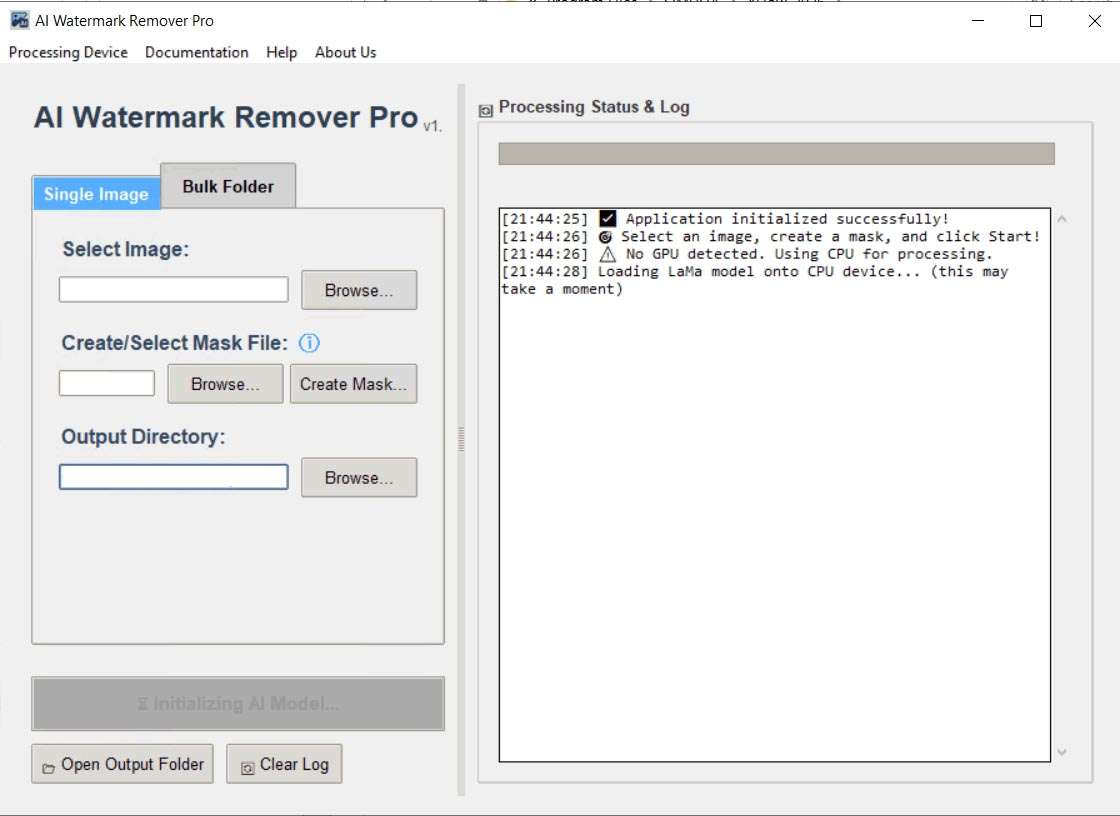
Download AI Image Watermark Remover Pro 1.0.1 – AI-Powered Watermark and Object Removal
AI Image Watermark Remover Pro 1.0.1 is a specialized graphics application designed for professional image editing tasks, focusing on the removal of watermarks, logos, and unwanted objects using advanced AI inpainting techniques. Developed by an independent software vendor, this tool is geared towards photographers, graphic designers, e-commerce specialists, and content creators who require efficient and high-fidelity image restoration and cleanup.
Clean Up Images Effortlessly with AI Inpainting
Professional Applications
Professionals across various fields utilize AI Image Watermark Remover Pro to enhance their digital assets. Photographers can remove bothersome timestamps or distracting elements from scenic shots, ensuring a pristine final image. Graphic designers leverage the AI’s capabilities for intricate object removal or logo deletion in client projects, saving significant manual editing time. E-commerce specialists rely on the software to present clean product images free of watermarks or distracting marks, improving listing appeal. Social media content creators can efficiently prepare images by removing any overlaid branding or unwanted graphic elements, maintaining a consistent aesthetic. For photo restoration enthusiasts, the AI provides a powerful method to reconstruct damaged or obscured areas of vintage photographs.
Advanced AI-Powered Watermark and Logo Removal
How Inpainting Technology Works
At its core, AI Image Watermark Remover Pro employs sophisticated inpainting technology driven by neural networks. This AI model analyzes the masked region—the area designated for removal—and intelligently assesses the surrounding pixels, textures, lighting conditions, and patterns. Based on this comprehensive analysis, learned from extensive training on vast image datasets, the AI synthesizes new pixel information to seamlessly reconstruct the masked area. This process allows for the realistic and natural completion of backgrounds, effectively making watermarks, logos, or other unwanted objects disappear without leaving visible traces.
Precise Masking and Selection Tools for Pixel-Perfect Results
Visual Mask Editor Features
Achieving pixel-perfect results is facilitated by a suite of intuitive masking tools within the Visual Mask Editor. Users can meticulously define the areas to be removed or restored through adjustable brush sizes and an eraser tool for fine-tuning selections. The software supports multiple mask layers, offering flexibility in complex editing scenarios. Enhanced accuracy is possible with zoom functionality, allowing for detailed work on critical areas. Furthermore, masks can be saved and reused, streamlining repetitive tasks and ensuring consistency across similar images or project elements.
Efficient Batch Processing for Large Image Sets
For professionals managing large volumes of images, AI Image Watermark Remover Pro offers robust batch processing capabilities. Users can define a single mask and apply it consistently across hundreds or even thousands of images located in various folders. This feature is particularly invaluable for updating product catalogs, managing extensive photo libraries, or performing large-scale content cleanup where uniformity and speed are essential. The batch processor ensures that the watermark or object removal process remains consistent, delivering uniform results across an entire dataset efficiently.
Compatibility with Popular Image Formats
The software ensures extensive compatibility by supporting a wide range of industry-standard image formats. This includes:
- PNG: Ideal for graphics and images requiring transparency support, widely used for web graphics and logos.
- JPEG/JPG: A ubiquitous format for photographs and complex images, offering good compression ratios for web use.
- BMP: A less compressed, high-quality format often used for raw image data storage.
- WEBP: A modern format offering superior lossless and lossy compression for web images, balancing quality and file size.
- TIFF: A high-fidelity format favored in professional printing and archiving workflows for its support of lossless compression and deep color depths.
This broad format support makes AI Image Watermark Remover Pro adaptable to virtually any professional workflow.
Privacy First: Complete Offline and Local Processing
Privacy is a paramount concern addressed by AI Image Watermark Remover Pro’s architecture. All AI computations, including image inpainting and watermark removal, are performed locally on the user’s computer. This means no internet connection is required for processing, and crucially, no image data is ever uploaded to external servers or cloud services. This fully offline and local processing model guarantees that sensitive or proprietary image data remains secure and private, under the user’s direct control.
Hardware Acceleration and Performance Optimization
To maximize efficiency, AI Image Watermark Remover Pro incorporates hardware acceleration, primarily through NVIDIA CUDA support for compatible GPUs. This enables significantly faster processing speeds, especially for complex inpainting tasks and batch operations, allowing users to preview results in near real-time. For systems not equipped with a CUDA-enabled NVIDIA GPU, the software includes a fallback to CPU processing, ensuring broad system compatibility and usability across a diverse range of hardware configurations while still offering optimized performance.
Frequently Asked Questions
Does AI Image Watermark Remover Pro work entirely offline?
Yes, AI Image Watermark Remover Pro is designed for complete offline operation. All sophisticated AI processing and inpainting computations occur locally on your machine; there is no requirement for an internet connection, and no image data is ever uploaded to any external servers, thereby ensuring maximum data privacy and security.
What image file formats are supported?
The software natively supports a comprehensive array of popular file formats essential for professional workflows. This includes PNG (preserving transparency), JPEG/JPG, BMP, WEBP, and TIFF, catering to both web-optimized and high-resolution archival needs.
Will removing watermarks or objects degrade image quality?
The advanced AI model is meticulously trained on millions of diverse images to ensure highly accurate background reconstruction. It strives to maintain texture, lighting, and perspective consistency, delivering results that are professional-grade and often indistinguishable from the original. While extremely intricate scenes might show minor variations, the overall quality remains exceptionally high and suitable for professional use.





Reviews
There are no reviews yet.