

AVEVA Plate & Bar Nesting 15.3: Shipbuilding Nesting & Manufacturing Optimization Software
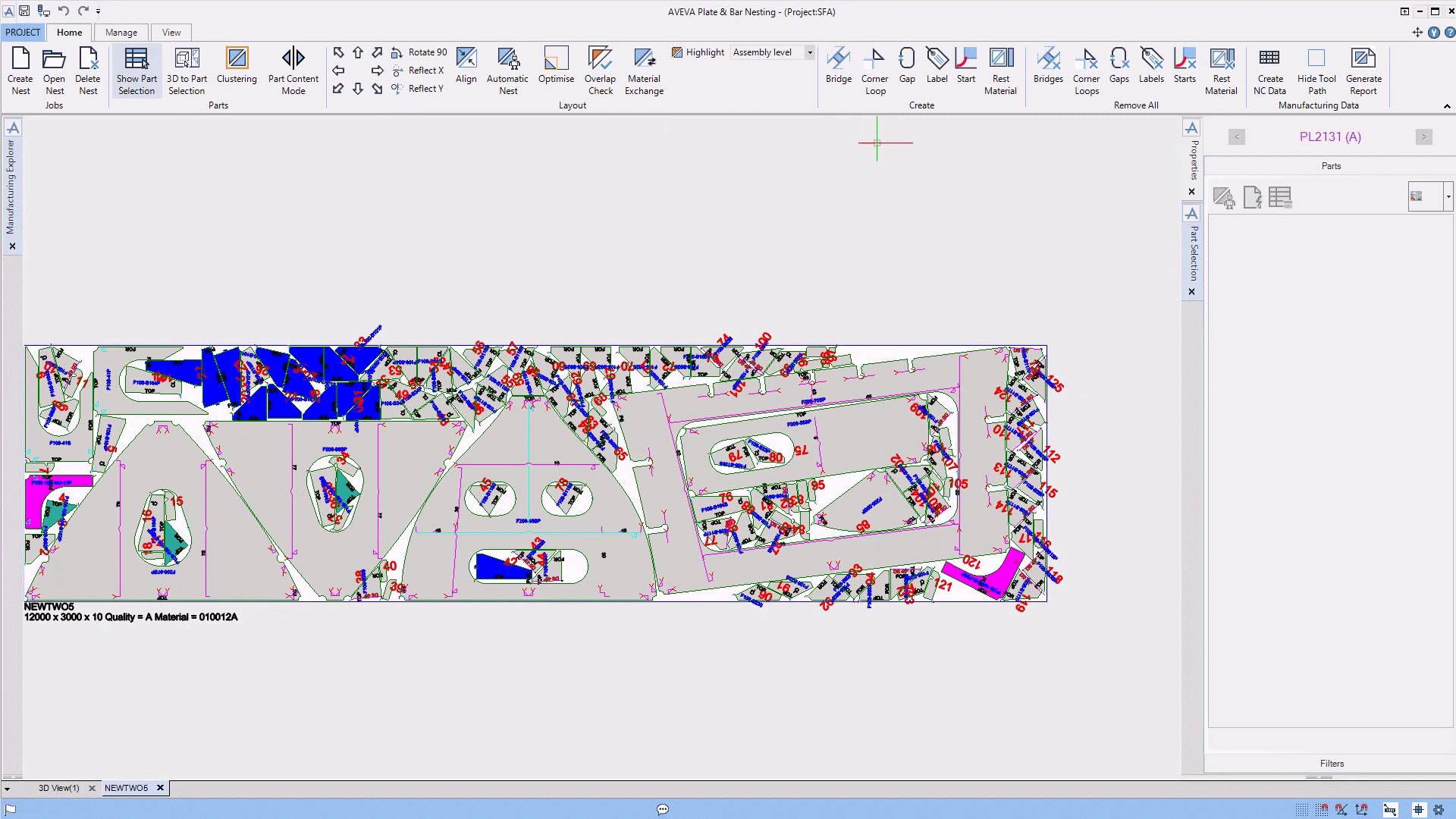
AVEVA Plate & Bar Nesting 15.3 is an advanced nesting solution for the shipbuilding industry, part of the AVEVA Hull & Outfitting suite, used for optimizing the layout of steel parts (plates, stiffeners, profiles) onto raw material stock to maximize yield and minimize waste .
The software automatically positions thousands of unique parts—cut from plates, profiles, or bars—onto standard-sized inventory using sophisticated algorithms that consider material grain direction, thermal distortion, and cutting path optimization to drastically reduce scrap rates and preparation time in shipyards
⚓ Primary Users
This professional shipbuilding nesting software is designed for:
-
Shipyard Production Engineers & Nesting Specialists optimizing material layout for steel plates and profiles to maximize yield
-
Manufacturing Planners & CNC Programmers generating cutting instructions for flame, plasma, and laser cutters
-
Plate & Profile Shop Managers minimizing material waste and managing remnant inventory
-
Quality Assurance Engineers verifying cutting accuracy and material traceability
-
Fabrication Supervisors tracking production progress and resource allocation
⚡ Key Features & Capabilities
????️ Direct Plate Editing (MPLATE)
New in 15.3.0.0 – MPLATE allows direct visualization and modification of plate manufacturing information directly within the nesting environment, eliminating the need to revert to the design team for changes .
Editable Properties:
-
Excess material allowances
-
Bevel angles and configurations
-
Hole positions and dimensions
-
Notch geometries
-
Marking and labeling information
Enhanced Visualization:
-
Clear display of all plate properties in Part Manager and Property Grid
-
Real-time visual feedback for modifications
Access Control:
-
Discretionary Access Control (DAC) allows administrators to set editing permissions
-
Role-based security ensures only authorized personnel can modify critical plate properties
Customer Benefits:
-
Saves valuable time by eliminating design team rework cycles
-
Reduces errors from manual communication
-
Faster response to production floor issues
???? Automatic Bridges
New in 15.3.0.0 – The automatic bridge configuration feature connects nested parts with a single click, significantly reducing manual effort .
Key Capabilities:
-
Automatically connects nested parts to prevent falling or deformation during cutting
-
Customizable bridge configurations
-
Bridges can connect to segments with bevels and curvatures
-
Bridges are created centrally on parts for optimal stability
-
Ability to exclude bridges between parts and holes when needed
Flexibility:
-
Manual or automatic bridge editing available
-
Visualization tool for identifying unconnected parts
-
Full manual override for custom project requirements
Customer Benefits:
-
Prevents part deformation during manufacturing
-
Ensures structural integrity of nested parts
-
Reduces manual bridge creation effort
???? Advanced Nesting Algorithms
The software uses sophisticated algorithms to automatically position parts onto standard-sized plates, bars, and profiles, optimizing for:
-
Maximum material yield
-
Reduced scrap rates
-
Consideration of grain direction and thermal distortion
-
Cutting path optimization
???? What’s New in Version 15.3.0.0
The 15.3.0.0 release introduces two major enhancements that significantly impact shipyard production efficiency :
| Feature | Description | Benefit |
|---|---|---|
| MPLATE Editing | Direct visualization and modification of plate manufacturing information | Eliminates design team rework cycles; saves time |
| Automatic Bridges | One-click connection of nested parts to prevent deformation | Reduces manual effort; ensures structural integrity |
| DAC Access Control | Role-based permissions for editing plate properties | Enhanced security and data accuracy |
Future Updates
Version 15.3 includes improved visualization tools in the Part Manager and Property Grid, providing enhanced visibility of excess, bevels, holes, notches, markings, and labels .
???? System Requirements
Minimum Requirements
-
OS: Windows 10/11 (64-bit)
-
Processor: 2.0 GHz dual-core
-
RAM: 8 GB




Reviews
There are no reviews yet.