

Download 3DCoat – Advanced Digital Sculpting and 3D Modeling Software
3DCoat is a specialized digital sculpting program developed by Pilgway, engineered for the creation of both organic and hard-surface 3D models. This powerful software is a key tool for professionals in game development, 3D modeling, animation, and visual effects. It offers a comprehensive suite of tools designed to facilitate complex 3D asset creation from initial concept to final rendering.
Introduction to 3DCoat and Its Applications
Overview of Software Capabilities
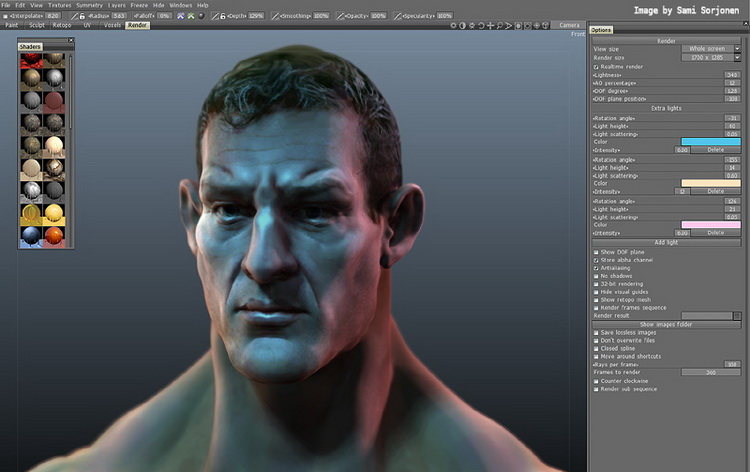
3DCoat is a prominent digital sculpting software that enables artists to craft intricate 3D models. Its core strength lies in its versatile approach to 3D asset creation, serving professionals across various high-demand industries. The software is instrumental in producing detailed models required for realistic video game environments, compelling animated sequences, and immersive visual effects in film.
Advanced Sculpting and Painting Features
The software provides a robust set of sculpting and painting tools that cater to a wide range of artistic needs. Users can leverage both voxel sculpting and polygonal sculpting techniques to achieve desired model forms. The dynamic patch tessellation technology allows for high-density geometry manipulation, essential for detailed organic shapes and complex mechanical designs. Furthermore, 3DCoat’s texture painting capabilities allow for the application of detailed surface properties directly onto the models.
UV Mapping and Texturing Options
Efficient UV mapping is critical for applying textures accurately to 3D models, and 3DCoat offers advanced tools to streamline this process. The software includes automated UV layout generation, which significantly speeds up the workflow for complex models. For users requiring precise control, manual UV editing tools are also available. This flexibility ensures that artists can create optimal UV layouts tailored to specific texturing requirements, facilitating detailed and high-quality texture painting.
Integration with Other Software and Applinks
3DCoat is designed to integrate seamlessly into existing 3D production pipelines through its Applinks system. This feature allows for direct connection and data transfer with popular 3D applications, such as Autodesk Maya, 3ds Max, and Blender. The Applinks facilitate an efficient workflow, enabling artists to paint textures or adjust models in 3DCoat and see the changes reflected in their primary modeling or animation software in real-time.
Real-World Applications and Educational Use
In professional settings, 3DCoat is utilized in various aspects of 3D content creation, from developing intricate characters for video games to designing detailed assets for visual effects in film productions. Its comprehensive toolset makes it suitable for both organic character sculpting and hard-surface modeling of props and environments. Additionally, 3DCoat is recognized for its value in educational institutions, where it serves as a teaching tool for digital sculpting and 3D modeling principles. This makes it an accessible yet powerful option for aspiring 3D artists.
Unique Features of 3DCoat Compared to Competitors
3DCoat distinguishes itself from other 3D modeling tools through several unique features. Its auto-retopology functions provide an efficient method for generating clean, animatable topology from high-poly sculpts. The dynamic patch tessellation technology further enhances the sculpting experience by allowing for detailed surface geometry manipulation without the constraints of traditional polygonal modeling. Combined with its real-time rendering capabilities, these features offer a distinct advantage for rapid prototyping and detailed asset creation.
Frequently Asked Questions
What is 3DCoat used for in the industry?
3DCoat is primarily used for digital sculpting and creating detailed 3D models in industries such as game development, animation, and visual effects. It offers tools for UV mapping and texture painting, making it suitable for both organic and hard surface modeling, enabling high-fidelity asset creation.
How does 3DCoat handle UV mapping?
3DCoat provides both automatic and manual UV mapping capabilities, allowing users to create UV layouts that suit their 3D models’ texture requirements. This flexibility is crucial for detailed texturing and rendering tasks, offering efficient tools for unwrapping complex models.
Can I integrate 3DCoat with other 3D software?
Yes, 3DCoat features a plugin system called Applinks that allows for seamless integration with various third-party 3D applications, enabling efficient model and texture transfer. This system enhances workflow by allowing artists to switch between applications without manual file conversion.





Reviews
There are no reviews yet.