

Download 3Dflow Zephyr 8.038 – Advanced Photogrammetry Software
3Dflow Zephyr 8.038 is an advanced photogrammetry software developed by 3Dflow, designed to transform 2D images into detailed 3D models. This powerful tool is essential for professionals in engineering, architecture, archaeology, environmental sciences, and the gaming industry who require precise 3D reconstruction from photographic data.
Introduction to 3Dflow Zephyr
3Dflow Zephyr leverages the principles of photogrammetry to enable users to generate high-fidelity 3D models from a collection of standard 2D photographs. This process involves sophisticated algorithms that analyze image overlap and pixel data to calculate depth and spatial information. The software is particularly recognized for its ability to automate many complex steps, making the intricate field of 3D model reconstruction more accessible without sacrificing the depth of functionality required by advanced users.
Applications Across Various Industries
The versatility of 3Dflow Zephyr allows it to serve a broad spectrum of industries and applications. In archaeology and historical preservation, it is used to create detailed digital archives of artifacts and sites, enabling research and public access without risking damage to delicate originals. For architecture and construction, Zephyr aids in site surveying, progress monitoring, and creating digital twins of existing structures for renovation or planning. Environmental scientists utilize it for mapping terrain, monitoring geological changes, and studying ecosystems in three dimensions. The gaming and visual effects industries also benefit from its capacity to generate realistic assets and environments from real-world reference.
User-Friendly Interface and Workflow Enhancements
3Dflow Zephyr is designed with an emphasis on an intuitive user interface, catering to a wide range of technical expertise. For users new to photogrammetry, the software provides guided workflows and automation features that simplify the process of converting photos to 3D. Experienced professionals will find advanced controls and customization options that allow for fine-tuning of the reconstruction process. This balance ensures that users can achieve high-quality results efficiently, regardless of their familiarity with complex 3D modeling software.
Key Features of Zephyr
User Interface and Functionality
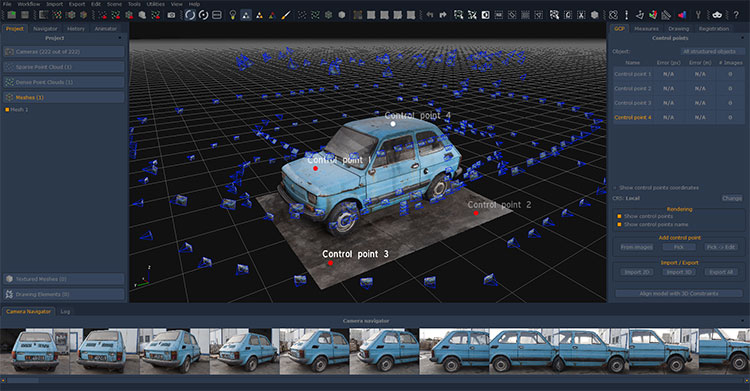
The software features a clean and organized graphical user interface that logically structures the photogrammetry workflow. Users can easily import images, manage projects, and access various processing tools. Functionality includes robust image calibration, point cloud generation, meshing, and texturing capabilities, all accessible through clear menus and toolbars. This design facilitates a smoother user experience and reduces the learning curve associated with powerful 3D reconstruction software.
Advanced Model Export Options
3Dflow Zephyr supports a comprehensive array of export formats, catering to diverse downstream applications. Users can export their fully reconstructed 3D models in formats such as OBJ, FBX, PLY, and STL, among others. The software allows for control over the quality and level of detail in the exported models, ensuring compatibility with various 3D rendering engines, CAD software, and 3D printing workflows. This flexibility is crucial for integrating Zephyr-processed data into existing professional pipelines.
Batch Processing Capabilities
To enhance efficiency, 3Dflow Zephyr incorporates powerful batch processing capabilities. This feature allows users to process multiple sets of images or entire projects simultaneously without manual intervention. By enabling multi-scene processing, users can save significant time, particularly when dealing with large datasets or recurring photogrammetry tasks. This aspect is invaluable for professional environments where throughput and time management are critical.
Integration with Laser Scanning Technology
Recognizing the value of multi-source data, 3Dflow Zephyr offers robust integration with laser scanning technology. The software can import and align point cloud data captured by laser scanners with photogrammetry-generated meshes and point clouds. This hybrid approach significantly enhances the accuracy, detail, and geometric fidelity of the final 3D model. By combining the surface texture information from photogrammetry with the precise geometric data from laser scans, users can achieve highly accurate and visually rich digital representations.
Real-World Use Cases of 3Dflow Zephyr
3Dflow Zephyr is employed in numerous practical scenarios across different sectors. For instance, in urban planning and heritage projects, it has been used to create detailed 3D models of historical city centers for preservation and simulation. Archaeological teams utilize Zephyr to digitally document excavation sites and artifacts, aiding in analysis and conservation efforts. In manufacturing and quality control, engineers can use it to inspect and measure parts by converting reference photos into 3D models. Furthermore, its application extends to creating immersive environments and characters for video games and virtual reality experiences.
Conclusion
3Dflow Zephyr 8.038 stands as a powerful and accessible solution for professionals seeking to perform accurate 3D model reconstruction from photographic data. Its combination of an intuitive interface, advanced features like batch processing and laser scanning integration, and broad industry applicability makes it an indispensable tool for converting photos to 3D. For users looking to download a comprehensive photogrammetry software, 3Dflow Zephyr offers a reliable pathway to creating detailed and precise 3D models.
Frequently Asked Questions
What is 3Dflow Zephyr used for?
3Dflow Zephyr is primarily used for converting 2D photographs into detailed 3D models using photogrammetry techniques. This transformation process makes it an invaluable tool in industries requiring precise spatial data, such as architecture, archaeology, environmental sciences, and digital media creation.
Does 3Dflow Zephyr support laser scanning data?
Yes, 3Dflow Zephyr integrates effectively with laser scanning data. Users can combine point cloud information from laser scanners with photogrammetric data within Zephyr to enhance the accuracy and detail of the generated 3D models, creating a more comprehensive dataset.
What types of outputs can be expected from 3Dflow Zephyr?
Users can export their 3D models in multiple formats and qualities, which can include formats suitable for visualization, analysis, or further processing within other applications. Common export options support workflows in engineering, gaming, and 3D printing.




Reviews
There are no reviews yet.