

Download 3DSnet OrthoGen 25.0 – Automated Orthographic Drawing Software for Engineering and Plant Design
3DSnet OrthoGen 25.0 is a specialized CAD automation software designed to streamline the creation of orthographic drawings for engineering and plant design projects. Developed to serve industries such as structural engineering, plant design, and BIM for building design, OrthoGen leverages 3D model data from various platforms to automate repetitive tasks, ensuring consistency and accuracy in technical documentation. This software is particularly beneficial for professionals seeking to optimize their design workflows.
Software Overview
Automating Orthographic Drawings in Engineering Workflows
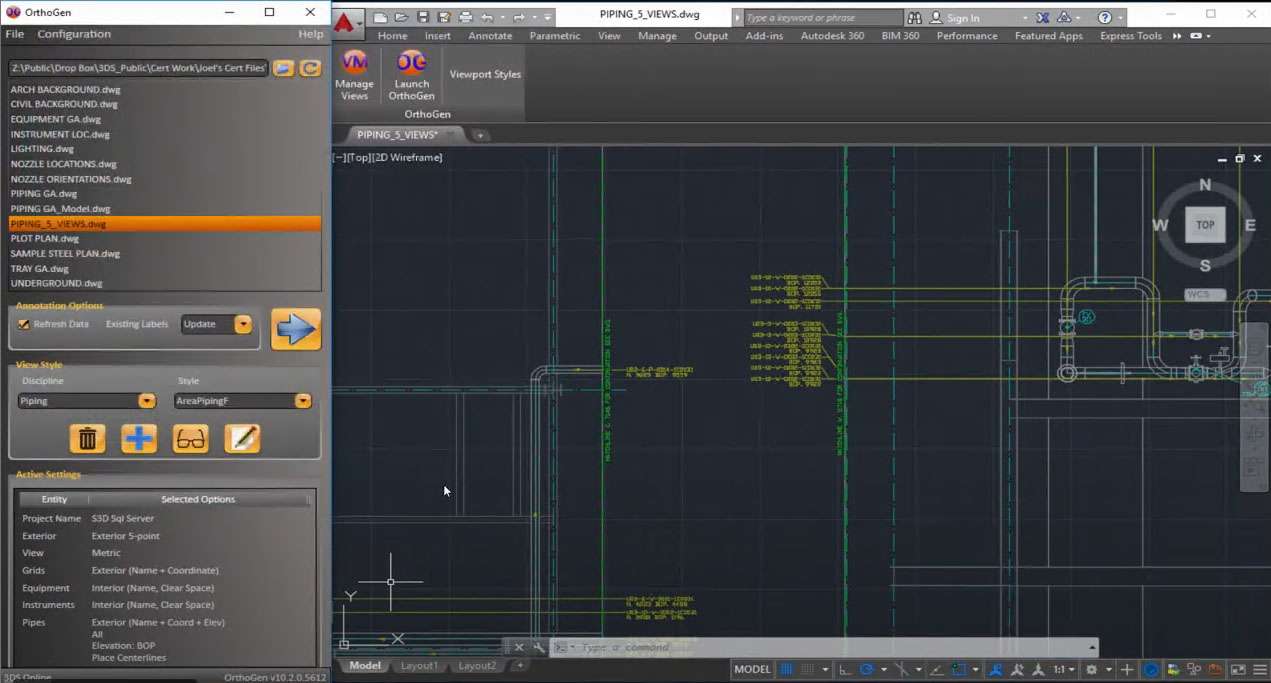
Orthographic drawing automation is crucial for improving efficiency and accuracy in complex engineering projects. 3DSnet OrthoGen addresses this by transforming 3D model data into detailed 2D orthographic drawings. The software automatically generates essential elements such as dimensions, labels, and annotations, directly reflecting the 3D model’s current state. This process significantly reduces the manual drafting effort typically required for structural, piping, HVAC, and electrical components, leading to more consistent and reliable design documentation across all project phases.
Comprehensive Labeling and Dimensioning Across Multiple Disciplines
Structural Drawing Labeling
For structural engineering, OrthoGen automates the labeling of key elements like member names and section names. It accurately places offset dimensions and supports multiple reference standards, ensuring clarity and adherence to project specifications. This capability simplifies the documentation of complex steel structures.
Route and Pipeline Annotation Capabilities
The software facilitates automatic annotation for various routes and pipelines, including pipes, HVAC ducts, and electrical cable trays. Features such as automatic slope labeling, precise elevation placement, and intelligent filtering of pipeline labels enhance the clarity and completeness of route documentation. OrthoGen can generate labels that indicate centerline, offset, and other critical route details.
Instrumentation and Electrical Tagging
Orthogen automates the tagging of instruments and electrical components. It supports the handling of multiple tag formats and can generate instrument list reports directly from the 3D model. This feature is vital for systems requiring precise identification and tracking of electrical and instrumentation assets in plant design.
Equipment Labeling and Nozzle Orientation
The software manages equipment tags and nozzle orientation labels efficiently. Users can choose to place these labels either inside or outside the view drawings, providing flexibility in presentation. This ensures that all necessary information for equipment installation and maintenance is clearly documented.
Integration with Leading CAD and BIM Platforms
3DSnet OrthoGen boasts broad interoperability, supporting data extraction from a wide array of leading CAD and BIM platforms. This includes established plant design software like AutoCAD, MicroStation, Smart 3D, PDS, CADWorx, Plant 3D, ESAPro, and OptiPlant. Furthermore, it enhances BIM workflows by enabling the extraction of Revit sheets into AutoCAD for detailed orthographic drawing production, bridging the gap between design and detailing phases.
Customizable Drawing Styles and User Interface
A core strength of OrthoGen lies in its highly customizable drawing styles. Managed through an intuitive Style Editor, users can create and modify INI file-based drawing styles. This allows for tailoring annotation, dimensioning, and labeling formats to meet specific project requirements or company standards without requiring programming expertise. The software also offers multi-language support and a straightforward user interface, designed to maximize user efficiency and reduce the learning curve.
Use Cases in Structural, Plant, and Healthcare Design Environments
In structural and plant engineering, 3DSnet OrthoGen significantly reduces design time by automating the tedious process of creating orthographic drawings. The software’s ability to maintain data integrity between the 3D model and 2D documentation is invaluable for large-scale projects. Its precision and automation capabilities also offer potential applicability in medical and healthcare engineering design, where accurate orthographic documentation is critical for specialized equipment and facility layouts.
Frequently Asked Questions
How does 3DSnet OrthoGen improve accuracy in orthographic drawing production?
3DSnet OrthoGen automates labeling, dimensioning, and drawing generation directly from 3D models, reducing human error and ensuring all drawings consistently reflect the most current model data. This automation ensures fast, accurate, and standardized output across multiple engineering disciplines.
Which CAD and BIM platforms does OrthoGen support for integration?
Orthogen supports integration with AutoCAD, MicroStation, Smart 3D, PDS, CADWorx, Plant 3D, ESAPro, OptiPlant, and also supports BIM workflows through Revit, allowing extraction of sheets to AutoCAD for detailed orthographic drawing production.
Can users customize drawing styles and labeling formats in OrthoGen?
Yes, OrthoGen allows extensive customization using INI file-based drawing styles managed through a Style Editor. Users can tailor labeling, dimensioning, and annotation styles to meet specific project or company standards without programming knowledge.






Reviews
There are no reviews yet.