

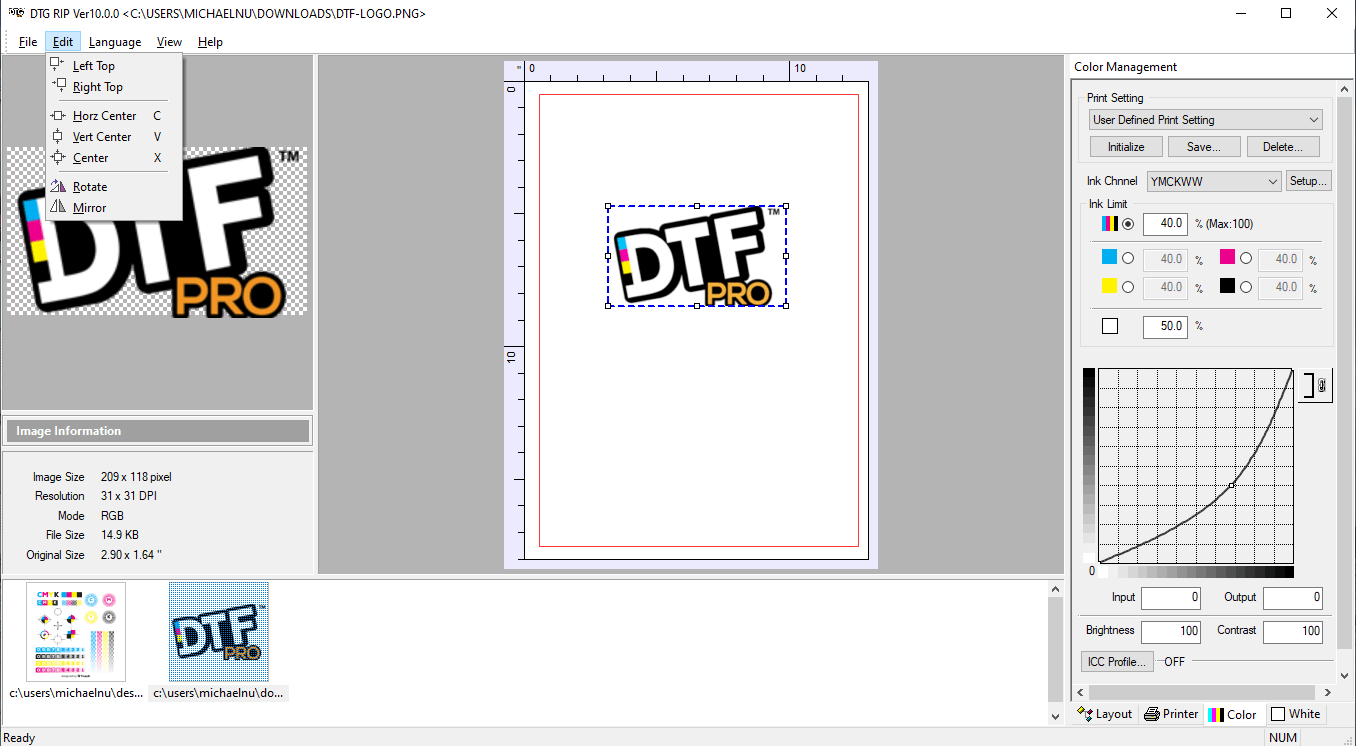
Download AcroRIP 11.2 – Professional RIP Software for Epson Flatbed Printers
AcroRIP 11.2 is a specialized Raster Image Processor (RIP) software designed for high-quality digital printing, particularly benefiting users of Epson flatbed printers. Developed to enhance color management and print job processing, this software translates digital artwork into precise raster formats suitable for professional printing applications. It serves industries such as industrial printing, sign making, and specialized color proofing, focusing on delivering accurate and vibrant output.
Overview of AcroRIP 11.2 and Its Role in Digital Printing
AcroRIP 11.2 functions as a crucial bridge between digital design and physical print output. As a Raster Image Processor (RIP), it interprets vector and raster image files, converting them into a format that a printer can understand — a grid of dots or pixels. This process is essential for managing complex color separations, especially in multi-channel printing environments. The software is particularly geared towards optimizing performance and color reproduction for various professional printing devices, with a notable emphasis on Epson’s flatbed printer technologies.
Advanced Color and Ink Channel Management for Precision Printing
ICC Profile Integration for Accurate Color Reproduction
Color accuracy is paramount in professional printing. AcroRIP 11.2 leverages ICC (International Color Consortium) profiles to ensure that the colors displayed on screen are faithfully reproduced on the printed substrate. By integrating and managing these color profiles, the software provides a consistent and predictable color output, which is critical for brand consistency and high-fidelity reproductions across different media types.
Support for White Ink and Multi-Channel Color Adjustment
AcroRIP 11.2 offers robust support for printing with white ink, a capability vital for achieving vibrant designs on dark or transparent media. The software provides detailed control over the white ink channel, allowing users to manage its opacity, placement, and layering effects. This granular control extends to other ink channels, enabling sophisticated multi-channel color adjustments for challenging print jobs and specialized applications.
User Interface and Workflow Enhancements for Efficient Print Job Processing
Efficiency in a professional print workflow is significantly improved by intuitive software interfaces and helpful features. AcroRIP 11.2 includes a user-friendly interface designed to simplify the preparation of print jobs. Key features such as job preview functionality allow operators to visualize the final output, including white ink placement and color separations, before committing to the print run. This confirmation step before printing helps minimize errors and material waste.
Compatibility and Use Cases in Industrial and Commercial Printing
AcroRIP 11.2 is engineered for compatibility with a range of professional digital printers, with a strong focus on flatbed models, especially those utilizing Epson printheads. Its utility spans various industrial and commercial printing sectors. Practical applications include high-quality signage production, custom textile printing, promotional item decoration, and intricate color proofing where precise color rendition and detail are essential.
Comparing AcroRIP 11.2 with Other RIP Solutions
In the competitive landscape of RIP software, AcroRIP 11.2 differentiates itself through its specialized optimization for Epson flatbed printers. While many RIP solutions offer broad hardware support, AcroRIP’s focused development provides advanced features tailored for these specific devices. Key advantages include its sophisticated white ink handling and precise multi-channel color adjustments, often offering a more streamlined workflow for users invested in the Epson ecosystem compared to more general-purpose RIP software.
Common Challenges Addressed by AcroRIP’s Technology
Professional printing often encounters issues such as inconsistent color reproduction, difficulties in layering white ink effectively, and complex job setup. AcroRIP 11.2 addresses these challenges by providing advanced color management tools through ICC profile support, ensuring reliable color matching. Its dedicated white ink channel controls directly tackle the complexities of printing opaque white onto diverse substrates, while its preview features help alleviate errors related to job setup, leading to more efficient and predictable print outcomes.
Frequently Asked Questions
What printers are compatible with AcroRIP 11.2?
AcroRIP 11.2 is specifically optimized for flatbed printers, especially those equipped with Epson printheads, supporting high-quality digital printing workflows. This focus ensures deep integration and performance benefits for users with these printer types.
How does AcroRIP handle white ink printing differently?
AcroRIP offers precise control over the white ink channel, enabling vibrant output on colored substrates by managing opacity and layering effects effectively. This granular control ensures that white ink is applied correctly for both underlays and overlays, enhancing design possibilities.
What role do ICC profiles play in AcroRIP’s color management?
ICC profiles allow AcroRIP to manage color accuracy across various devices, ensuring the vivid colors seen on screen are faithfully reproduced in the printed output. This adherence to industry-standard profiles is crucial for achieving predictable and professional color results.






Reviews
There are no reviews yet.