

Download Adobe Premiere Elements 2025 – The User-Friendly Video Editing Software
Adobe Premiere Elements 2025 is a video editing software developed by Adobe Inc., designed to provide an accessible platform for creating and editing high-resolution videos. Aimed at the video production, content creation, and digital media fields, this software offers simplified tools suitable for amateur editors, distinguishing it from the professional-grade Adobe Premiere Pro. It empowers users to produce polished video content with features supporting color correction, audio editing, and instant rendering.
Introduction to Adobe Premiere Elements 2025
A Brief Overview
Adobe Premiere Elements 2025 serves as a comprehensive yet approachable video editing solution for individuals looking to produce high-quality video content without the steep learning curve associated with professional applications. Based on findings from its development history, the software prioritizes a user-friendly experience, making video creation accessible to a wider audience. It allows for the editing of high-definition and 4K videos, incorporating features that simplify complex tasks.
Target Audience
This video editing software is specifically tailored for novice editors, content creators, and consumers who want to enhance their personal videos, home movies, or educational presentations. It aims to bridge the gap between basic video editing apps and professional-grade software, providing tools that are easy to understand and operate for those new to the field of digital media production.
Core Video Editing Features
Intuitive Editing Tools
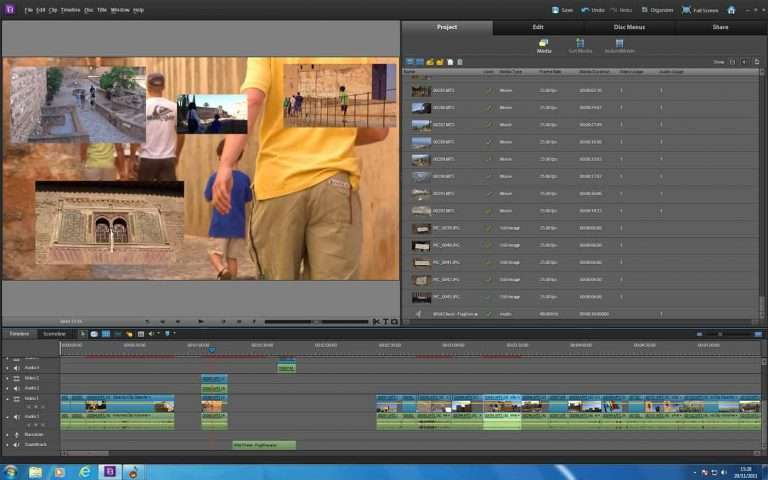
Adobe Premiere Elements 2025 features an intuitive interface designed to streamline the video editing workflow. Users can engage with a drag-and-drop environment, making it simple to arrange clips, add transitions, and apply basic effects. The software guides users through the editing process, reducing complexity for everyday tasks.
Advanced Features for Enhanced Editing
Beyond its user-friendly facade, Premiere Elements 2025 integrates advanced functionalities for more sophisticated edits. These include support for keyframe effects to precisely control animations and transitions, tools for creating slow-motion or fast-motion sequences, and robust capabilities for editing 4K video. These features allow users to achieve professional-looking results, even with complex creative visions.
File Format Support and Plugin Compatibility
Supported Formats
Premiere Elements 2025 ensures broad compatibility by supporting a wide array of video and audio file formats relevant to modern digital media creation. Users can import and export content in various standard codecs, facilitating seamless integration into different workflows and platforms. This broad support minimizes conversion steps and speeds up the editing process.
Extending Functionality with Plugins
A significant advantage of Adobe Premiere Elements 2025 is its support for third-party plugins. This allows users to expand the software’s capabilities beyond its built-in tools. By integrating plugins, users can access specialized effects, advanced color correction tools, or unique transitions, further customizing their video production workflow and achieving more specialized creative outcomes.
Integration with Adobe Premier Pro
While distinct in their target audiences, Adobe Premiere Elements 2025 shares an ecosystem with Adobe Premiere Pro. Users may find that projects initiated in Elements can be transitioned to Premiere Pro for more advanced editing needs, offering a scalable pathway for content creators as their skills and project demands evolve. This shared foundation ensures a degree of familiarity for those transitioning between the two applications.
Real-World Use Cases and Applications
Adobe Premiere Elements 2025 is well-suited for a variety of personal and educational video projects. Common applications include editing family vacations, creating highlight reels for events, producing marketing videos for small businesses, and developing engaging presentations for academic or professional purposes. The software’s ease of use makes it ideal for quickly transforming raw footage into polished shareable content.
Conclusion and Final Thoughts
Adobe Premiere Elements 2025 stands out as a powerful yet accessible video editing software. It effectively balances user-friendliness for beginners with a robust set of features that cater to growing creative ambitions. For anyone looking to download a capable video editing software that simplifies the creation process while offering room for advanced techniques and third-party expansions, Premiere Elements 2025 presents a compelling option in the digital media landscape.
Frequently Asked Questions
What are the main features of Adobe Premiere Elements 2025?
Adobe Premiere Elements 2025 includes features like unlimited movie project handling, advanced keyframe effects, 4K video editing capabilities, and easy output to various formats, making it suitable for novice editors. The software also offers tools for color correction and audio editing within an intuitive interface.
How does Adobe Premiere Elements differ from Adobe Premiere Pro?
Adobe Premiere Elements is designed for beginner to intermediate users, offering a simpler interface and fewer professional tools compared to Adobe Premiere Pro, which is intended for professional video editing. Elements focuses on ease of use and accessibility, while Pro offers a more extensive feature set for complex productions.
Can I use third-party plugins with Adobe Premiere Elements 2025?
Yes, Adobe Premiere Elements 2025 supports various third-party plugins, including some that may be compatible with Premiere Pro and After Effects, allowing users to expand functionality and enhance their editing experience. This extensibility is a key benefit for users seeking custom tools and effects.






Reviews
There are no reviews yet.