

Download Adobe Speech to Text for Premiere Pro – Automated Subtitle Creation Tool
Adobe Speech to Text is an advanced feature seamlessly integrated into Adobe Premiere Pro, designed to streamline the video editing and creation process. Developed by Adobe Systems Incorporated, this tool enhances video production workflows for professionals in film, content creation, and media by providing automated transcription and subtitling capabilities. It leverages Adobe Sensei’s machine learning to deliver accurate results, making it an essential component for modern video editing suites.
Introduction to Adobe Speech to Text
Overview and Integration in Premiere Pro
Adobe Speech to Text significantly improves video editing by automating the creation of dialogue transcripts and subtitles directly within Premiere Pro. This integration means that editors and content creators no longer need to rely on external applications for transcription services, as the feature is readily available within their primary video editing environment. The core benefit lies in its ability to expedite the workflow, allowing users to focus more on the creative aspects of post-production, from narrative editing to visual effects, while efficiently handling the crucial element of subtitling and accessibility.
Key Features and Capabilities
Automated Transcription Services
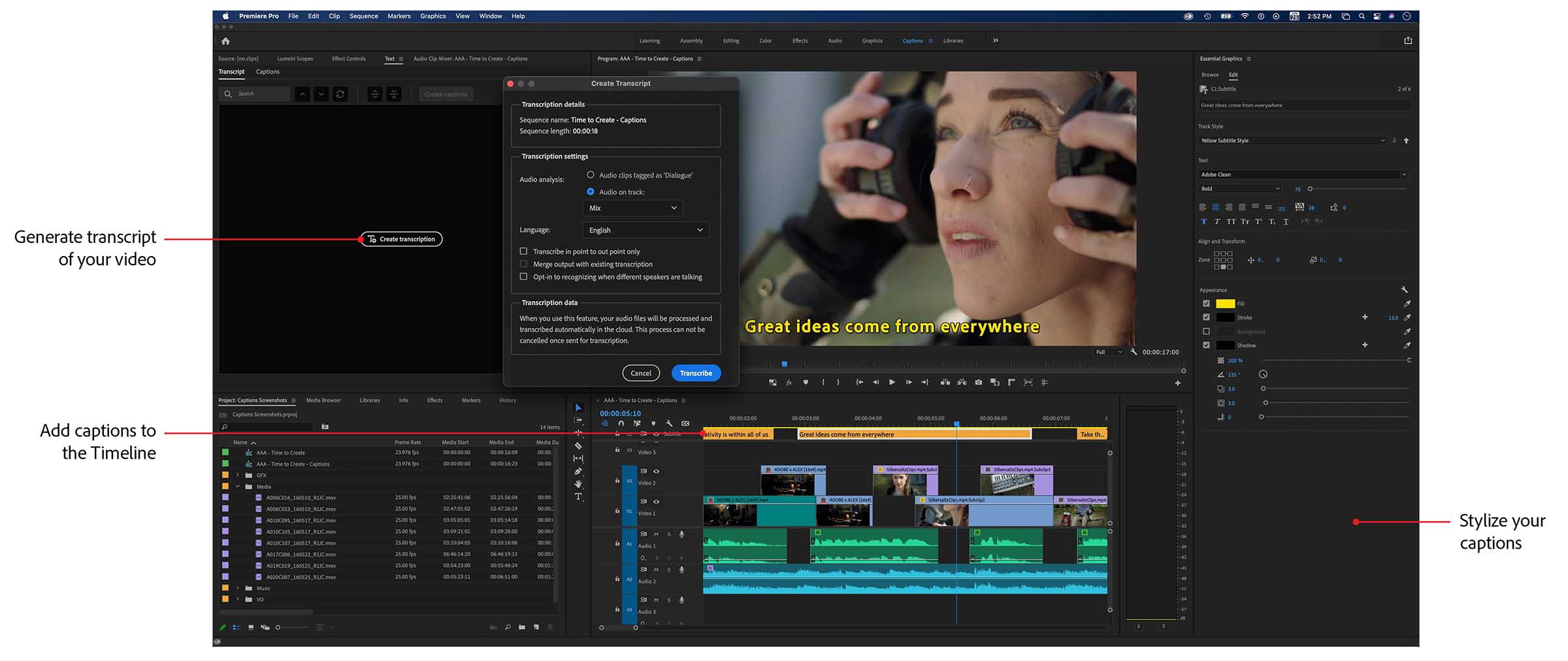
This feature offers robust speech-to-text conversion, transforming spoken dialogue in video files into accurate text transcripts. By analyzing audio tracks using sophisticated algorithms, Adobe Speech to Text generates a textual representation of the spoken content, which serves as the foundation for creating subtitles and captions.
Customizable Subtitles and Closed Captioning
Beyond simple transcription, the tool provides extensive options for customizing the appearance and placement of subtitles. Users can refine formatting through Premiere Pro’s Essential Graphics panel, adjusting elements such as font styles, sizes, colors, and background elements. This control ensures that subtitles not only convey information clearly but also align with the aesthetic requirements of the video project, enhancing viewer experience and brand consistency.
Supported Languages for Transcription
Adobe Speech to Text supports a wide array of languages, significantly broadening its utility for global content creators. This multilingual capability ensures that videos can be effectively subtitled for diverse audiences, breaking down language barriers and expanding reach. Key supported languages include:
- English
- Spanish
- French
- Chinese
- German
- Japanese
- Korean
- Portuguese
- Italian
Real-World Applications and Use Cases
The integration of speech-to-text technology within Premiere Pro offers practical solutions across various industries. In marketing, it aids in creating accessible promotional videos and social media content. Educational institutions use it to produce subtitled lecture videos, improving comprehension and searchability. The entertainment industry relies on these tools for creating polished final products, including films, documentaries, and streaming content, ensuring accessibility and professional presentation. Furthermore, it is invaluable for user-generated content creators aiming to reach a wider audience through subtitled vlogs and tutorials.
Comparative Analysis with Other Subtitle Tools
Compared to standalone transcription services or basic subtitle editors, Adobe Speech to Text stands out due to its tight integration within the Premiere Pro ecosystem. A key differentiator is its reliance on Adobe Sensei, which provides advanced AI-driven accuracy and language support that may surpass simpler tools. While other applications might offer broad compatibility, the seamless workflow enabled by Adobe Speech to Text—from transcription to subtitle placement and style adjustment within the same interface—offers a significant advantage in efficiency for Premiere Pro users. This native integration minimizes the need for data transfer between applications and allows for more intuitive control over the final subtitled output.
Conclusion and Getting Started
Enhancing Your Video Projects with Adobe Speech to Text
Incorporating Adobe Speech to Text into your Premiere Pro workflow is a strategic step towards producing more engaging, accessible, and professional video content. The ability to automate transcription and customize subtitles efficiently saves valuable post-production time and resources. By leveraging Adobe Sensei’s advanced AI, the tool ensures accuracy and supports a global audience through multiple languages. Getting started involves accessing the feature within Premiere Pro and beginning the transcription process, which then unlocks powerful subtitle customization options for truly enhanced video projects.
Frequently Asked Questions
How does Adobe Speech to Text work in Premiere Pro?
Adobe Speech to Text utilizes advanced machine learning algorithms from Adobe Sensei to automatically generate accurate transcriptions of spoken dialogue in your video. These transcripts can then be easily converted into customizable subtitles placed within your video timeline.
What languages are supported by Adobe Speech to Text?
Adobe Speech to Text supports multiple languages, including English, Spanish, French, Chinese, German, and several others. This wide range allows content creators to access tools for diverse audiences globally.
How can I customize the subtitles created by Adobe Speech to Text?
Users can customize subtitles using the Essential Graphics panel in Premiere Pro, allowing adjustments in font, color, positioning, and style to meet specific creative visions for their video projects.






Reviews
There are no reviews yet.