

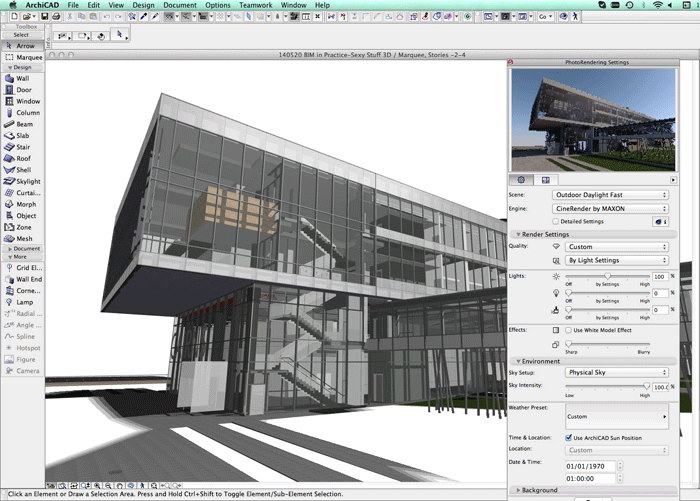
Download ARCHICAD 29.1 – Advanced BIM Software for Architects
ARCHICAD 29.1, developed by Graphisoft, is a premier Building Information Modeling (BIM) CAD software designed for the architecture and construction industries. As a commercial BIM product, it has been instrumental in advancing the field since its inception. This latest version enhances the foundational capabilities that made it a trailblazer, focusing on improved collaborative work, seamless remote project access, and sophisticated parametric tools specifically for architects.
Introduction to ARCHICAD
A Trailblazer in Architectural Design
ARCHICAD represents a significant evolution in architectural design software, widely recognized as the first commercial BIM solution. Developed by Graphisoft, its heritage dates back to 1984, continually shaping the landscape of architectural visualization and documentation. The software integrates comprehensive 2D and 3D drafting capabilities with advanced BIM functionalities, empowering architects to design, document, and deliver projects efficiently.
Core Features and Functionalities
Innovative Design Capabilities
ARCHICAD provides architects with a powerful suite of tools for conceptualizing and detailing building designs. Its integrated environment supports the entire design process, from initial sketches to final construction documents.
- Parametric Objects: ARCHICAD allows for the creation and manipulation of intelligent, parametric objects, which automatically adjust their properties based on predefined relationships and user inputs. This ensures design consistency and simplifies modifications.
- 2D Drafting and 3D Modeling: The software seamlessly combines traditional 2D drafting tools with robust 3D modeling capabilities, enabling users to develop complex building models with precision and intuitive control.
- Building Component Assemblies: Users can define and manage detailed building components, ensuring accurate representation of the constructed elements and facilitating direct generation of technical documentation.
- Visualization Tools: ARCHICAD offers integrated rendering and visualization options, allowing architects to present designs compellingly and assess aesthetic and functional aspects before construction.
Collaboration and Remote Access Tools
Enhancing Team Workflow
In modern architectural practice, effective collaboration and remote accessibility are paramount. ARCHICAD 29.0 offers advanced solutions to streamline team-based workflows and facilitate distributed project management.
- BIMcloud Integration: ARCHICAD leverages BIMcloud, a real-time collaboration platform, to enable multiple users to work concurrently on the same project file, regardless of their physical location.
- Teamwork Functionality: The software’s Teamwork features allow for granular control over project sharing and team member access, ensuring efficient task allocation and conflict resolution.
- Remote Project Access: With BIMcloud, project teams can access and update project data remotely, supporting flexible working arrangements and ensuring project continuity.
Integration with Other Software
Seamless Data Management
ARCHICAD is designed for interoperability, allowing it to integrate smoothly within a broader ecosystem of design and analysis software, crucial for complex project workflows.
- IFC Support: It offers robust support for Industry Foundation Classes (IFC), the open standard for BIM data exchange, enabling seamless collaboration with various stakeholders using different software platforms.
- Interoperability with CAD and Rendering Software: ARCHICAD provides direct links and import/export functionalities for popular applications like AutoCAD and 3ds Max, facilitating data transfer for detailed design stages and advanced visualization.
- API for Customization: The software’s Application Programming Interface (API) allows third-party developers to create custom tools and integrations, extending its functionality to meet specific project or firm requirements.
User Interface and Experience
Optimizing the Design Process
Graphisoft prioritizes a user-friendly and efficient interface in ARCHICAD, recognizing that intuitive design tools accelerate the architectural process.
- Customizable Workspace: ARCHICAD features a highly customizable user interface, allowing users to tailor toolbars, palettes, and shortcuts to their preferred workflow, enhancing productivity.
- Intuitive Navigation: The software’s navigation system is designed to be straightforward, enabling users to move easily between different views and levels of detail within their project models.
- Context-Sensitive Tools: Tools and commands are often presented contextually, offering relevant options based on the active design element or task, thereby reducing complexity and improving design efficiency.
Real-World Applications in Architecture
Showcasing Project Examples
ARCHICAD’s comprehensive capabilities have made it a preferred tool for numerous architectural firms undertaking diverse and complex projects globally.
- Large-Scale Commercial Buildings: Architecture firms have utilized ARCHICAD to design and document intricate commercial spaces, managing complex structural and MEP systems through its BIM functionalities.
- Residential Developments: The software supports the creation of detailed residential projects, from single-family homes to multi-unit developments, offering efficiency in design and documentation.
- Public Infrastructure and Institutional Projects: ARCHICAD has been applied to the design of various public and institutional buildings, demonstrating its capacity for handling projects with strict regulatory requirements and stakeholder coordination needs.
Conclusion and Future Perspectives
What’s Next for ARCHICAD?
ARCHICAD 29.1 continues to solidify its position as a leading BIM software, offering a robust platform for current architectural challenges and anticipating future industry demands. Its ongoing development focuses on enhancing performance, deepening collaborative capabilities, and integrating advanced visualization and analysis tools.
The software’s commitment to open standards and interoperability ensures its relevance in evolving digital construction workflows. As the industry moves towards greater integration and data-driven design, ARCHICAD is well-positioned to remain an essential tool for architects seeking efficiency, collaboration, and innovative design solutions.
Frequently Asked Questions
What is ARCHICAD used for in the architecture field?
ARCHICAD is a Building Information Modeling (BIM) software primarily used by architects and planners to create detailed 2D and 3D designs with integrated project data management features. It serves as a comprehensive tool for the entire design process, from conceptualization to construction documentation.
How does ARCHICAD facilitate collaboration among architects?
ARCHICAD incorporates collaborative tools such as BIMcloud, allowing multiple users to work on the same project simultaneously and efficiently manage changes remotely. This ensures seamless teamwork and consistent project data across distributed teams.
What are the key features that differentiate ARCHICAD from other CAD software?
ARCHICAD’s unique features include its robust parametric modeling capabilities, comprehensive BIM functionalities, and the ability to create detailed technical documents from a single model, setting it apart from traditional CAD tools. Its focus on integrated data and intelligent objects provides a more holistic design and documentation approach.







Reviews
There are no reviews yet.