

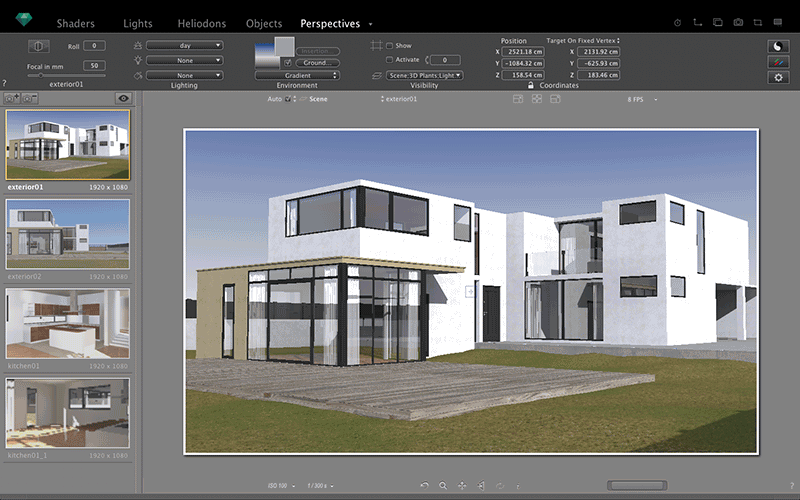
Download Artlantis 2021 – High-Quality Architectural Rendering Software
Download Artlantis 2021, a leading architectural visualization software developed by Abvent. This powerful application is specifically designed for professionals in architecture, interior design, and urban planning, enabling them to create compelling 3D visualizations of their projects. Artlantis is renowned for its ability to produce high-quality images and animations with remarkable speed.
Overview of Artlantis
History and Development
Artlantis has evolved significantly over the years, from its earlier iterations as Artlantis Studio to the current advanced version, Artlantis 2021. This progression reflects Abvent’s commitment to enhancing the software with cutting-edge rendering technologies and user-centric features, solidifying its position in the architectural visualization market.
Intended Use Cases
Artlantis is meticulously crafted for professionals within the architecture, interior design, and urban planning industries. It serves as an indispensable tool for translating complex design concepts into realistic visual representations, allowing clients and stakeholders to fully grasp spatial designs and aesthetic intentions.
Key Design Tools and Capabilities
Rendering Features
Artlantis excels in providing rapid rendering of high-quality images. The software is optimized for speed without compromising on the final output’s resolution and detail, allowing architects and designers to iterate quickly on their visual concepts.
Animation and Real-time Visualization
Beyond static images, Artlantis offers robust animation features that bring architectural designs to life. Its real-time rendering capabilities provide an interactive visualization experience, enabling users and clients to explore projects dynamically and make informed decisions.
File Format Compatibility
Ensuring seamless integration into existing workflows, Artlantis supports a wide range of industry-standard file formats. This includes popular CAD file types such as 3DS, SKP, and OBJ, facilitating easy import of models from various design software and enabling flexible export options for diverse project needs.
Unique Characteristics of Artlantis
Extensive Catalog of Objects
A significant advantage of Artlantis is its rich, built-in catalog of 3D objects. This library features a diverse selection of elements like furniture, vegetation, and accessories, which can be easily customized and integrated into scenes, significantly speeding up the visualization process.
Lighting and Material Customization
Artlantis provides sophisticated tools for adjusting lighting conditions and applying detailed textures. Advanced material editing and precise light control allow users to achieve photorealistic results, accurately simulating environmental factors and material properties.
Integration and Workflow
Artlantis is designed to integrate smoothly with most CAD and BIM software used by architects and designers. Its efficient workflow allows users to easily import their models, apply visualizations, and export results, streamlining the entire design and presentation process.
Comparison with Other Rendering Software
Compared to other rendering software, Artlantis distinguishes itself through its specialized focus on architectural visualization and its balance of advanced features with user-friendly operation. While tools like Lumion and Twinmotion also offer powerful visualization capabilities, Artlantis is often highlighted for its speed in generating final renderings and its extensive object library tailored for architectural contexts.
Real-world Applications and Use Cases
Artlantis has played a crucial role in visualizing a multitude of architectural projects. Its capabilities are demonstrated in the creation of realistic renderings for residential buildings, commercial complexes, and intricate urban planning developments, helping design teams communicate their visions effectively.
Frequently Asked Questions
What are the main features of Artlantis 2021?
Artlantis 2021 offers advanced rendering capabilities, including high-resolution image output, animation tools, and an extensive object library. Users can customize lighting and materials to create realistic designs.
Is Artlantis suitable for beginners in architectural visualization?
While Artlantis is powerful and feature-rich, it is designed with an intuitive interface that can be navigated by beginners, although some understanding of architectural visualization principles is beneficial.
What file formats can Artlantis import and export?
Artlantis supports various formats including 3DS, SKP, and OBJ, allowing seamless integration with popular CAD software and facilitating diverse project workflows.





Reviews
There are no reviews yet.