
Download Autodesk EAGLE Premium 9.6.2 – Powerful PCB Design Software
Autodesk EAGLE Premium 9.6.2 is an electronic design automation (EDA) application designed for schematic capture and printed circuit board (PCB) layout. Developed by Autodesk Inc., the software supports electronics engineers and hobbyists in creating functional electronic designs. EAGLE has a long history, originally developed by CadSoft Computer, and offers a comprehensive suite of tools for PCB design workflows, serving as a cost-effective solution in the electronics engineering field.
Introduction to Autodesk EAGLE
Autodesk EAGLE is a prominent electronic design automation software primarily used for schematic capture and PCB layout. It empowers engineers and designers to conceptualize, design, and prepare electronic circuits for manufacturing. With its origin tracing back to 1988, EAGLE has established itself as a reliable tool within the electronics industry, catering to both professional electronics engineers and dedicated hobbyists looking to bring their circuit designs to life through PCB fabrication.
Key Features and Capabilities
Autodesk EAGLE offers a robust set of features essential for the complete PCB design process, from initial concept to final layout.
- Schematic Capture: Users can create complex electronic circuit diagrams by placing symbols and wiring them together. The software manages the connectivity information, forming the foundation for the PCB layout.
- PCB Layout Design: Transitioning from schematics, designers can arrange components on a virtual board and route electrical connections between them. EAGLE provides tools to manage trace widths, layers, and copper pours for efficient board design.
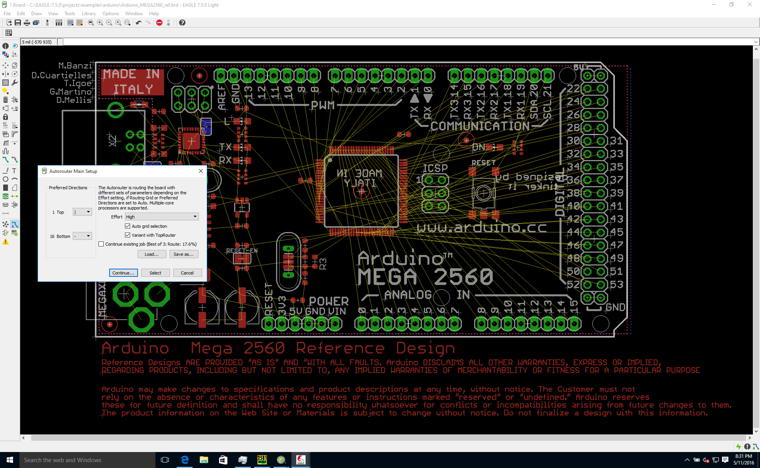
- Autorouting: For streamlined workflow, EAGLE includes an autorouter that can automatically create connections between components on the PCB layout, assisting in the completion of the design.
- User-Defined Programming Language (ULP): This feature allows users to extend the software’s functionality by writing custom scripts to automate tasks or add specific design checks.
- Component Libraries: EAGLE supports extensive libraries of electronic components, helping users quickly find and implement standard parts in their designs.
File Formats and Compatibility
Ensuring seamless integration with the manufacturing process, Autodesk EAGLE supports several industry-standard file formats critical for PCB fabrication services.
- Schematic Files: Designs are saved in the .SCH format, preserving the logical connections of the circuit.
- Board Files: The PCB layout is stored in the .BRD format, detailing the physical placement of components and traces.
- Gerber Files: EAGLE can generate Gerber files, the de facto industry standard for transmitting PCB layout data to manufacturers for etching and drilling.
- Other Outputs: The software also supports exporting manufacturing data for drilling operations and bill of materials (BOM) generation.
This broad compatibility ensures that designs created in EAGLE can be readily processed by most PCB fabrication houses worldwide.
Integration with Design Tools
Autodesk EAGLE provides capabilities to integrate with other design tools and incorporates unique functionalities that enhance the design process.
- DesignLink: This feature facilitates the integration of EAGLE with other Autodesk products and services, enabling a more cohesive design environment.
- Data Management: EAGLE manages design data, linking schematic symbols to their corresponding PCB footprints and ensuring consistency throughout the design lifecycle.
- Collaboration Features: While the prompt does not detail specific collaboration tools, EDA software typically allows for project management and the sharing of design files, enabling team-based workflows.
Applications in Industry and Hobby Design
Autodesk EAGLE is utilized across a spectrum of applications by both professional engineers in dedicated firms and individuals pursuing personal electronics projects.
- Professional Engineering: Small to medium-sized electronics firms use EAGLE for designing custom PCBs for product development, including consumer electronics, industrial controls, and embedded systems. Its structured approach helps ensure robust and manufacturable designs.
- Hobbyist Projects: For makers and electronics enthusiasts, EAGLE offers an accessible entry point into PCB design. It allows them to move beyond breadboard prototypes to create professional-looking and functional custom circuit boards for projects like robots, home automation systems, and experimental devices.
- Educational Purposes: The software’s user-friendly nature and affordability make it a suitable tool for educational institutions teaching electrical engineering and circuit design principles.
Future of Autodesk EAGLE and Transition to Fusion
Autodesk has outlined a roadmap that impacts the future availability and support for EAGLE users.
Autodesk has announced plans to phase out Autodesk EAGLE in favor of Fusion 360 for comprehensive PCB design capabilities. While EAGLE will continue to be supported until 2026, users are encouraged to explore and transition to Fusion 360. This strategic shift aims to provide an integrated platform that combines mechanical, electrical, and manufacturing design tools, offering a more unified experience for product development.
Frequently Asked Questions
What is Autodesk EAGLE used for?
Autodesk EAGLE is an electronic design automation (EDA) software used primarily for designing printed circuit boards (PCBs) and creating schematic diagrams. It enables users to easily layout and simulate electronic designs before production, providing a complete environment for taking an electronic concept from schematic to a manufacturable board file.
How does Autodesk EAGLE differ from other PCB design software?
Autodesk EAGLE is tailored for small businesses and hobbyists, offering a cost-effective solution with robust features typically found in more expensive software. Its user-friendly interface, along with extensive library support and automation capabilities through ULPs, makes it particularly appealing for those new to PCB design or working with budget constraints.
When will Autodesk EAGLE be discontinued?
Autodesk has announced that EAGLE will be supported until 2026, after which it will be phased out in favor of Fusion 360 for PCB design. Users are encouraged to transition to Fusion for future support and updates, as Autodesk integrates its PCB design tools into a broader product development platform.



Reviews
There are no reviews yet.